React Js + React-Redux (part-2)
NOTE : In the "Reducer" function always have a 'default' switch case,else you'll get Undefined state error.
Redux is an open-source state management javascript library. As the application grows, it becomes difficult to keep it organized and maintain data flow. Redux solves this problem by managing application’s state with a single global object called Store.
Redux itself is a standalone library that can be used with any UI layer or framework, including React, Angular, Vue, Ember, and vanilla JS. Although Redux and React are commonly used together, they are independent of each other.
NOTE : The data in react always flows from parent to child components,which makes react "Unidirectional". Unlike react, Angular makes use of bi-directional binding in which the data flow takes place in both directions.
What problem does Redux solve ?
So, state is everywhere in web application. Even an innocent single page app could grow out of control without clear boundaries between every layer of the application. This holds particularly true in React.Yeah, you can get by with keeping the state within a parent React component (or in context) as long as the application remains small. Then things will become tricky especially when you add more behaviours to the app.

At some point you may want to reach for a consistent way to keep track of state changes. Not only, I’d say that frontend components shouldn’t know about the business logic. Ever.Unfortunately a ton of logic gets stuffed into frontend components these days. Is there an alternative to this agony?
Redux can solve exactly those issues. It might not be clear in the beginning, but Redux helps giving each frontend component the exact piece of state it needs.Even better, Redux can hold business logic inside its own layer (middleware), alongside with the code for fetching data. The benefits of this approach are manifold.
NOTE : State management libraries beautifully keep logic and behaviours abstracted away from the UI. UI testability skyrockets and so developer productivity
NOTE : Redux has changed a lot. "Redux toolkit" has become the recommended way to use Redux.However the fundamental building blocks of Redux are still action, reducers, middleware, and the store, and you need a good knowledge of these lego blocks to be proficient with Redux and Redux toolkit.
--------------------------------------------------------------------------------------------------------------
Principles of Redux
Predictability of Redux is determined by three most important principles as given below :
1] Single Source of Truth
The state of your whole application is stored in an object tree within a single store. As whole application state is stored in a single tree, it makes debugging easy, and development faster.
2] State is Read-only
The only way to change the state is to emit an action, an object describing what happened. This means nobody can directly change the state of your application.
3] Changes are made with pure functions
To specify how the state tree is transformed by actions, you write pure reducers. A reducer is a central place where state modification takes place. Reducer is a function which takes state and action as arguments, and returns a newly updated state.
--------------------------------------------------------------------------------------------------------------
The 3 main concepts in Redux

1] Store : A Store is a place where the entire state of your application lists. It manages the status of the application and has a dispatch(action) function.Its the main place where your final state is residing so that you can directly access it from here rather than doing prop drilling. Every Redux store has a "single root" reducer function i.e rather then having a single reducer function,we create multiple reducers and combine them together to create a root reducer.The store contains the state of the components which need to be passed to other components. The store makes this passing along much easier as we no longer need to maintain a state inside a parent component in order to pass the same to its children components.
2] Actions : We define all the actions we need to perform for changing the state.Action is sent or dispatched from the view which are payloads that can be read by Reducers. It is a pure object created to store the information of the user's event. It includes information such as type of action, time of occurrence, location of occurrence, its coordinates, and which state it aims to change.The actions part of the react-redux basically contains the different actions that are to be performed on the state present in the store.The actions included must contain the type of the action and can also contain payload(data field in the actions).Example: Actions of increment and decrements in a react app. Action can also contain payload information.
3] Reducers : These tell us how to or what process to follow to change the state. Reducer read the payloads from the actions and then updates the store via the state accordingly. It is a pure function to return a new state from the initial state.The reducers in react-redux are the pure functions that contain the operations that need to be performed on the state. These functions accept the initial state of the state being used and the action type. It updates the state and responds with the new state. This updated state is sent back to the view components of the react to make the necessary changes. A reducer must contain the action type.
Example]
Let us assume our application’s state is described by a plain object called initialState which is as follows :
const initialState = {
   isLoading: false,
   items: [],
   hasError: false
};
Every piece of code in your application cannot change this state. To change the state, you need to dispatch an action.
What is an Action ?
An action is a plain Js object that describes the intention to cause change with a type property. An action is dispatched when a user interacts with the application.It must have a 'type' property which tells what type of action is being performed. The command for action is as follows :
return {
   type: 'ITEMS_REQUEST', //action type
   isLoading: true //payload information
}
Actions and states are held together by a function called Reducer. An action is dispatched with an intention to cause change. This change is performed by the reducer. Reducer is the only way to change states in Redux, making it more predictable, centralised and debuggable. A reducer function that handles the ‘ITEMS_REQUEST’ action is as follows :
const reducer = (state = initialState, action) => { //es6 arrow function
   switch (action.type) {
      case 'ITEMS_REQUEST':
         return Object.assign({}, state, {
            isLoading: action.isLoading
         })
      default:
         return state;
   }
}
Redux has a single store which holds the application state. If you want to split your code on the basis of data handling logic, you should start splitting your reducers instead of stores in Redux.

Action Creator
An "action creator" is a function that literally creates an action object. In Redux, action creators simply return an action object and pass the argument value if necessary.
Here's an example of a really simple action creator :
It's just a plain old function that returns an action object. With this approach, we can repeat ourselves a bit less, and now we can dispatch like so :
Redux Store Features
One react application can have only one Redux store. Redux store exposes the following methods for using store :
1] getState() - gives acess to application state inside store
2] dispatch(action) - allows state to update
3] subscribe(listener) - allows to register listener
Steps to use Redux Store in React App :
1] Create react app
2] Create Action-creators and define type constants
3] Create reducer functions
4] Create Redux store and provide it to react app
5] Connect Component to store
6] Dispatch actions on events
NOTE : When using React-Redux we usually create 3 different folders to structure the redux code :
- Actions-folder - It contains all the Action-creator functions
- Types-folder - It contains all the Action-type constants
- Reducer-folder - It contains all the reducer functions
- RootReducer (optional) - It combines multiple reducers into one store.
--------------------------------------------------------------------------------------------------------------
Important
The React ecosystem is ever evolving with introduction of new features in every release. In 2019 , the React ecosystem was introduced to Hooks. The release of Hooks enabled alot of npm libraries to support those hooks and create a more refine API.
There are currently 2 ways to use Redux in ReactJS :
- Redux with No Hooks (Plain Redux)
- Redux with Hooks (React-Redux & Redux-Toolkit)
--------------------------------------------------------------------------------------------------------------
Redux with ReactJS (Without Hooks)
Redux is framework agnostic. You can use it with vanilla Javascript. Or with Angular. Or with React. There are bindings for joining together Redux with your favorite framework/library.
For React there is react-redux, a library for which you need to learn just one method for now: connect(). What does it do? Unsurprisingly it connects a React component with the Redux store.
- mapStateToProps - It does exactly what its name suggests: it connects a part of the Redux state to the props of a specific React component. By doing so a connected React component will have access to the exact part of the store it needs.
- mapDispatchToProps - It does something similar, but for actions. mapDispatchToProps connects Redux actions to React props. This way a connected React component will be able to send messages to the store.
NOTE : Basically, whenever a component needs access to the redux store, we use the connect() method and connect the store values into the components props. The connect() also takes your component and return a new component with additional props. This way we can specifically choose which components have acces to the Store.
Example] Below is an example where we use React-Redux without hooks.
ActionTypes.Js
ActionCreators.Js
CountReducer.Js
Store.Js
Index.Js
App.Js
NOTE : A more prefered way is to create a seperate file for the connect() which will return the wrapper component, below is an example of the above code.
--------------------------------------------------------------------------------------------------------------
Redux with ReactJS (With Hooks)
Before Hooks, we always used a connect() which is a higher-order component and wrapper to our component, connect() read values from the Redux store. When hooks were introducted, React-Redux also introduced a set of hook APIs as an alternative to existing connect() Higher-Order Component. These APIs allow you to subscribe to the Redux store and dispatch actions, without having to wrap your components in connect().
React Redux provides the following Hooks as alternative to connect() :
- useSelector() - It is analogous to
connect’smapStateToProps. You pass it a function that takes the Redux store state and returns the pieces of state you’re interested in.
- useDispatch() - It replaces
connect’smapDispatchToPropsbut is lighter weight. All it does is return your store’sdispatchmethod so you can manually dispatch actions.
Example] Below we show how we can convert our previous example to use the newly introduced hooks instead of the connect() method.
ActionTypes.Js
ActionCreators.Js
CountReducer.Js
Store.Js
Index.Js
App.Js
NOTE : Rather than accessing a single value one by one, we can also take benefit of object destructuring and assign multiple state values to different variables.
Sending Payload data with Action-Object
We can also send some extra data along with the action object when dispatching an action. This extra data will be received inside the reducer function and can be then used to change store values accordingly. You just need to make some changes to th Action Creator function and access the payload inside the reducer.
Example] Pass the Username and Surname with the Action object and access them into the reducer function.
ActionTypes.Js
ActionCreators.Js
CountReducer.Js
Store.Js
Index.Js
App.Js
Combining Multiple Reducers
In most react app,we would like to create seperate reducer functions for different actions. But the createStore() function which is used to create redux store only accepts single reducer. So what we can do is combine multiple reducers and create a single root-reducer using the function "combineReducers()",it takes an object as a parameter. Below we combine multiple reducer functions and dispatch action objects.
Step 1] Define Action-creators and 'type' constants.
cakeActions.js
cakeTypes.js
iceCreamActions.js
iceCreamTypes.js
Step 2] Create seperate reducer functions.
cakeReducer.js
iceCreamReducer.js
Step 3] Combine all reducers using combineReducers() and export the rootreducer.
rootReducer.js
Step 4] Create Redux store and provide it to react app with 'Provider' component.
store.js
App.js
NOTE : Notice how you acess the state-variable inside store. Since we combined multiple reducers,we have to first acess the reducer and then get state-variable.
HooksCakeContainer.js
HooksIceCreamContainer.js
--------------------------------------------------------------------------------------------------------------
Redux Developer Tool
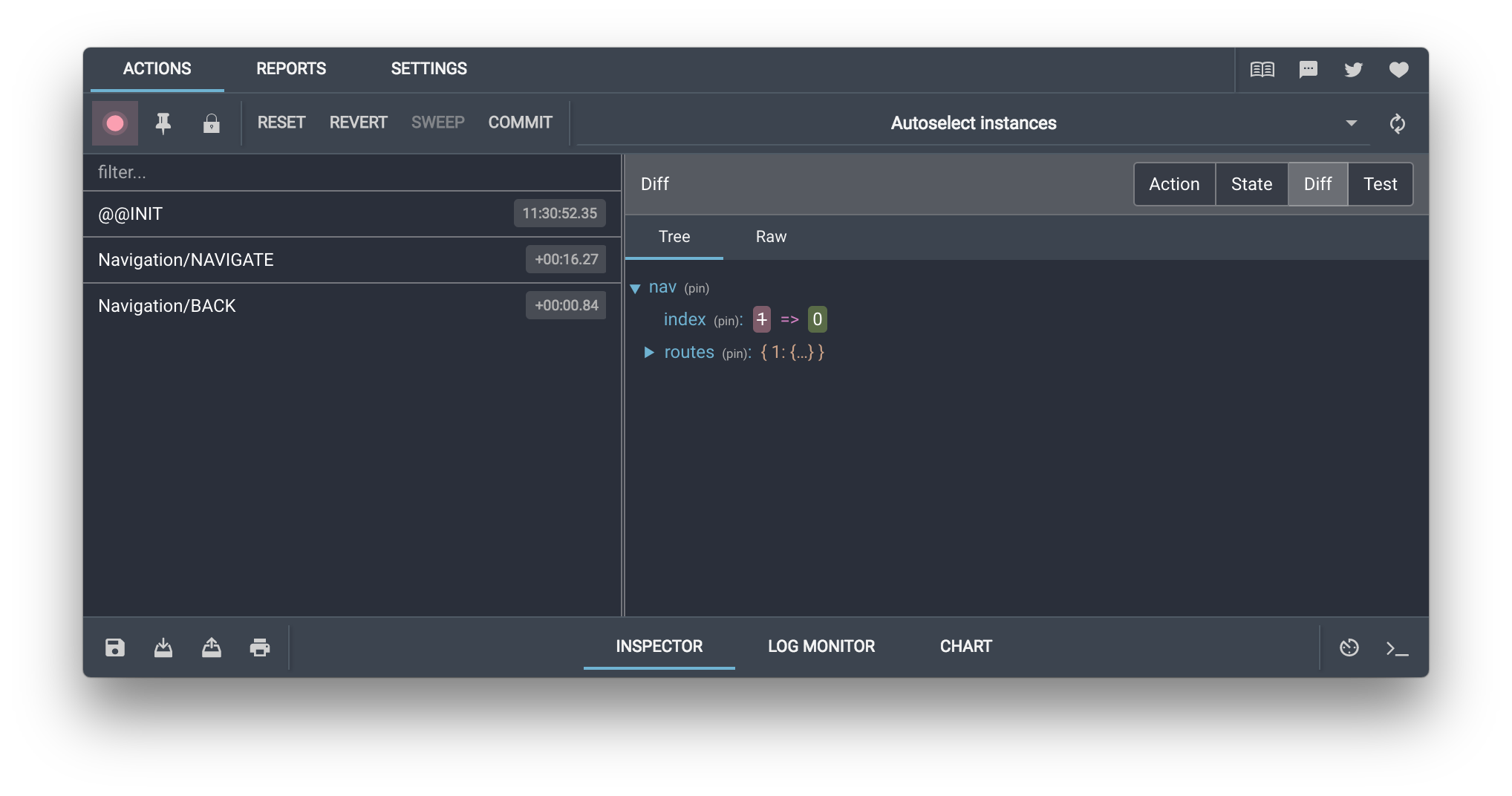
It is a debugging tool for redux applications. Redux-Devtools provide us debugging platform for Redux apps. It allows us to perform "time-travel debugging" and live editing. Some of the features in official documentation are as follows −
- It lets you inspect every state and action payload.
- It lets you go back in time by “cancelling” actions.
- If you change the reducer code, each “staged” action will be re-evaluated.
- If the reducers throw, we can identify the error and also during which action this happened.
- With persistState() store enhancer, you can persist debug sessions across page reloads.
Steps to setup :
Step 1] Install redux-logger and redux-devtools-extension
Step 2] Install redux-devtools chrome extension from here.
Step 3] Add the logger to DevTools in createStore(),below is an code example.
Step 4] When you start your react app,the dev-tools chrome extension will start glowing click on it and it should launch a window.
--------------------------------------------------------------------------------------------------------------
Redux Middleware
The action/reducer pattern is very clean for updating the state within an application. But what if we need to communicate with an external API? Or what if we want to log all of the actions that are dispatched? We need a way to run side effects without disrupting our action/reducer flow.
Redux middleware is a snippet of code that provides a third-party extension point between dispatching an action and the moment it reaches the reducers.

Middleware allows for side effects to be run without blocking state updates.We can run side effects (like API requests) in response to a specific action, or in response to every action that is dispatched (like logging). There can be numerous middleware that an action runs through before ending in a reducer.
Where does Middleware fit ?
First, let's look at a redux pattern without middleware :
1. An event occurs
2. An action is dispatched
3. Reducer creates a new state from the change prescribed by the action
4. New state is passed into the React app via props
Adding middleware gives us a place to intercept actions and run side effects before or after an action occurs. After dispatching an action, it will first go through the middleware, then into the reducer.Our new pattern with middleware now looks like :
1. An event occurs
2. An action is dispatched
3. Middleware receives the action
4. Reducer creates a new state from the change prescribed by the action
5. New state is passed into the React app via props
Redux middleware function provides a medium to interact with dispatched action before they reach the reducer. Customized middleware functions can be created by writing high order functions (a function that returns another function), which wraps around some logic. Multiple middlewares can be combined together to add new functionality, and each middleware requires no knowledge of what came before and after.
NOTE : Commonly, middlewares are used to deal with asynchronous actions in your app. Redux provides with API called "applyMiddleware()" which allows us to use custom middleware as well as Redux middlewares like redux-thunk and redux-promise.

You can apply multiple middleware to a Redux store, which means that the action will have to go through all the middleware before making it to the reducer. The order of execution is actually the order in which you pass the middleware to the store. Also, at any point in a middleware, you can chose to stop forwarding the action, which will end the cycle.
What can we do in Middleware ?
Anything that should take place as a result of the action, but doesn't change state. Here's an example that logs every actio n: We have access to the action itself within our middleware, so we can log it :
We also have access to state, so we can log the current state before the action is received :
After next is called with our action, we can log the new state created in response to our action :
In the example above, when we call next with the action, we are passing it down the middleware pipeline. This makes the action continue through to the following middleware, then into the reducer. It's important to think of middleware like a pipeline :
dispatch → middleware1 → middleware2 → ... → reducer
We dispatch one action, it runs through the middleware one at a time, ending in the reducer.
What is the difference between next() and store.dispatch ?
NOTE : Use next() to continue an action, use store.dispatch to send a new action. Calling next() continues the propagation of the current action. It's important to not alter the action and to call it once and only once within a middleware. Calling store.dispatch starts the new action from the beginning of the pipeline. This can be called as many times as needed from within middleware.
Writing a Middleware
To define your own middleware, you need to write a function with the following signature : store => next => action => result
store is the Redux store instance that will be passed to your middleware.next is a function that you need to call with an action when you want to continue the flow execution, which means passing the action to the next in line: either the following middleware or a reducer.action is the action that was originally dispatched so that you can access it, apply logic based on the action, and eventually pass it on using next.result is the value used as the result of the dispatch call.
const loggerMiddleware = (store) => (next) => (action) => {    // your code  };
The above code is equivalent to the below code :
Finally, to apply this middleware to the Redux store, you need to call applyMiddleware when creating the store through createStore().
Once the middleware function is created, we pass it to the applyMiddleware function like this :
And finally, we pass the middleware to the createStore function like this:
NOTE : Even though we mentioned above that middleware is the third argument to the createStore function, the second argument (initial state) is optional. So based on the type of arguments, the createStore function automatically identifies that the passed argument is a middleware because it has the specific syntax of nested functions.
Example 1] Custom MiddleWare for Logging Data
Step 1] Define Action-creators and 'type' constants.
cakeActions.js
cakeTypes.js
Step 2] Create reducer function.
cakeReducer.js
Step 3] Create Redux store and provide it to react app with 'Provider' component.
store.js
App.js
Step 4] Instead of using "connect()" method,we'll use useSelector() and useDispatch() hooks.
CakeContainer.js
Example 2] Add Multiple MiddleWares
In the Example 1 above,change the store.js file's code to below code. Each middleware function is called in the order it is given.
Example 3] Using Built-In MiddleWare
In the Example 1 above,change the store.js file's code to below code. We are using redux-logger which gives a built-in middleware for logging. Check the console to see the logging data when clicking the button.
--------------------------------------------------------------------------------------------------------------
(Useful : 1] Click)
Redux Toolkit
The Redux.Js is a standalone core state management library, whereas the Redux-React library is the wrapper over the core library which provides extra hooks to easily integrate react components to redux store. But there was still alot of broilerplate code needed to setup the redux store, so the "Redux Toolkit" was introduced which provides some options to configure the global store and create both actions and reducers in a more streamlined way by abstracting the Redux API as much as possible. Today the Redux Toolkit (RTK) is the standard way to implement redux in react applications.

The Redux-Toolkit provides 2 main functions which help us abstract the existing Redux API's and reduce boilerplate code. These functions does not change the flow of Redux but only streamline them in a more readable and manageable manner.
- createSlice() : Accepts an initial state and a lookup table with reducer names and functions and automatically generates action creator functions, action type strings, and a reducer function.
- configureStore() : Creates a Redux store instance like the original createStore from Redux, but accepts a named options object and sets up the Redux DevTools Extension automatically.
CreateSlice() Method
In the traditional Redux, we usually write reducers and actions/action-creators separately or in most cases different files. With Redux Toolkit, we can make the code much more concise by using createSlice() and write the actions and reducer functions together.
A Redux Slice is a collection of reducer logic and actions for a single feature of our app. The name “slice” comes from the idea that we’re splitting up the root Redux state object into multiple “slices” of slate.
In Redux-Toolkit, the createSlice method helps us create a slice of the redux-store. The createSlice() takes an object of reducer functions, a slice name, and an initial state value and it auto-generates action types and action creators, based on the names of the reducer functions that we supply. It also helps you organize all of your Redux-related logic for a given slice into a single file and Internally, it uses createAction and createReducer.
So now we dont need to create 3 different files to maintain Action Types, Action creators and Reducer functions, we can simply use the createSlice() method and autogenerate Action creators and Reducer function.
As seen from the code above, defining reducers and actions become cleaner and faster in Redux Toolkit. There is no longer need to use the switch statements to manage the action with its corresponding reducer.
NOTE : The createSlice() method prevents us from writing the boilerplate code need to create Action Types and Action creators, at removes the need to use Switch statements inside reducer function.
ConfigureStore() Method
Redux Toolkit has a configureStore() method that simplifies the store setup process. It wraps around the Redux library’s createStore() method and the combineReducers() method, and handles most of the store setup for us automatically. Unlike createStore, configureStore from Redux Toolkit not only creates a store, but it can also accept reducer functions as arguments and automatically sets up the Redux DevTools Extension for easy debugging.
So rather than creating a single rootReducer, we create multiple reducers using the createSlice() method and pass them to the configureStore() method.
Example] In the below example we create a simple counter which uses modern redux.
AddSubSlice.js
Store.js
Index.js
App.js
Combining Multiple Reducers
The configureStore() method provided by the redux toolkit is a combination of both createStore() and combineReducers() methods. In order to include another Reducer in the store, we just create a new Slice using the createSlice() and then include their reducer inside the configStore() method.
NOTE : Remeber that each slice you create using createSlice() will have its own initialstate and reducer logic to manage that state.
Example] In the below example we create multiple slices and include their reducers in the store.
counterSlice.js
loggerSlice.js
store.js
index.js
App.js
--------------------------------------------------------------------------------------------------------------


Comments
Post a Comment