Java Notes
IMPORTANT NOTES
Java is a Purely Object Oriented Programming language.
Every line of code that runs in Java must be inside a class.
Remember that every Java program has a class name which must match the filename, and that every program must contain the main() method.
A single java file can contain only a single Public class because it enforces better code readability and faster compilation.
The main() method is the starting point a string array is to be passed to the main() as a parameter by default.
Since Java is purely Object oriented , everything is structured in an "Inheritence" way.
Example - Object class is the Highest Parent class & everything else inherits from it.
Note: Each code statement must end with a semicolon.
-------------------------------------------------------------------------------------------------------------------------
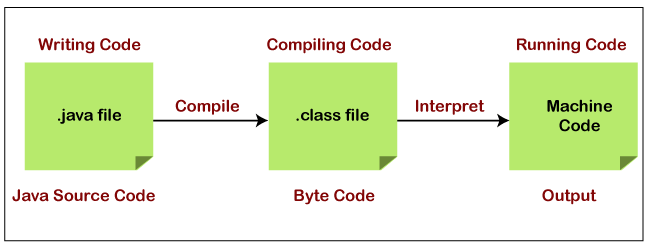
Java source files have an extension of ".java" and the compiled bytecode files have an extension of ".class". To execute an java program we first compile them to bytecode and then execute that compiled code.
-------------------------------------------------------------------------------------------------------------------------
Variables
Data types are divided into 2 groups:
- Primitive data types - includes
byte,short,int,long,float,double,booleanandchar - Non-primitive data types - such as Strings,Arrays & Classes.
String).Syntax
type variable = value;Type Casting
In Java, there are 2 types of casting:
byte -> short -> char -> int -> long -> float -> doublepublic class Home {
public static void main(String[] args) {
int myInt = 9;
double myDouble = myInt; // Automatic casting: int to double
System.out.println(myInt); // Outputs 9
System.out.println(myDouble); // Outputs 9.0
}
}
Narrowing Casting (manually) - converting a larger type to a smaller size type
double -> float -> long -> int -> char -> short -> byte
public class Home {
    public static void main(String[] args) {
        double myDouble = 9.78;
        int myInt = (int) myDouble; // Manual casting: double to int

        System.out.println(myDouble);   // Outputs 9.78
        System.out.println(myInt);      // Outputs 9
    }
}
Note : Widening casting is done automatically when passing a smaller size type to a larger size type. Narrowing casting must be done manually by placing the type in parentheses in front of the value.
---------------------------------------------------------------------------------------------------------------------
Input & Output
Use println(), print() or printf() to display an output in terminal.
System.out.print() - It prints string inside the quotes.System.out.println() - It prints string inside the quotes similar like
print() method. Then the cursor moves to the beginning of the next line.System.out.printf() - It provides string formatting .
    System.out.println("Hello world !");
    System.out.print("Hello world !");
Java provides different ways to get input from the user. However , mostly we use the object of Scanner class.
import java.util.Scanner;

public class Home {
    public static void main(String[] args) {

        System.out.println("Enter your name : ");
        Scanner input = new Scanner(System.in);
        String userinput = input.next();

        System.out.print("Welcome , "+userinput);

    }
}
---------------------------------------------------------------------------------------------------------------------
Conditions and If Statements
Syntax:
if (condition1) {
  // block of code to be executed if condition1 is true
} else if (condition2) {
  // block of code to be executed if the condition1 is false and condition2 is true
} else {
  // block of code to be executed if the condition1 is false and condition2 is false
}
public class Home {

     public static void main(String[] args) {

         int num1=10;
         int num2=20;

         if (num1>num2){
             System.out.println("num1 greater than num2");
         }else if (num1<num2){
             System.out.println("num2 is greater than num1");
         }else{
             System.out.println("Both are equal");
         }
     }
}
Short Hand If...Else (Ternary Operator)
Syntax:
variable = (condition) ? expressionTrue : expressionFalse;
public class Home {
    public static void main(String[] args) {

        int num1=10;
        int num2=20;

        String result= (num1>num2)? "num1 greater than num2" : "num2 greater than num1 ";
        System.out.println(result);

    }
}
Switch Statements
Use the switch statement to select one of many code blocks to be executed.
Syntax:
switch(expression) {
  case x:
    // code block
    break;
  case y:
    // code block
    break;
  default:
    // code block
}case.If there is a match, the associated block of code is executed.
break keyword, it breaks out of the switch. block.The default keyword specifies some code to run if there is no case match:
public class Home {
    public static void main(String[] args) {

        switch (10){
            case 1:
                System.out.println("Value is 1");
                break;
            case 10:
                System.out.println("Value is 10");
                break;
            case 100:
                System.out.println("Value is 100");
                break;
            default:
                System.out.println("Value Not Found");
        }
    }
}
public class Home {
    public static void main(String[] args) {

//  This is a new "Enhanced Switch"
        switch (10) {
            case 1 -> System.out.println("Value is 1");
            case 10 -> System.out.println("Value is 10");
            case 100 -> System.out.println("Value is 100");
            default -> System.out.println("Value Not Found");
        }
    }
}
---------------------------------------------------------------------------------------------------------------------
While Loop & For Loop
Syntax:
while (condition) {
  // code block to be executed
}
public class Home {
    public static void main(String[] args) {

        int x=0;
        while (x<10){
         System.out.println("X : " + x);
         x++;
        }
    }
}
When you know exactly how many times you want to loop through a block of code, use the for loop instead of a while loop.
Syntax:
for (statement 1; statement 2; statement 3) {
  // code block to be executed
}
Statement 1 is executed (one time) before the execution of the code block.
Statement 2 defines the condition for executing the code block.
Statement 3 is executed (every time) after the code block has been executed.
public class Home {
    public static void main(String[] args) {
        for (int i = 0; i < 5; i++) {
            System.out.println(i);
        }
    }
}
Enhanced For Loop
Java also comes with an enhanced for loop which can be useful when you want to iterate over something and dont know the length of it. It is similar to python's for loop.
import java.util.ArrayList;

class Linkedlist{

    public static void main(String[] args) {

        ArrayList<Integer> scores = new ArrayList<>();
        scores.add(10);
        scores.add(11);
        scores.add(13);
        scores.add(15);

        // Enhanced For Loop
        for (Integer score : scores) {
            System.out.println(score);
        }

    }

}
---------------------------------------------------------------------------------------------------------------------
Java Methods
Methods are functions inside classes , since everything in java is inside a class , all functions are in a way Methods.
Syntax:
Acess_Modifers return_type Function_name(){ // code block }
public class Home {

// Create a Method

    public static int addNumbers(int x, int y){
        return x+y;
    }

    public static void main(String[] args) {

        int result = addNumbers(10,20);
        System.out.print(result);

    }
}
(You'll learn about acess-modifiers later)
--------------------------------------------------------------------------------------------------------------------
OBJECT ORIENTED PROGRAMMING
To create a class, use the keyword class
A class should always start with an uppercase first letter, and the name of the java file should match the class name containing the main() method.
To create an object of MyClass, specify the class name, followed by the object name, and use the keyword new.
The specified class name can also be a Super class of the class you are creating object for.
NOTE: In one Java file there can only be one public class
Animal.java
public class Animal {

    //ATTRIBUTE
    String name=null;

    //METHOD
    private void makeSound(){
        System.out.println("Animal makes sound !");
    }

    //CONSTRUCTOR
    Animal(String name){
        this.name=name;
    }

    public static void main(String[] args) {

        // Create Object of class.
        Animal tiger = new Animal("Tiger");
        tiger.makeSound();
        System.out.print(tiger.name);
    }

}
The constructor name must match the class name, and it cannot have a return type (like void).
Also note that the constructor is called when the object is created.
All classes have constructors by default: if you do not create a class constructor yourself, Java creates one for you. However, then you are not able to set initial values for object attributes.
Generics
In java you can have generic classes which mean that you can use the same class or methods have different data types.
public class Main1{

    public static void main(String[] args) {

        Animal<Integer> animal1 = new Animal<Integer>(10);
        System.out.println(animal1.roll_number);

        Animal<String> animal2 = new Animal<String>("Ten");
        System.out.println(animal2.roll_number);

        // 10
        // Ten

    }


    static class Animal<T>{

        Animal(T roll_number){
            this.roll_number = roll_number;
        }

        T roll_number;

    }

}
--------------------------------------------------------------------------------------------------------------------
Inner Classes
In Java, it is also possible to nest classes (a class within a class). To access the inner class, create an object of the outer class, and then create an object of the inner class.
class OuterClass {
    int x = 10;

     static class InnerClass {
        int y = 5;
    }
}

public class Home {
    public static void main(String[] args) {

        OuterClass myOuter = new OuterClass();
        OuterClass.InnerClass myInner = new OuterClass.InnerClass();
        System.out.println(myInner.y + myOuter.x);
    }
}

// Outputs 15 (5 + 10)
Unlike a "regular" class, an inner class can be private or protected. If you don't want outside objects to access the inner class, declare the class as private.
An inner class can also be static, which means that you can access it without creating an object of the outer class.
--------------------------------------------------------------------------------------------------------------------
MODIFIERS
We divide modifiers into 2 groups:
- Access Modifiers - controls the access level for classes, attributes, methods and constructors.
- Non-Access Modifiers - do not control access level, but provides other functionality.
Acess Modifiers
For classes, you can use either public or default:
| Modifier | Description | |
|---|---|---|
public | The class is accessible by any other class | |
| default | The class is only accessible by classes in same package. |
For attributes, methods and constructors, you can use the one of the following:
| Modifier | Description | |
|---|---|---|
public | The code is accessible for all classes | |
private | The code is only accessible within the declared class | |
| default | The code is only accessible in the same package. | |
protected | The code is accessible in subclasses & in same package. |
Non-Access Modifiers
For classes, you can use either final or abstract:
| Modifier | Description | |
|---|---|---|
final | The class cannot be inherited by other classes. | |
abstract | The class cannot be used to create objects (To access an abstract class, it must be inherited from another class. |
For attributes and methods, you can use the one of the following:
| Modifier | Description |
|---|---|
final | Attributes and methods cannot be overridden/modified |
static | Attributes and methods belongs to the class, rather than an object |
abstract | Can only be used in an abstract class, and can only be used on methods. The method does not have a body.The body is provided by the subclass (inherited from). |
transient | Attributes and methods are skipped when serializing the object containing them. |
synchronized | Methods can only be accessed by one thread at a time |
volatile | The value of an attribute is not cached thread-locally, and is always read from the "main memory" |
A static method means that the method can be accessed without creating an object of the class.
public class Animal {

    //STATIC METHOD
    static int addNumbers(int x,int y) {
        return x + y;
    }

    public static void main(String[] args) {

        int result = Animal.addNumbers(10,30);
        System.out.print(result);

    }
}
--------------------------------------------------------------------------------------------------------------------
Java Packages & API
A package in Java is used to group related classes.
Packages are divided into 2 categories:
- Built-in Packages (packages from the Java API)
- User-defined Packages (create your own packages)
Built-in Packages
The Java library is divided into packages and classes. Meaning you can either import a single class (along with its methods and attributes), or a whole package that contain all the classes that belong to the specified package.
To use a class or a package from the library, you need to use the import keyword
To import a whole package, end the sentence with an asterisk sign (*). The following example will import ALL the classes in the java.util package:
Example
import java.util.*;User-defined Packages
To create a package, use the package keyword.
MyPackageClass.java
package mypack;
class MyPackageClass {
    public static void main(String[] args) {
        System.out.println("This is my package!");
    }
}
Save the file as MyPackageClass.java, and compile it.
This forces the compiler to create the "mypack" package.
--------------------------------------------------------------------------------------------------------------------
Java Inheritance
To inherit from a class, use the extends keyword.
class Animal{

    void eatFood(){
        System.out.println("I am eating");
    }
}

class Tiger extends Animal{

}

public class Home {
    public static void main(String[] args) {

        Tiger shera = new Tiger();
        shera.eatFood();
    }
}
If you don't want other classes to inherit from a class, use the final keyword.
--------------------------------------------------------------------------------------------------------------------
Abstraction
The abstract keyword is a non-access modifier, used for classes and methods:
- Abstract class: is a restricted class that cannot be used to create objects (to access it, it must be inherited from another class).
- Abstract method: can only be used in an abstract class, and it does not have a body. The body is provided by the subclass (inherited from).
An abstract class can have both abstract and regular methods.
abstract class Animal{

    // ABSTRACT METHOD
   abstract void eatFood();
}

class Tiger extends Animal{

    void eatFood() {
        System.out.print("Tiger is eating");
    }
}

public class Home {
    public static void main(String[] args) {

        Tiger shera = new Tiger();
        shera.eatFood();
    }
}
Note: Only a abstract class can contain abstract method , so if you declare a method as "abstract" , you have to declare entire class abstract.
The difference between Abstarct class and an Interface is that an Abstract class can contain both abstract and non-abstract methods,while an interface cannot contain both.
abstract class Animal1{

    void makeSound(){
        System.out.print("Barkkk !");
    }

    abstract void eatFood();
}


interface Animal2{

    void makeSound();
    void eatFood();
}
--------------------------------------------------------------------------------------------------------------------
Interfaces
An interface is a completely "abstract class" that is used to group related methods with empty bodies:
To access the interface methods, the interface must be "implemented" (kinda like inherited) by another class with the implements keyword (instead of extends). The body of the interface method is provided by the "implement" class.
// Interface
interface Animal {
    void animalSound(); // interface method (does not have a body)
    void sleep(); // interface method (does not have a body)
}

// Pig "implements" the Animal interface
class Pig implements Animal {
    public void animalSound() {
        // The body of animalSound() is provided here
        System.out.println("The pig says: wee wee");
    }
    public void sleep() {
        // The body of sleep() is provided here
        System.out.println("Zzz");
    }
}

class Main {
    public static void main(String[] args) {
        Pig myPig = new Pig();  // Create a Pig object
        myPig.animalSound();
        myPig.sleep();
    }
}
Notes:
Like abstract classes, interfaces cannot be used to create objects.
An interface cannot contain a constructor (as it cannot be used to create objects).A Java class can inherit only from one class , but it can implement multiple interfaces.
// Interfaces
interface Animal {
    void animalSound();
    void sleep();
}

interface SuperPowers{
    void Immortality();
    void SuperSonicFlight();
}

// Pig "implements" the Animal & SuperPowers interface
class Pig implements Animal,SuperPowers {
    public void animalSound() {
        System.out.println("The pig says: wee wee");
    }
    public void sleep() {
        System.out.println("Zzz");
    }

    public void Immortality() {
        System.out.println("I am Immortal");
    }

    public void SuperSonicFlight() {
        System.out.println("I can Fly");
    }
}

class Main {
    public static void main(String[] args) {
        Pig myPig = new Pig();
        myPig.animalSound();
        myPig.sleep();
        myPig.Immortality();
    }
}
--------------------------------------------------------------------------------------------------------------------
Enums
An enum is a special "class" that represents a group of constants.
To create an enum, use the enum keyword (instead of class or interface), and separate the constants with a comma. Note that they should be in uppercase letters.
enum Level {
    LOW,
    MEDIUM,
    HIGH
}


class Main {
    public static void main(String[] args) {

        Level acess = Level.HIGH;
        System.out.println(acess);  // OUTPUT: HIGH
    }
}
--------------------------------------------------------------------------------------------------------------------
Exception Handling
The try statement allows you to define a block of code to be tested for errors while it is being executed.
The catch statement allows you to define a block of code to be executed, if an error occurs in the try block.
Syntax :
try {
  //  Block of code to try
}
catch(Exception e) {
  //  Block of code to handle errors
}
The finally statement lets you execute code, after try...catch, regardless of the result.
public class Main {
    public static void main(String[] args) {
        try {
            int[] myNumbers = {1, 2, 3};
            System.out.println(myNumbers[10]);
        } catch (Exception e) {
            System.out.println("Something went wrong.");
        } finally {
            System.out.println("The 'try catch' is finished.");
        }
    }
}
The 'throw' keyword
The throw statement allows you to create a custom error.
The throw statement is used together with an exception type.
public class Main {
    static void checkAge(int age) {
        if (age < 18) {
            throw new ArithmeticException("Access denied - You must be at least 18 years old.");
        }
        else {
            System.out.println("Access granted - You are old enough!");
        }
    }

    public static void main(String[] args) {
        checkAge(15); // Set age to 15 (which is below 18...)
    }
}
There are many exception types available in Java:
ArithmeticException, FileNotFoundException, ArrayIndexOutOfBoundsException, SecurityException, etc:
--------------------------------------------------------------------------------------------------------------------
Lambda Expressions
A lambda expression is a short block of code which takes in parameters and returns a value.
Lambda expressions are similar to methods, but they do not need a name and they can be implemented right in the body of a method.
Syntax:
(parameter1, parameter2) -> expressionExpressions are limited,In order to do more complex operations, a code block can be used with curly braces.
(parameter1, parameter2) -> { code block }--------------------------------------------------------------------------------------------------------------------
Wrapper Classes
Wrapper classes provide a way to use primitive data types (int, boolean, etc..) as objects.
The table below shows the primitive type and the equivalent wrapper class:
| Primitive Data Type | Wrapper Class |
|---|---|
| byte | Byte |
| short | Short |
| int | Integer |
| long | Long |
| float | Float |
| double | Double |
| boolean | Boolean |
| char | Character |
Sometimes you must use wrapper classes, for example when working with Collection objects, such as ArrayList, where primitive types cannot be used (since the list can only store objects)
    ArrayList<int> numbers = new ArrayList<int>() // INVALID
    ArrayList<Integer> number_s = new ArrayList<Integer>();// VALID
--------------------------------------------------------------------------------------------------------------------
Standard Data structures in Java.
Arrays
Syntax:
data_type[] array_name
public class Main {

    public static void main(String[] args) {

        String[] numbers={"one","two","three","four","five"};

        System.out.println(numbers[0]);

    }
}
Multidimensional Arrays
public class Main {

    public static void main(String[] args) {

        String[][] numbers= { {"one","two"}, {"three","four","five"} };

        System.out.println(numbers[1][0]); //three

    }
}
ArrayList
The difference between a built-in array and an ArrayList in Java, is that the size of an array cannot be modified (if you want to add or remove elements to/from an array, you have to create a new one).
import java.util.ArrayList;

public class Main {

    public static void main(String[] args) {

        ArrayList<String> numbers = new ArrayList<>();
        numbers.add("one");
        numbers.add("two");
        numbers.add("three");
        numbers.add("four");

        System.out.println(numbers);
        //OUTPUT : [one, two, three, four]

    }
}
The ArrayList class has a regular array inside it. When an element is added, it is placed into the array. If the array is not big enough, a new, larger array is created to replace the old one and the old one is removed.
HashMap
A HashMap store items in "key/value" pairs.
import java.util.HashMap;

public class Main {

    public static void main(String[] args) {

        HashMap<String,Integer> Data = new HashMap<>();

        Data.put("Deepesh",2000);
        Data.put("Rohan",3000);
        Data.put("Kiran",4000);

        System.out.print(Data.get("Deepesh")); //2000

    }
}
HashSet
A HashSet is a collection of items where every item is unique.
import java.util.HashSet;

public class Main {
    public static void main(String[] args) {
        HashSet<String> cars = new HashSet<String>();
        cars.add("Volvo");
        cars.add("BMW");
        cars.add("Ford");
        cars.add("BMW");
        cars.add("Mazda");
        System.out.println(cars);
    }
}

//OUTPUT: [Volvo, Mazda, Ford, BMW]
--------------------------------------------------------------------------------------------------------------------


Comments
Post a Comment