FastAPI Notes
FastAPI is a modern, high-performance, batteries-included Python web framework that's perfect for building RESTful APIs. It can handle both synchronous and asynchronous requests and has built-in support for data validation, JSON serialization, authentication and authorization, and OpenAPI.. FastAPI is one of the fastest Python web frameworks. In fact, its speed is at par with Node.js and Go.
Key Highlights :
- Heavily inspired by Flask, it has a lightweight microframework feel with support for Flask-like route decorators.
- It takes advantage of Python type hints for parameter declaration which enables data validation (via Pydantic) and OpenAPI/Swagger documentation.
- Built on top of Starlette, it supports the development of asynchronous APIs.
- It's fast. Since async is much more efficient than the traditional synchronous threading model, it can compete with Node and Go with regards to performance.
Installation
The Installation of FastAPI is very easy. The main thing you need to run a FastAPI application in a remote server machine is an ASGI server program like Uvicorn. So you also need to install uvicorn.
- "pip install uvicorn".
- "pip install fastapi"
The simplest FastAPI file could look like this :
from fastapi import FastAPI
import uvicorn

app = FastAPI()


@app.get("/")
def root():
    return "Hello World !"


if __name__ == "__main__":
    uvicorn.run(app, host="127.0.0.1", port=8000)
---------------------------------------------------------------------------------------------------------------
OpenAPI & Swagger UI
Once you have written the code for your API it can be now readily used, but what if you want to explain your API to another developer ? Going through the API code will take alot of time,hence we need a way to describe or document our API which can explain things like API endpoints,protocols and functions of endpoints etc.
The OpenAPI is a specification which defines a standard description for HTTP APIs,which allows the consumers of API to understand the functions and capabilities of the service without having acess to the source code.
The most well-known Implementation of OpenAPI specification is 'Swagger'. It is basically a set of tools through which we can structure and create documentation for our API's. It is not language dependent,so we can write our APIs in any language but the documentation will remain the same.
Some of the popular swagger tools :
- Swagger Editor: Swagger Editor lets you edit OpenAPI specifications in YAML inside your browser and to preview documentations in real time.
- Swagger UI: Swagger UI is a collection of HTML, Javascript, and CSS assets that dynamically generate beautiful documentation from an OAS-compliant API.
- Swagger Inspector (free): API testing tool that lets you validate your APIs & generate OpenAPI definitions from an existing API
- SwaggerHub (free and commercial): API design and documentation, built for teams working with OpenAPI.
One of the main tool provided by swagger is 'Swagger UI'. Swagger UI uses an existing JSON or YAML document and makes it interactive. It create a browser based interactive API documentation. This is very useful and can be used to dynamically generate documentation page for yoru APIs.
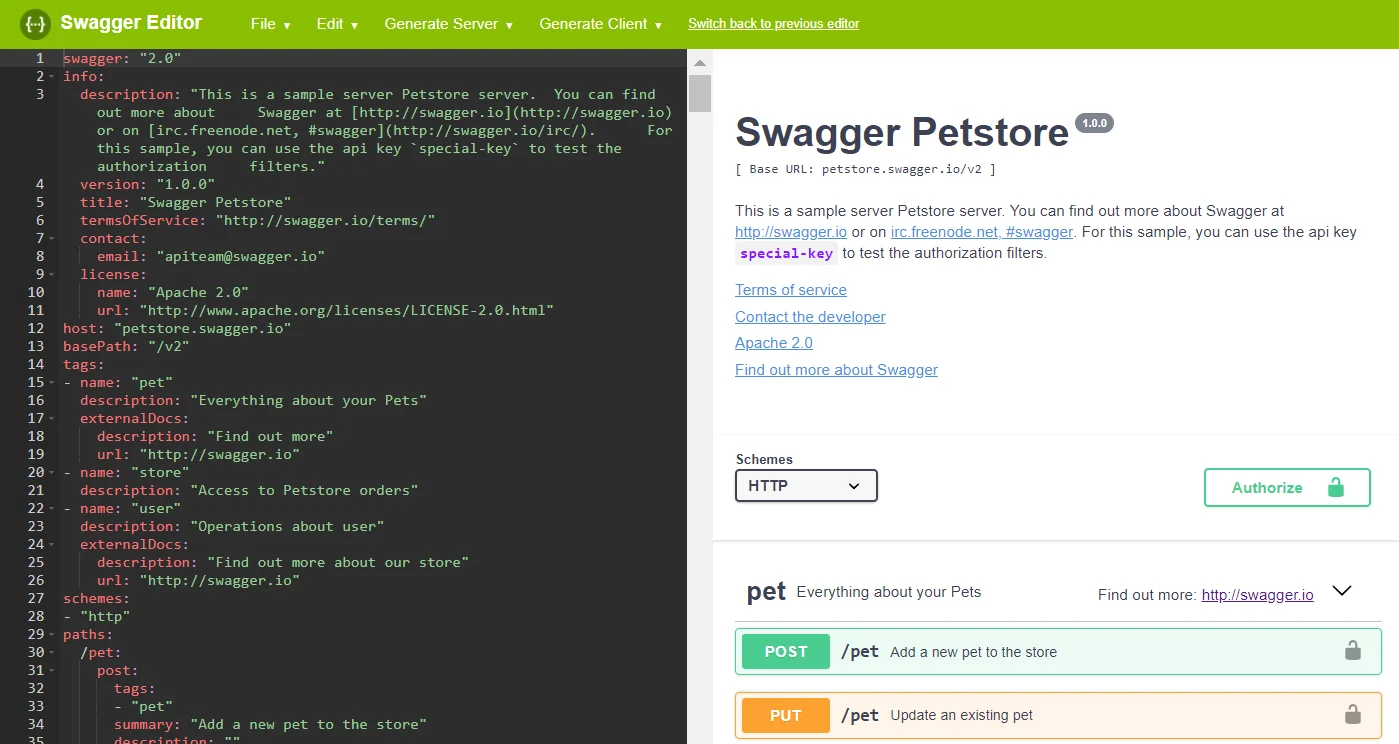
FastAPI uses Swagger UI internally to dynamically generate documentation for each endpoint in your app.
/docs" at the root of a FastAPI site./openapi.json" at the root of a FastAPI site, you’ll get a JSON file that describes each endpoint, the data it can receive, and the data it returns.---------------------------------------------------------------------------------------------------------------
Path Operation Function
The FastAPI provides various decoretors called 'Path operations' which can be used to create endpoints. These functions define 2 main endpoint parameters :
- Endpoint path - Defines the URL path for request.
- Endpoint operation - Defines the request operation like GET,POST etc
When designing your API endpoints you'll sometimes need to restrict access to certain resources through predefined HTTP methods,for that you can use the path operations. FastAPI provides the following path operation functions :
@app.get()@app.post()@app.put()@app.delete()@app.options()@app.head()@app.patch()@app.trace()
from fastapi import FastAPI
import uvicorn

app = FastAPI()


@app.get("/user")
def root():
    return {"username":"Deepeshdm","age":19}

@app.get("/home")
def root():
    return "Welcome Home !"

@app.get("/marks")
def root():
    return 10011

if __name__ == "__main__":
    uvicorn.run(app, host="127.0.0.1", port=8000)
NOTE : The FastAPI functions can return a dict, list, singular values as str, int, etc. By default all 'pydantic' models are converted to Json during return.
---------------------------------------------------------------------------------------------------------------
Path Parameters
We can also declare path parameters or variables inside our path. This is similar to dynamic Urls in Flask. Optionally you can also mention the "type" for the path variable,by mentioning the parameter data type, FastAPI will automatically convert it before passing it to the function.
NOTE : If the path variable is not of a valid type,then the request will send an error code back. You should always mention the input type as it helps in creating good documentation through the swagger UI.
from fastapi import FastAPI
import uvicorn

app = FastAPI()


@app.get("/user/{username}")
def root(username):
    return f"Welcom home, {username}"


@app.get("/marks/{points}")
def root(points : int):
    return "Total Points : " + str(points)

if __name__ == "__main__":
    uvicorn.run(app, host="127.0.0.1", port=8000)
Query Parameters
Query parameters are a defined set of key-value parameters attached to the end of a url. They are extensions of the URL that are used to help define specific content or actions based on the data being passed.
To append query params to the end of a URL, a ‘?’ Is added followed immediately by a query parameter. To add multiple parameters, an ‘&’ is added in between each.
NOTE : As query parameters are not a fixed part of a path, they can be optional and can have default values. The value of these parameters can be created by any variation of object types or lengths such as String, Arrays,Booleans and Numbers.
NOTE : To make a query parameter optional,set its default value to None.

In FastAPI, when we declare a function with parameters that are not present as path parameters, they are interpreted as query parameters. Query parameters are not part of the fixed path. Hence, they are optional and can have default values in case we don’t pass any value as input. FastAPI also supports automatic type conversion for query parameters.
In the below example the "username" parameter is not given a default value, the "premium_user" parameter have a default value.
from fastapi import FastAPI
import uvicorn

app = FastAPI()

@app.get("/user/{userid}")
def profile(userid:int,username:str=None , premium_user:bool=False):

    if username == None:
        return "Enter your Username inside Query !"
    else:
        i = "PREMIUM USER" if premium_user else "NON-PREMIUM USER"
        return f"Welcome {username},you are a {i} with UserID - {userid}"

# Send query data inside the URL as : "/user/{USERID}?username=VALUE&premium_user=VALUE"
# Eg - /user/1000?username=Deepeshdm&premium_user=True

if __name__ == "__main__":
    uvicorn.run(app, host="127.0.0.1", port=8000)
---------------------------------------------------------------------------------------------------------------
Request Body & Pydantic model
A request body is data sent by the client to your API. A response body is the data your API sends to the client. Your API almost always has to send a response body. But clients don’t necessarily need to send request bodies all the time.
NOTE : To declare a request body, you use 'pydantic models' and use the POST method as you are sending data to the API.
To create pydantic model you need to import BaseModel from pydantic and then use it to create subclass which defines the schema, or data shapes, you want to receive.
from fastapi import FastAPI
import uvicorn
from pydantic import BaseModel

app = FastAPI()

# create pydantic model
class userData(BaseModel):
    username:str
    password:str
    phone:int
    location:str
    premium_user:bool

@app.post("/profile")
def profile(data : userData):

    # convert model to dict
    data = data.dict()

    # The keys are same as mentioned in model
    username = data.get("username")
    password = data.get("password")
    phone = data.get("phone")
    location = data.get("location")
    is_premium_user = data.get("premium_user")

    return f" USERNAME : {username} , PHONE : {phone} , LOCATION : {location}"

if __name__ == "__main__":
    uvicorn.run(app, host="127.0.0.1", port=8000)


"""
Code used to send POST request :

import requests
url = 'http://127.0.0.1:8000/profile'

data = {
  "username": "DEEPESHDM",
  "password": "234567uh",
  "phone":  8850730893,
  "location": "MUMBAI",
  "premium_user": True
}

x = requests.post(url, json = data)
print(x.text)
"""
---------------------------------------------------------------------------------------------------------------
Request Files
File uploads typically use the multipart/form-data media type, and mixed-data requests usually use multipart/mixed. Multipart requests combine one or more sets of data into a single body, separated by boundaries. You typically use these requests for file uploads and for transferring data of several types in a single request (for example, a file along with a JSON object.
NOTE : To receive uploaded files in FastAPI, first install "python-multipart".
Example] Upload file to the server usingFastAPI.
from fastapi import FastAPI, UploadFile
import uvicorn

app = FastAPI()

@app.get("/")
def profile():
    return "Hello User !"


@app.post("/upload")
async def upload_file(file: UploadFile):
    return {"Filename": file.filename, "Content-Type": file.content_type}


if __name__ == "__main__":
    uvicorn.run(app, host="127.0.0.1", port=8000)


#---------------------------------------
# Code used to send file in POST request

import requests
url = 'http://127.0.0.1:8000/upload'
files = {'file': open('C:/Users/Deepesh/Pictures/Batman_God_of_Knowledge.jpg', 'rb')}
result = requests.post(url, files=files)
print(result.content)
Example] Returning an existing file from the server and Creating a Download Link for the Image.
The below example will display the image in the browser window and not download it.
import os
from fastapi import FastAPI
from fastapi.responses import FileResponse
import uvicorn

app = FastAPI()

file_path = r"C:\Users\Deepesh\PycharmProjects\pythonProject\files\anime summer.jpg"

@app.get("/")
def profile():
    return "Hello User !"


@app.get("/image")
async def get_file():

    if os.path.exists(file_path):
        # return a file saved on the server
        return FileResponse(file_path)
    else:
        return {"Error":"File Not Found !"}


if __name__ == "__main__":
    uvicorn.run(app, host="127.0.0.1", port=8000)
If you mention the filename and media-type,it'll automatically download the file on user's device when user visits the link.
import os
from fastapi import FastAPI
from fastapi.responses import FileResponse
import uvicorn

app = FastAPI()

file_path = r"C:\Users\Deepesh\PycharmProjects\pythonProject\files\anime summer.jpg"

@app.get("/")
def profile():
    return "Hello User !"


@app.get("/image")
async def get_file():

    if os.path.exists(file_path):
        # return a file saved on the server
        return FileResponse(path=file_path,media_type="image/jpeg",filename="ServerImage.jpg")
    else:
        return {"Error":"File Not Found !"}


if __name__ == "__main__":
    uvicorn.run(app, host="127.0.0.1", port=8000)
---------------------------------------------------------------------------------------------------------------
Customizing Swagger Docs
You can customize several metadata configurations in your FastAPI application.
Useful : https://fastapi.tiangolo.com/tutorial/metadata/
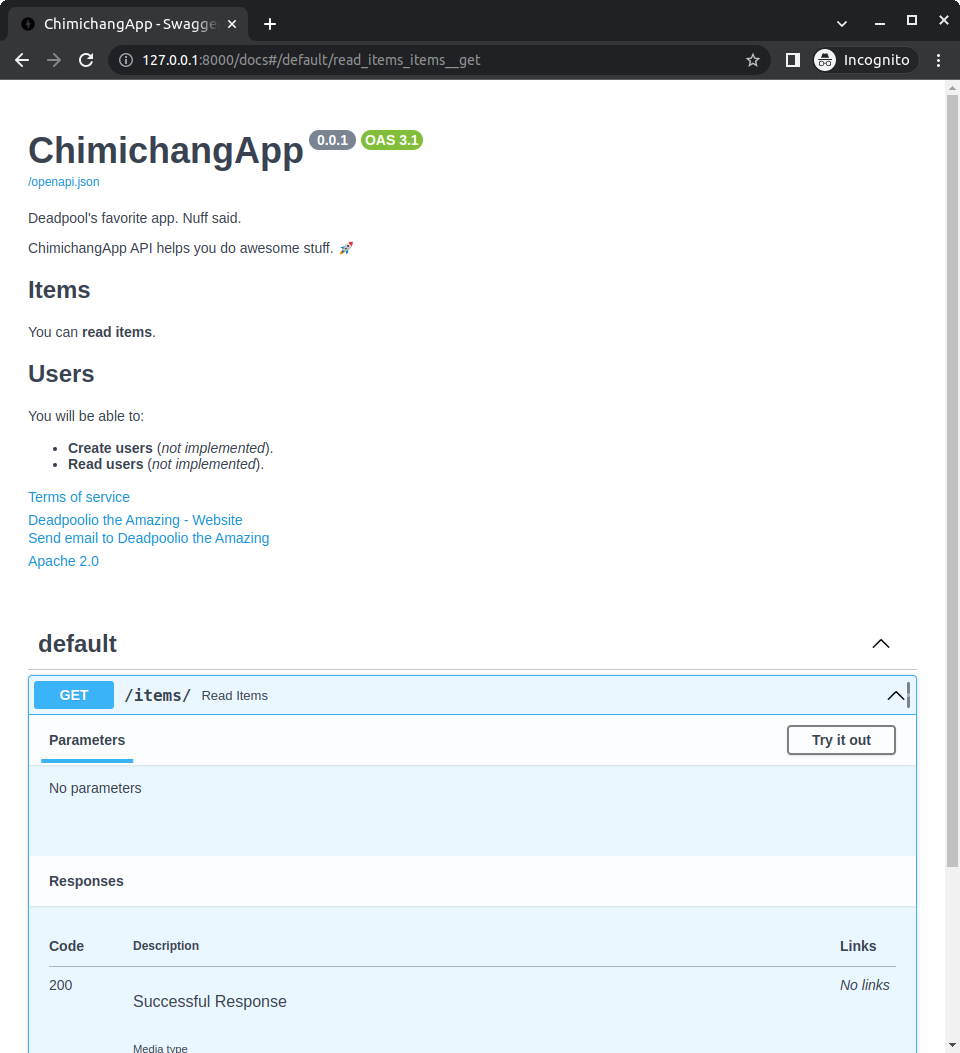
from fastapi import FastAPI
import uvicorn

#------------------------------------------

description = """
ChimichangApp API helps you do awesome stuff. 🚀

## Items

You can **read items**.

## Users

You will be able to:

* **Create users** (_not implemented_).
* **Read users** (_not implemented_).
"""

app = FastAPI(
    title="ChimichangApp",
    description=description,
    version="0.0.1",
    terms_of_service="http://example.com/terms/",
    contact={
        "name": "Deadpoolio the Amazing",
        "url": "http://x-force.example.com/contact/",
        "email": "dp@x-force.example.com",
    },
    license_info={
        "name": "Apache 2.0",
        "url": "https://www.apache.org/licenses/LICENSE-2.0.html",
    },
)

#------------------------------------------


@app.get("/user")
def root():
    return {"username":"Deepeshdm","age":19}

@app.get("/home")
def root():
    return "Welcome Home !"

@app.get("/marks")
def root():
    return 10011

if __name__ == "__main__":
    uvicorn.run(app, host="127.0.0.1", port=8000)
---------------------------------------------------------------------------------------------------------------
Enable CORS
 app = FastAPI()

 # Enable Cors
 app.add_middleware(
    CORSMiddleware,
    allow_origins=["*"],
    allow_credentials=True,
    allow_methods=["*"],
    allow_headers=["*"],
 )
---------------------------------------------------------------------------------------------------------------


Comments
Post a Comment