Web Sockets & Socket.io
The HTTP protocol is stateless,which means each request from the client to server is treated independently. The server has no way to know if the request is coming for the first time or the last. For session management the server relies on Cookies.
Every time that the client makes a new HTTP server request, the default behavior is to open a new HTTP connection. This is inefficient because it uses bandwidth on recurring non-payload data and increases latency between the data transfers.
HTTP is unidirectional where the client sends the request and the server sends the response. There is traditionally no mechanism for the server to initiate communication with the client. The server is unable to send data to the client unless the client requests it first.
A single HTTP handshake sizes between 200-400 bytes including cookies and headers,this is very inefficient for real-world HTTP browser connections where we need real-time updates and there is often several kilobytes of data sent as part of the request in both directions.To solve this problem a new protocol called "Web Socket" was created.

Web socket is an Bi-directional Independent TCP based protocol. The use of WebSocket allows two-way real-time communication between the client and the server over a single TCP connection. This reduces unnecessary network traffic, as data can immediately travel both ways through a single open connection. This provides speed and real-time capability on the web.
WebSocket is a bidirectional communication protocol that can send the data from the client to the server or from the server to the client by reusing the established connection channel. The connection is kept alive until terminated by either the client or the server. All the frequently updated applications used WebSocket because it is faster than HTTP Connection.
------------------------------------------------------------------------------------------------------------
How Web Sockets Work ?
WebSockets begin life as a standard HTTP request and response. Within that request response chain, the client asks to open a WebSocket connection, and the server responds (if its able to). If this initial handshake is successful, the client and server have agreed to use the existing TCP/IP connection that was established for the HTTP request as a WebSocket connection. Data can now flow over this connection using a basic framed message protocol.
A WebSocket connection is similar to a phone call between client and server,where both parties can send data and have the ability to terminate the connection. Whereas HTTP is like sending letters,the client sends a letter to server and the server responses another back,then connection closes.
NOTE : WebSockets do not use the http:// or https:// scheme (because they do not follow the HTTP protocol). Rather, WebSocket URIs use a new scheme ws: or wss: for a secure WebSocket.
WebSocket connections can only be established to URIs that follow this scheme. That is, if you see a URI with a scheme of ws:// (or wss://), then both the client and the server MUST follow the WebSocket connection protocol.
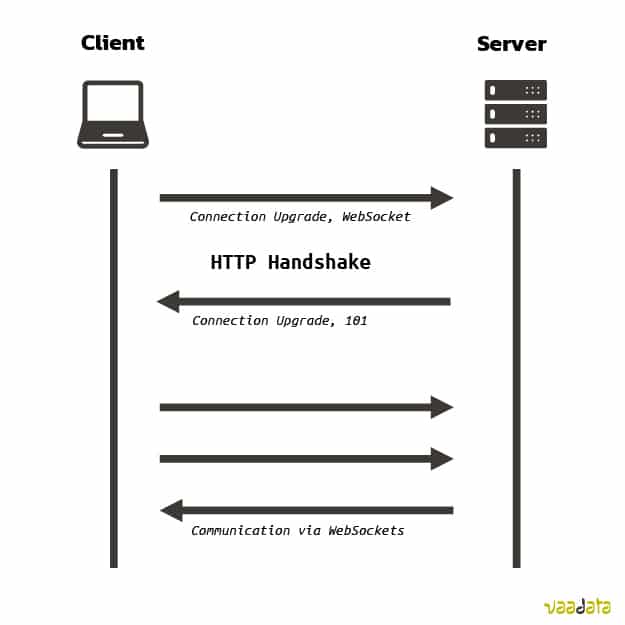
All websocket conncections are first initiated by a HTTP request. The client sent the HTTP request to the server and performs TCP handshake. After that the client requests the server to upgrade the existing TCP connection to a Websocket connection.
If the server accepts the request then a WebSocket connection is established ,the client and the server communicate asynchronously. The format of the exchanged data can be of any form (HTML, JSON, Text…). However, in practice, the most used WebSocket libraries exchange in JSON format.
The WebSocket connection is "stateful", which means the client does'nt have to tell the server who it is on every request (like it happens in HTTP), that authentication only happens during the first TCP handshake.
NOTE : It is possible for a websocket connection to stay open forever, therefore it is necessary to add timeouts so the connection is terminated automatically after some duration of inactivity.
------------------------------------------------------------------------------------------------------------


Comments
Post a Comment