MySQL SQL Notes - Part 2 (Keys,Joins,ORM,NFs, Schema Design)
---------------------------------------------------------------------------------------------------------------
DBMS Keys
Keys are very important part of Relational database model. They are used to establish and identify relationships between tables and also to uniquely identify any record or row of data inside a table.
KEYS in DBMS is an attribute or set of attributes which helps you to identify a row(tuple) in a relation(table). They allow you to find the relation between two tables. Keys help you uniquely identify a row in a table by a combination of one or more columns in that table.
In real world application a single database may contain large number of tables which are related to each other,in order to maintain these relationships we use keys. They also help us retrieve data from multiple related tables using Joins.
There are mainly 8 different types of Keys in DBMS :
- Primary Key – is a column or group of columns in a table that uniquely identify every row in that table.
- Foreign Key – is a column that creates a relationship between two tables. The purpose of Foreign keys is to maintain data integrity and allow navigation between two different instances of an entity.
- Super Key – A super key is a group of single or multiple keys which identifies rows in a table.
- Candidate Key – is a set of attributes that uniquely identify tuples in a table. Candidate Key is a super key with no repeated attributes.
- Alternate Key – is a column or group of columns in a table that uniquely identify every row in that table.
- Compound Key – has two or more attributes that allow you to uniquely recognize a specific record. It is possible that each column may not be unique by itself within the database.
- Composite Key – is a combination of two or more columns that uniquely identify rows in a table. The combination of columns guarantees uniqueness, though individual uniqueness is not guaranteed.
- Surrogate Key – An artificial key which aims to uniquely identify each record is called a surrogate key. These kind of key are unique because they are created when you don’t have any natural primary key.
PRIMARY KEY
The PRIMARY KEY constraint uniquely identifies each record in a table. It is the combination of UNIQUE and NOT NULL constraints. PRIMARY KEY in DBMS is a column or group of columns in a table that uniquely identify every row in that table. The Primary Key can’t be a duplicate meaning the same value can’t appear more than once in the table.
Rules for defining Primary key in a Table :
- Two rows can’t have the same primary key value
- It must for every row to have a primary key value.
- The primary key field cannot be null.
- The value in a primary key column can never be modified or updated if any foreign key refers to that primary key.
NOTE : A table cannot have more than one primary key.
NOTE : If a primary key is based on multiple columns then each record in the table must contain unique values for both of the columns.
Composite Key
A primary key having two or more attributes is called composite key. It is a combination of two or more columns which form a single primary key. A composite key with the help of 2 or more attributes can uniquely identify another attribute or record in the table.
The combination of columns guarantees uniqueness, though individually uniqueness is not guaranteed. Hence, they are combined to uniquely identify records in a table.
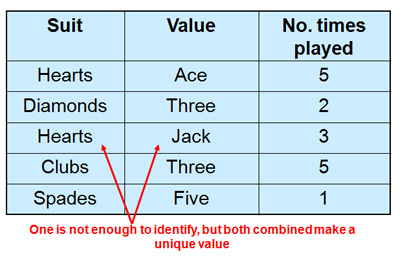
NOTE : Simply put we get a composite key when we have 2 or more Primary key columns (which uniquely identify every row) in the table.
Eg - Imagine we identified a student by their firstName + lastName. In a table representing students our primary key would now be firstName + lastName. Because students can have the same firstNames or the same lastNames these attributes are not simple keys. The primary key firstName + lastName for students is a composite key.
FOREIGN KEY (Useful : 1] Click)
A Foreign Key is a constraint on a column or group of columns in a table that links or creates relationship between two or more tables. The purpose of Foreign keys is to maintain data integrity and allow navigation between two different instances of an entity. It acts as a cross-reference between two tables as it references the primary key of another table.
A FOREIGN KEY is a field (or collection of fields) in one table, that refers to the PRIMARY KEY in another table. The table with the foreign key is called the child table, and the table with the primary key is called the referenced or parent table.
While a primary key may exist on its own, a foreign key must always reference to a primary key somewhere. The original table containing the primary key is the "parent table" (also known as referenced table). This key can be referenced by multiple foreign keys from other tables, known as “child” tables.
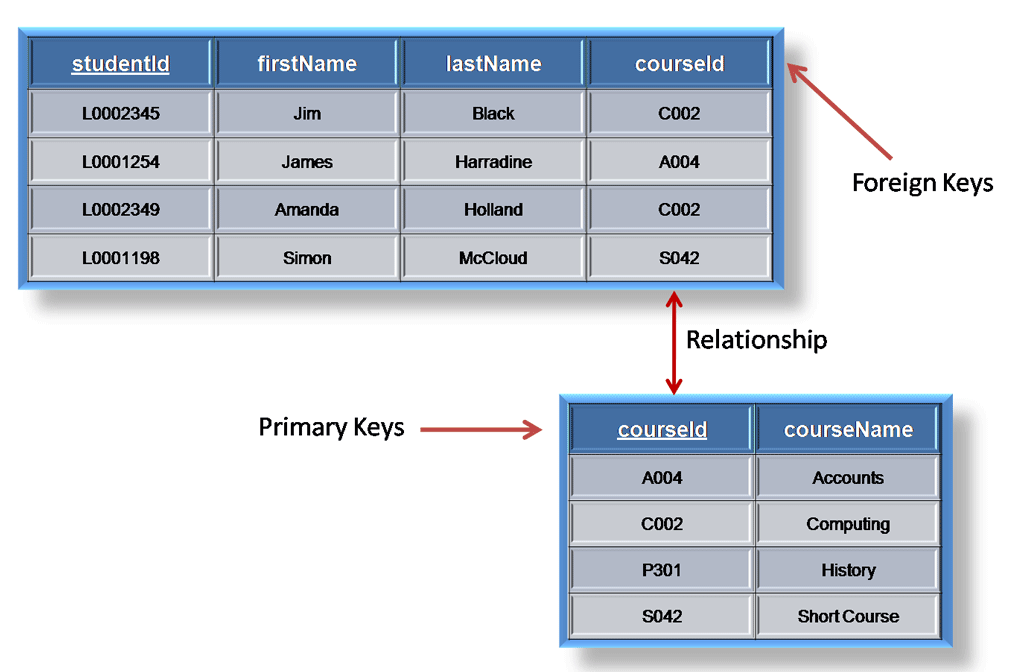
The parent table holds the central data and the child table just points to the parent by including a similar column i.e Foreign key column into its table.If you try to add a record into child table whose Foreign key value is not present in any row of the parent table's primary key column then you'll get an error.
NOTE : If you try to add a row/record inside the child table for which no matching row (with the given foreign key value) is present in the parent table,then the query is aborted. Since the parent table holds the central data and child table just points to it, you'll always add data to parent table first before inserting anything new in child table.
For any column acting as a foreign key, a corresponding value should exist in the linked table. Special care must be taken while inserting data and removing data from the foreign key column, as a careless deletion or insertion might destroy the relationship between the two tables.

NOTE : If you attempt to delete rows from the parent table before you delete rows from the child table you'll get an error. We need to make sure that no record is left orphaned in the child table.
Referential Integrity Constraint
Referential Integrity is a set of constraints applied to foreign keys which prevents entering a row in the child table (where you have the foreign key) for which you don't have any corresponding row in the parent table.
NOTE : Most Relational databases follow referential integrity. When the tables are created the referential integrity constraints are set up.
There are 2 main referential integrity constraints :
- Insert Constraint : Value cannot be inserted in CHILD Table if the value is not lying in PARENT Table
- Delete Constraint : Value cannot be deleted from PARENT Table if the value is lying in CHILD Table
The Insert Constraint can easily be followed since we just need to add records in the parent table first to follow the insert constraint. But the Delete Constraint is a bit tricky since it does'nt allow us to directly delete a record from the parent table without first removing it from child table.
ON DELETE CASCADE
The ON DELETE CASCADE constraint is used in MySQL to delete the rows from the child table automatically, when the rows from the parent table are deleted. When rows in the parent table are deleted, the matching foreign key columns in the child table are also deleted, creating a cascading delete.
By mentioning the ON DELETE CASCADE constraint we can directly delete records from parent table. When creating or altering a table with a foreign key constraint, you can specify ON DELETE CASCADE to define the desired behavior upon deletion of a parent record.
When you delete rows from the parent table, you don't need to explicitly mention or perform any additional actions related to the child tables if you have already set up the foreign key constraint with ON DELETE CASCADE. The database automatically deletes the child table rows.
---------------------------------------------------------------------------------------------------------------
DBMS JOINS
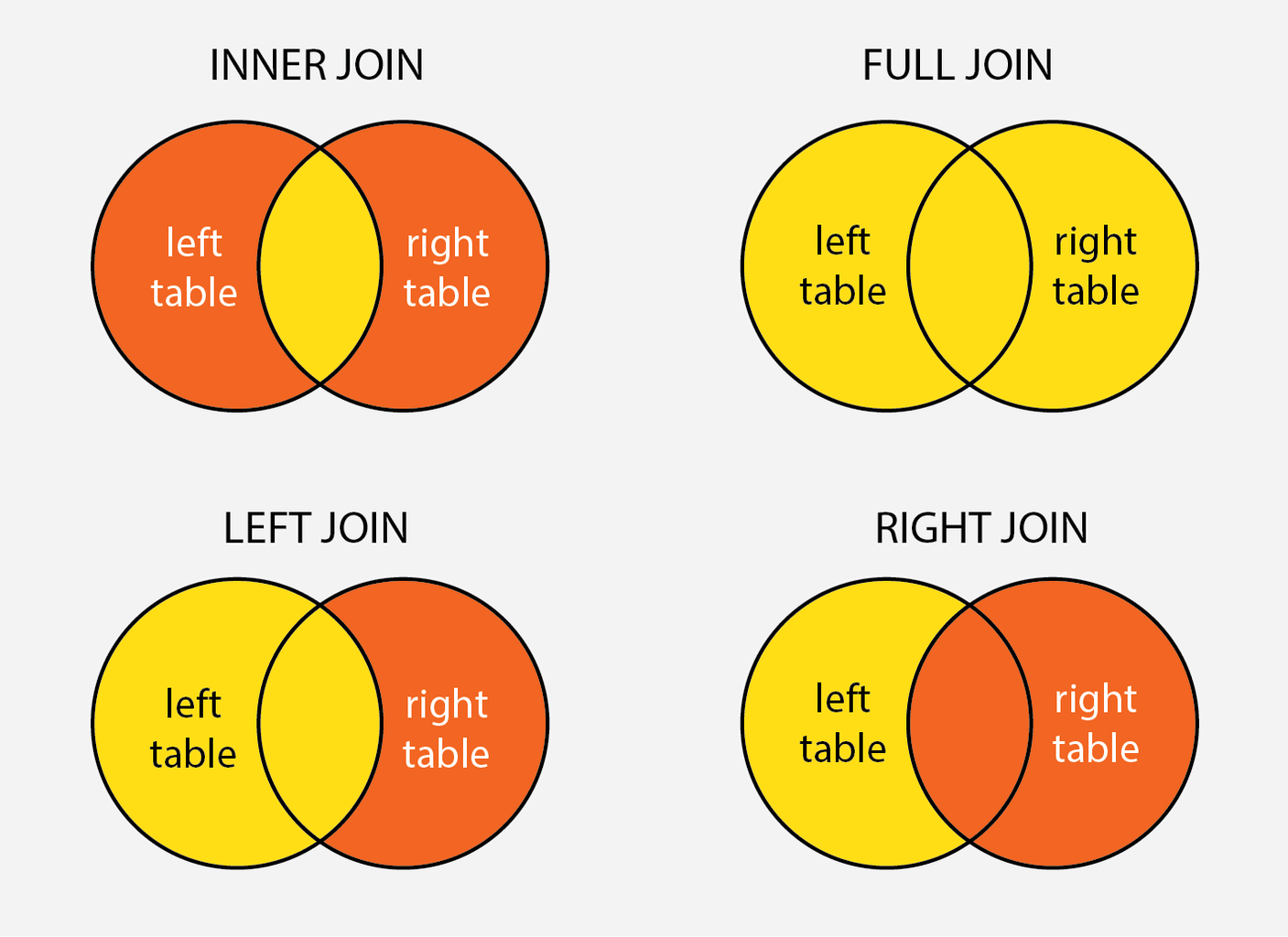
A SQL Join statement is used to combine rows from two or more tables based on a common column field between them. In most cases this common field is a Primary or Foreign Key. On a high-level there are mainly 3 types of Joins in SQL which are as follows :
INNER JOIN - Fetches records that have matching values in both tables.
OUTER JOIN are of 3 types :
Left Join / Left Outer Join- Fetches all records from the left table and the matching records from the right table.- Right Join / Right Outer Join - Fetches all records from the right table, and the matching records from the left table.
- Full Join / Full Outer Join - Fetches all records when there is a match in left or right table records.
CROSS JOIN : It is used to combine each row of the first table with each row of the second table. It is also known as the Cartesian join since it returns the Cartesian product of the sets of rows from the joined tables.
NOTE : In order to perform Joins we dont need Primary or Foreign keys,all we need is 2 columns with similar data-types. But to maintain data consistency Joins are mainly used with Foreign keys only.
INNER JOIN
The inner join is one of the most commonly used joins in SQL. The inner join clause allows you to query data from two or more related tables. The INNER JOIN selects all the records from both the tables for which the common field value matches.

Below is the syntax used to Join two or more tables in MySQL :
NOTE : If you just mentionJOIN then by default it is a INNER JOIN.
OUTTER JOIN
The INNER JOIN only returns records from the tables which have a matching value ,the rest of the unmatched records are not selected. In a OUTTER JOIN the matched records as well as unmatched records of one or both tables can be returned. There are mainly 3 types of outer joins :
LEFT JOINreturns only unmatched rows from the left table.RIGHT JOINreturns only unmatched rows from the right table.FULL OUTER JOINreturns unmatched rows from both tables.

NOTE : An OUTER join has to be LEFT | RIGHT | FULL you can not simply say OUTER JOIN. You can drop OUTER keyword and just say LEFT JOIN or RIGHT JOIN or FULL JOIN.
LEFT JOIN
The LEFT JOIN keyword returns all records from the left table (table1), and the matching records from the right table (table2). The result is 0 records from the right side, if there is no match.

RIGHT JOIN
The RIGHT JOIN keyword returns all records from the right table (table2), and the matching records from the left table (table1). The result is 0 records from the left side, if there is no match.

FULL JOIN
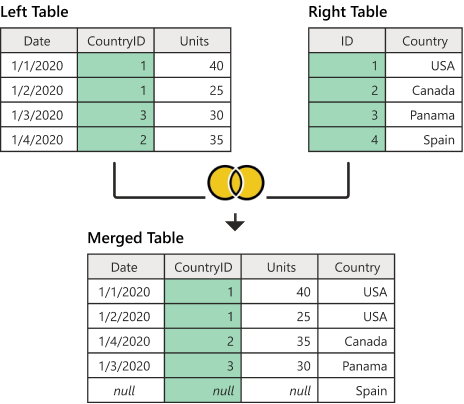
The FULL OUTER JOIN keyword returns all records when there is a match in left (table1) or right (table2) table records. The full join is the result of combination of both left and right outer join and the join tables have all the records from both tables. It puts NULL on the place of matches not found.
SELF JOIN
A self join in SQL is a type of join operation where a table is joined with itself. Self joins are useful in various scenarios, especially when dealing with hierarchical data or when you need to compare records within the same table.
One common use case for self joins is when dealing with hierarchical data, such as organizational charts, bill of materials (BOM), or category trees. For example, in an employees table where each employee has a manager, you can use a self join to retrieve employees along with their respective managers.
A self join is typically implemented as an inner join, but you can also specify other types of joins (e.g., left join, right join, full outer join) depending on your specific requirements and the nature of your data.
NOTE : There is no SELF JOIN keyword, you just write an ordinary join where both tables involved in the join are the same table. One thing to notice is that when you are self joining it is necessary to use an alias for the table otherwise the table name would be ambiguous.
Use a self join to compare records within the same table based on certain criteria, such as historical data comparisons, analyzing relationships between entities, or identifying patterns among related records.
Optimize SELECT SQL queries by using same column type for joins
When joining two tables, ensure that the columns in the join condition are of the same type. Joining an integer Id column in one table with another customerId column defined as VARCHAR in another table will force the database to convert each Id to a string before comparing the results, slowing down the performance.

NOTE : When migrating a column type from Eg- VARCHAR to INT, check that all the values in the column are integers indeed. If some of the values are not integers, you have a potential data quality problem.
---------------------------------------------------------------------------------------------------------------
Useful : 1] Click
Transaction Control
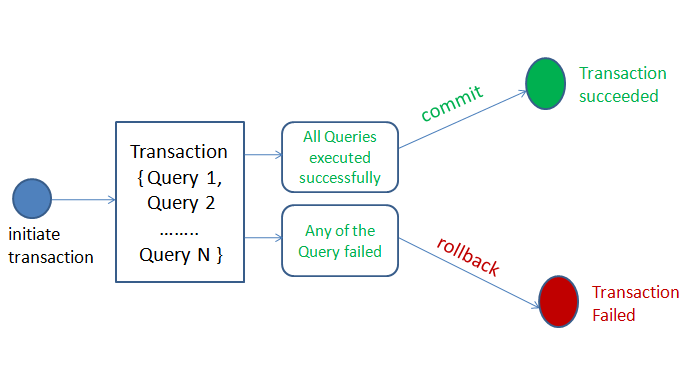
A transaction is a sequence of operations performed (using one or more SQL statements) on a database as a single logical unit of work.The effects of all the SQL statements in a transaction can be either all committed (applied to the database) or all rolled back (undone from the database).
Transactions ensure data integrity by allowing you to perform multiple operations as a single atomic operation. If any part (even a single SQL statement) of the transaction fails, the entire transaction is rolled back, and changes made by the transaction are not persisted to the database.

Below are commonly used SQL transaction commands supported in MySQL :
- BEGIN or START TRANSACTION: Starts a new transaction explicitly. All subsequent SQL statements in the session are part of this transaction until it's committed or rolled back.
- COMMIT: Permanently saves the changes made within a transaction to the database, marking the successful completion of the transaction.
- ROLLBACK: Undoes the changes made within a transaction and restores the database to its state before the transaction started or last committed state.
- SET autocommit: Enables or disables autocommit mode for transactions. When enabled (1), each SQL statement is treated as a separate transaction and is automatically committed. When disabled (0), you must use explicit transaction commands to manage transactions.
AUTOCOMMIT
In most database systems, when we execute an SQL statement, it typically makes a permanent data change in the database system. This change is due to a feature known as AUTOCOMMIT, which is present in many database management systems (DBMS), including MySQL.
AUTOCOMMIT is a configuration setting that determines the behavior of transactions in a database. When AUTOCOMMIT is enabled, which is often the default setting, each individual SQL statement is automatically committed as a separate transaction. This means that any changes made by the SQL statement are immediately saved and become permanent in the database.
In MySQL, there isn't a specific standalone command called AUTOCOMMIT to enable or disable autocommit directly like some other DBMSs might have. Instead, you manage autocommit behavior using the autocommit system variable along with SQL statements.
Disabling autocommit using SET autocommit = 0; applies only to the current session or connection in which the command is executed. It does not affect the global autocommit setting for other users or sessions in the database.
NOTE : The AUTOCOMMIT feature is enabled by default in most database systems, which mean that by default every SQL command we execute makes a permanent change in the database. Each individual SQL statement is automatically committed as a separate transaction.
Sometimes, when we need to run multiple SQL commands as part of a transaction, ensuring that either all commands succeed or none are applied (atomicity), it may be necessary to turn off autocommit in the database system. Otherwise, each SQL command would be committed individually as a permanent change, even if errors occur during the execution of some commands.
COMMIT
The COMMIT command is used to make permanent changes to the database that have been made within a transaction. When a COMMIT command is executed, all the changes made by the SQL statements within the transaction are finalized and become a permanent part of the database.
When executing multiple SQL statements in a transaction we use the COMMIT at end once all SQL statememts are executed. If incase an error occurs while executing any single SQL statement we then use ROLLBACK to move to previous commit state of database.
NOTE : It is commonly used in cases where AUTOCOMMIT feature is disabled and so we use the COMMIT command to explicitly mark changes as permanent in the database.
ROLLBACK
ROLLBACK command is used to undo changes made by SQL statements in the current session and revert the state of database to last COMMIT or ROLLBACK. It is helpful for reverting changes that were made accidentally, correcting errors, or discarding changes that you do not want to commit.The ROLLBACK command cannot revert changes that have already been committed. Once a transaction is committed (either explicitly using COMMIT or automatically with autocommit enabled), the changes made by that transaction become permanent and cannot be rolled back.
NOTE : Rollback is not much useful when autocommit is enabled since each SQL statement executted is commited.
In cases where autocommit is disabled and we are executing multiple SQL statements in transaction like manner, ROLLBACK becomes particularly useful for undoing changes made within the transaction if an error occurs or if you want to discard the changes.
While we cannot roll back individual statements when autocommit mode is enabled, we can use error handling mechanisms (e.g., TRY...CATCH blocks in SQL Server, BEGIN...EXCEPTION blocks in PostgreSQL) to catch errors and initiate rollback actions for entire transactions.
NOTE : It is not common or practical to use the ROLLBACK command outside of transactions in MySQL as each SQL statement is typically treated as a separate transaction when autocommit is enabled (default behavior), meaning that each statement is automatically committed after execution.
Transactions in MySQL (START TRANSACTION)
To start a transaction in MySQL, you can use either the BEGIN or START TRANSACTION command. After executing one of these commands, a new transaction is initiated in the current session, and any subsequent SQL statements executed within the same session will be part of this transaction until it is explicitly committed or rolled back.
Once a transaction is started, you can execute multiple SQL statements within the transaction. These statements can include data manipulation operations such as inserts, updates, deletes, and queries.
To make the changes within a transaction permanent and commit the transaction, you use the COMMIT command. If you want to discard the changes made within a transaction and revert to the state before the transaction began, you can use the ROLLBACK command.
Transactions are often used in error handling scenarios. If an error occurs during the execution of SQL statements within a transaction, you can catch the error and initiate a rollback to maintain data integrity.
NOTE : When you explicitly start a transaction using BEGIN or START TRANSACTION in MySQL, it disables autocommit for the duration of that transaction. After starting a transaction, multiple SQL statements executed within that transaction are grouped together as a single unit of work, and they are not committed until we explicitly issue a COMMIT.
The decision to commit or rollback a transaction should typically be based on conditions determined by your application logic, which may involve checking results of SQL queries, processing data, or evaluating business rules.
We can also just simply COMMIT at the end of a transaction without ROLLBACK, as MySQL will automatically rollback the changes in case an error occurs while executing even a single SQL statement in transaction.
NOTE : Transactional commands (BEGIN, COMMIT, ROLLBACK) can only be used with Data Manipulation Language (DML) commands (INSERT, UPDATE, DELETE) to ensure ACID properties of database operations. These commands cannot be used with Data Definition Language (DDL) commands (CREATE, ALTER, DROP) because DDL operations are automatically committed by the database management system (DBMS).
---------------------------------------------------------------------------------------------------------------
ACID Properties
The acronym ACID refers to the four key properties of a transaction : atomicity, consistency, isolation, and durability.
Atomicity : The term atomicity defines that the data remains atomic. It means if any operation is performed on the data, either it should be performed or executed completely or should not be executed at all. It further means that the operation should not break in between or execute partially. For example, in an application that transfers funds from one account to another, the atomicity property ensures that, if a debit is made successfully from one account, the corresponding credit is made to the other account.
Consistency : The word consistency means that the value should remain preserved always. In DBMS, the integrity of the data should be maintained, which means if a change in the database is made, it should remain preserved always. In the case of transactions, the integrity of the data is very essential so that the database remains consistent before and after the transaction.
Isolation : If the multiple transactions are running concurrently, they should not be affected by each other; i.e., the result should be the same as the result obtained if the transactions were running sequentially.
NOTE : Most RDBMS databases like MySQL and PostgreSQL are ACID compliant.
---------------------------------------------------------------------------------------------------------------
SQL Injection
SQL injection is one of the most common web hacking techniques. SQL injection is a code injection technique that might destroy your database. SQL injection is the placement of malicious code in SQL statements via web page input.
SQL injection usually occurs when you ask a user for input, like their username/userid, and instead of a name/id, the user gives you an SQL statement that you will unknowingly run on your database. See the belwo image for example.

Different Ways to Prevent SQL Injection :
1] Most instances of SQL injection can be prevented by using parameterized queries (also known as prepared statements) instead of string concatenation within the query. Always avoid using string concatenation in SQL queries.
2] The use of ORM also prevents SQL injections,and these tools thankfully use parameterized statements under the hood.
3] Utilize the principle of least privilegewhen provisioning accounts used to connect to the SQL database. For example, if a web site only needs to retrieve web content from a database using SELECT statements, do not give the web site's database connection credentials other privileges such as INSERT, UPDATE, or DELETE privileges.
4] Configure proper error reporting and handling on the web server and in the code so that database error messages are never sent to the client web browser. Attackers can leverage technical details in verbose error messages to adjust their queries for successful exploitation.Database Partitioning
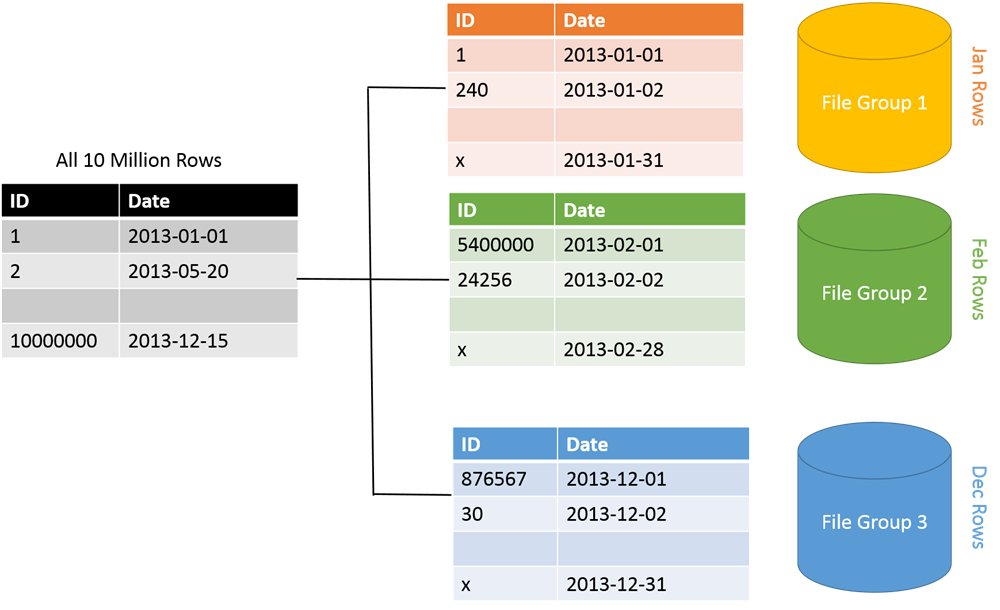
Partitioning is the database process where very large tables are divided into multiple smaller parts. By splitting a large table into smaller, individual tables, queries that access only a fraction of the data can run faster because there is less data to scan. The main of goal of partitioning is to aid in maintenance of large tables and to reduce the overall response time to read and load data for particular SQL operations.
Some advantages of database partitioning are as follows :
Improve security. In some cases, you can separate sensitive and nonsensitive data into different partitions and apply different security controls to the sensitive data.
Improve performance. Data access operations on each partition take place over a smaller volume of data. Correctly done, partitioning can make your system more efficient. Operations that affect more than one partition can run in parallel.
Improve scalability. When you scale up a single database system, it will eventually reach a physical hardware limit. If you divide data across multiple partitions, each hosted on a separate server, you can scale out the system almost indefinitely.
There mainly 2 types of database partitioning methods :
- Vertical Partitioning
- Horizontal Partitioning (or Sharding)
Vertical Partitioning
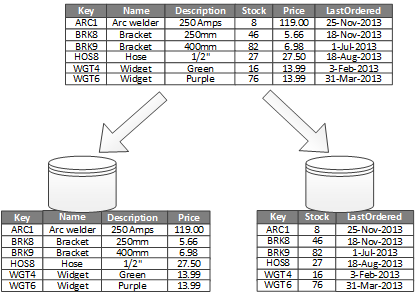
Vertical partitioning involves creating tables with fewer columns and using additional tables to store the remaining columns. Vertical table partitioning is mostly used to increase SQL Server performance especially in cases where a query retrieves all columns from a table ,In this case to reduce access times the columns can be split to their own table.
Another example is to restrict access to sensitive data e.g. passwords, salary information etc. Vertical partitioning splits a table into two or more tables containing different columns.
Horizontal Partitioning / Sharding
Horizontal partitioning divides a table into multiple tables that contain the same number of columns, but fewer rows. For example, if a table contains a large number of rows that represent monthly reports it could be partitioned horizontally into tables by years, with each table representing all monthly reports for a specific year. This way queries requiring data for a specific year will only reference the appropriate table.

---------------------------------------------------------------------------------------------------------------
Functional Dependency
A functional dependency (FD) is a relationship between two columns/attributes, typically between the Primary-Key and other non-key attributes within a table. The attribute Y is functionally dependent on attribute X (usually the PK), if for every valid instance of X, that value of X uniquely determines the value of Y.
Types of functional dependency in DBMS :
- Single Valued & Multivalued Functional Dependency
- Fully Functional Dependency
- Partial Functional Dependency
- Transitive Functional Dependency
NOTE : A functional dependency is denoted by an arrow “→”. In other words, a dependency FD: X → Y ,means that the values of Y can be determined by the values of X.
1] Single Valued Functional Dependency


3] Fully Functional Dependency

From above table,{Roll_Number, Subject_Name} –> Paper_Hour ,Since neither Roll_Number –> Paper_Hour nor Subject_Name –> Paper_Hour hold. We cannot find Paper_Hour just by knowing half the composite key attributes. We need all the comosite key attributes to uniquely identify or find a record in the table.
4] Partial Functional Dependency

5] Transitive Functional Dependency (Useful : 1] Click)

From above table,Roll_Number –> Pin_Code and Pin_Code –> City_Name hold.Than Roll_Number –> City_Name also holds which creates a transitive FD between them. No transitive dependencies means non-primary key columns should not depend on other non-primary key columns.
NOTE : To remove Transitive dependency, we can divide the table, remove the attribute which is causing it, and move it to some other table where it fits in well.
---------------------------------------------------------------------------------------------------------------
Normalization (1NF,2NF,3NF)
Normalization is a process of structuring a relational database by applying a series of principles called 'normal forms' in order to reduce data redundancy and improve data integrity.
Normalization rules divides larger tables into smaller tables and links them using relationships. The purpose of Normalisation in SQL is to eliminate redundant (repetitive) data and ensure data is stored logically.
Below is a list of Normal forms (NF) used in DBMS :
- 1NF (First Normal Form)
- 2NF (Second Normal Form)
- 3NF (Third Normal Form)
- BCNF (Boyce-Codd Normal Form)
- 4NF (Fourth Normal Form)
- 5NF (Fifth Normal Form)
1NF (First Normal Form)
For a table to be in 1NF, it has to satisfy 2 rules :
- The values in each column should be atomic.
- Each record in the column is unique, (No repeating columns for same type of value)
- All the columns in a table should have unique names.
2NF (Second Normal Form)
For a table to be in 2NF, it has to satisfy 2 rules :
- The table should be in 1NF
- There should be no "Partial Functional Dependency" in the table. Partial FD should be converted to Full FD.
3NF (Third Normal Form)
For a table to be in 3NF, it has to satisfy 2 rules :
- The table should be in 2NF
- There should be no "Transitive Functional Dependency" in the table
---------------------------------------------------------------------------------------------------------------
Schema Design
A database schema is a structured blueprint of how data is organized within a database. It defines the logical and physical structure of the database, detailing how tables, columns, data types, relationships, and constraints are arranged. It acts as a framework to ensure data consistency, integrity, and efficient retrieval.
Below are steps commonly used for database schema designing process :
- Gather Requirements - The first step is to understand the purpose and goals of the database by collecting detailed requirements from the application or business context. This includes identifying the types of data to store, the relationships between different data elements, and the key operations or functionalities the database must support.
- Identify Entities - Entities represent the key objects or concepts that need to be stored in the database. For each entity, think of it as a table in the schema. During this phase, you identify entities like "User", "Task", and "Bid" that will become tables in your schema. Each entity should directly correspond to a key business object or real-world concept that the system will work with.
- Define Attributes - Attributes describe the properties of each entity. These become the columns within the respective tables. For instance, a "User" entity might have attributes like
user_id, name, email, and phone_number. It’s essential to define the attributes clearly, assign appropriate data types, and consider the constraints like NOT NULL or UNIQUE to ensure data integrity.
- Define Relationships - Identifying relationships between entities helps to understand how the tables will be linked. Relationships are classified into one-to-one, one-to-many, and many-to-many. For example, in GigBuzz, a user can post many tasks (one-to-many), and multiple users can place bids on a single task (many-to-many). These relationships are implemented using foreign keys and junction tables to maintain referential integrity.
- Create an ER Diagram - An ER Diagram is a visual representation of entities and their relationships. It helps you map out how data will flow between different entities and ensures that you have considered all relationships. During this phase, you’ll diagram the entities as rectangles, attributes as ovals, and relationships as diamonds, linking them appropriately to represent the business rules visually.
- Normalize the Database - Normalization is the process of organizing data to minimize redundancy and avoid anomalies. The goal is to ensure that each piece of data only appears once in the database. You apply normalization rules such as 1NF, 2NF, and 3NF to progressively reduce duplication and ensure a more efficient and logical structure. For example, separating a user's address into a different table from the user data can be a way to normalize the schema.
- Refine and Iterate - Schema design is an iterative process. After testing and feedback, you may need to refine and optimize your schema by adding or removing entities, relationships, or constraints. This phase helps to address any performance issues or changing business requirements and ensures the schema evolves with the application.
user_id, name, email, and phone_number. It’s essential to define the attributes clearly, assign appropriate data types, and consider the constraints like NOT NULL or UNIQUE to ensure data integrity.Relationships Mapping
Once you've defined the entities and relationships, it’s essential to understand how different types of relationships are represented in the database schema. The way you map these relationships will dictate how data can be efficiently accessed and manipulated. Here's how each type of relationship is typically represented:
1] One-to-One (1:1) Relationship
In a one-to-one relationship, one record in a table is related to one record in another table. For example, a "Person" might have one "Passport". To represent this in a schema:
- Both tables (Person and Passport) have a primary key.
- One of the tables (usually the dependent table) will have a foreign key reference to the other table's primary key.
- Example: Person table’s
person_idis the primary key, and Passport table’sperson_idbecomes the foreign key referencing the Person table’sperson_id.
2] One-to-Many (1:N) Relationship

In a one-to-many relationship, one record in a table is related to multiple records in another table. For example, a "Department" can have many "Employees". To represent this:
- The "one" side (Department) table has a primary key.
- The "many" side (Employee) table includes a foreign key referencing the primary key of the "one" side.
- Example: The Department table’s
department_idis the primary key, and the Employee table has adepartment_idcolumn as a foreign key to indicate which department an employee belongs to.
3] Many-to-Many (M:N) Relationship
In a many-to-many relationship, multiple records in one table are related to multiple records in another table. For example, a "Student" can enroll in many "Courses", and a "Course" can have many "Students". To map this relationship:
- A junction table (also called an associative table) is created to break down the many-to-many relationship.
- This junction table includes foreign keys that reference the primary keys of both the related tables.
- Example: A Enrollment table (junction table) with columns
student_idandcourse_id, wherestudent_idreferences the Student table, andcourse_idreferences the Course table.

Once the many-to-many relationship is established using the junction table, you can query to retrieve the associated records. For example:
- Find all courses for a specific student: Query the Enrollment table to find all
course_idvalues for a givenstudent_id, and then join it with the Course table to get the course details. - Find all students for a specific course: Similarly, query the Enrollment table to find all
student_idvalues for a givencourse_id, and then join it with the Student table to get the student details.
A many-to-many relationship in a relational database is represented using a junction table (or intermediate table) that contains foreign keys from both tables involved in the relationship.
Many-to-many relationships are non-hierarchical. If you can’t draw a clear one-to-many or one-to-one relationship between two tables, it’s likely many-to-many.
- In a one-to-many relationship, you can assign a clear parent-child structure, where each child/record is tied to exactly one parent.
- In many-to-many, the relationship is more flexible, with multiple "children (records)" being associated with multiple "parents."
NOTE : In many-to-many relationships, there is no obvious "parent" entity. Instead, both entities are on equal footing, each having multiple associations with the other. Eg - Authors and Books: An author can write many books, and a book can have many authors. There's no clear "owner" entity; both authors and books have multiple associations with each other.
---------------------------------------------------------------------------------------------------------------
ORM (Object Relational Mapping)
Object-Relational Mapping (ORM) is a technique that lets you query and manipulate data from a database using an object-oriented paradigm. When talking about ORM, most people are referring to a library that implements the Object-Relational Mapping technique.
The use of ORM helps us to query the relational database without writing any SQL,we write code in the native language and the ORM will then internally convert it to SQL code.

Some advantages of using an ORM :
- They write correct and optimized SQL queries, thereby eliminating the hassle for developers
- They make the code easier to update, maintain, and reuse as the developer can think of, and manipulate data as objects
- ORMs will shield your application from SQL injection attacks since the framework will filter the data for you.
Below are some common ORMs used in different programming languages :
- Python - SQLAlchemy
- Javascript - Sequelize
- JAVA - Hibernate
NOTE : In most cases ORMs are used for common repetitive tasks, while Complex queries are hand-coded using SQL.
---------------------------------------------------------------------------------------------------------------
SQLAlchemy
SQLAlchemy is an open-source SQL toolkit and object-relational mapper for the Python programming language released under the MIT License.
SQLAlchemy is a library that facilitates the communication between Python programs and databases. Most of the times, this library is used as an Object Relational Mapper (ORM) tool that translates Python classes to tables on relational databases and automatically converts function calls to SQL statements.
Think of it like this, a Class represents the entire table structure and inside the table each row/record can be represented as an Object of that class. The ORM acts in between here to translate or rather map classes/objects to the actual database.
NOTE : SQLAlchemy is not a pure ORM toolkit. It also allows to execute raw SQL statements when needed.
Engine & DbAPI
The Engine is the starting point for any SQLAlchemy application. It’s “home base” for the actual database and its DBAPI, which describes how to talk to a specific kind of database.
An "engine" is a Python object representing a database. Engines are created one time upfront by passing in connection info for a target database. Once an engine is created, we can swiftly work with our database at any time by interacting with the engine object.
The syntax for creating an engine is refreshingly simple. create_engine() requires one positional argument, which is a string representing the connection information to connect to a database :
Dissecting a URI into its parts looks like this :
- [DB_TYPE] : Specifies the kind (dialect) of database we're connecting to. SQLAlchemy can interface with all mainstream flavors of relational databases. Depending on which database you're connecting to, replace
[DB_TYPE]with the matching dialect:- MySQL:
mysql - PostgreSQL:
postgresql - SQLite:
sqlite - Oracle (ugh):
oracle - Microsoft SQL (slightly less exasperated "ugh"):
mssql
- MySQL:
- [DB_CONNECTOR] : To manage your database connections, SQLAlchemy leverages whichever Python database connection library you chose to use. Below are some libraries that you can use for different databases :
- MySQL: pymysql, mysqldb
- PostgreSQL: psycopg2, pg8000
- SQLite: (none needed)
- Oracle: cx_oracle
- Microsoft SQL: pymssql, pyodbc
The variables that come after should all look familiar; these refer to your target database's URL, a database user, that user's password, etc. Below is an example for connecting to a MySQL database running locally :
---------------------------------------------------------------------------------------------------------------
Execute Raw SQL Queries (Useful : 1] Click)
We can run raw queries on an engine object directly by usingexecute(). When we call execute() on an engine, SQLAlchemy handles :
- Opening a connection to our database.
- Executing raw SQL on our database and returning the results.
- Immediately closes the database connection used to run this query to avoid hanging connections.
NOTE : The execute() function returns the output of the query as a Result Object. The Result object makes it easy to get a high-level look at how our query succeeded by giving us access to attributes, like rowcount.
---------------------------------------------------------------------------------------------------------------
SEE THE NEXT PART 3...


Comments
Post a Comment