AWS (Amazon Web Services) + (SSH,Putty,Boto3)
Useful : 1] Click
---------------------------------------------------------------------------------------------------------------
Amazon Web Services (AWS) is the world's most comprehensive and broadly adopted cloud platform, offering over 200 fully featured services from data centers globally.
Some of the most commonly used AWS services :
- EC2
- S3
- Lambda
- EMR
- RDS
- RedShift
- SageMaker
- API Gateway Integration
- Amplify
- VPC (security)
- Cloudwatch (monitoring)
The EC2 and S3 service are the most used AWS services to date.
(Comparison of AWS, Microsoft Azure, and Google Cloud Platform)
| AWS | Dominant market position Extensive, mature offerings and training Support for large organizations Global reach | Difficult to use Cost management Overwhelming options |
| Microsoft Azure | Second in market share Integration with Microsoft tools and software Broad feature set Hybrid cloud | Issues with documentation Incomplete management tooling |
| Google Cloud Platform | Designed for cloud-native businesses Commitment to open source and portability Deep discounts and flexible contracts DevOps expertise | Late entrant to IaaS market Fewer features and services Historically not as enterprise-focused |
---------------------------------------------------------------------------------------------------------------
AWS Global Infrastructure

The 2 main components that make up the AWS infrastructure :
- Regions
- Availability Zones (AZ)
A region can contain one or multiple AZs,these AZs are connected to each other through a low-latency link. Also inside each AZ there can be one or more 'Data Centers'.
In India,Mumbai is a Region and contains 3 Availability-Zones,Another Region is being build in Hyderabad.
(See the official MAP of regions and AZs inside them : Link)
---------------------------------------------------------------------------------------------------------------
Types of Services
AWS is designed to be quite low-level. It’s not designed for the casual website builder. AWS is built for large enterprises to build their entire business on.Not only is AWS low-level, but there are many different services, and lots of the services even substitute each other.
All the services provided by AWS are categorised into different domains such as Compute,Storage,Data Analytics etc

Some of the services along with their categories are listed below :
- Compute Services : Lambda,EC2
- Data Migration : DMS,Snowball
- Database Services : RDS,DynamoDB
- Storage Services : S3,Glacier
- Machine Learning Service : SageMaker
NOTE : Within AWS many services are built on, or around a set of "core services". For example,AWS has a service called ECS (Elastic Container Service). ECS allows you to run container based services. When you run services on ECS, you can configure the host for your containers to run on. And one of the options is to run your host on EC2 (Elastic Cloud Compute). In this scenario, EC2 is the core service. And if you don’t know EC2 well, it’ll make working with ECS more difficult.
NOTE : The core services in AWS are : EC2, IAM and S3.
---------------------------------------------------------------------------------------------------------------
AWS EC2 (Elastic Compute Cloud)
EC2 stands for Amazon Elastic Compute Cloud. Amazon Ec2 is a basic virtual machine with customizable hardware components and an OS.
EC2 instances are virtual environments that are disconnected from the foundation On-demand service. Here, an ec2 user can rent the virtual server or so-called "Instance" as per requirement and effectively move/connect the applications into it. A foresaid, using ec2 instances you can easily increase or decrease according to the website traffic dynamics. AWS Ec2 instances also eliminate your dependency on additional hardware and software investments and management.
An instance is a virtual server in the cloud.You can use one or hundreds or even thousands of server instances simultaneously. Each instance type offers different compute and memory capabilities. Select an instance type based on the amount of memory and computing power that you need for the application or software that you plan to run on the instance.
NOTE : Instances are created from Amazon Machine Images (AMI). The machine images are like templates. They are configured with an operating system (OS) and other software, which determine the user's operating environment. Users can select an AMI provided by AWS, the user community or through the AWS Marketplace. Users also can create their own AMIs and share them.
TYPES OF EC2 INSTANCES IN AWS
Amazon has an immense ecosystem providing multiple AWS ec2 instance types. These ec2 instances can be used in different cases. We have listed all the types of ec2 instances with a brief explanation to aid you to choose the best instance as per your requirement.
1] General Purpose Instances
Well known for its application in web servers and running deployment for gaming and mobile applications, General Purpose Instances is the most used ec2 instance type. They are explicitly designed for beginners with an easy to use application. General-purpose instances include – A1, M5, M5a, M4, T3, T3a, and T2.
2] Compute Optimized Instances
These ec2 instance types are ideal for raw compute power systems like scientific modeling, media transcoding, web servers with high-performance, and gaming servers. They are pricier when compared to other instance types, but deploy faster. The expense is based on CPU, Instance storage, memory, EBS bandwidth, and network. Compute Optimized instances include – C5, C5n, and C4.
3] Memory-Optimized Instances
Memory-Optimized Instances are perfect for memory sensitive applications. They include a high-performance database, real-time massive data analytics, and more. Memory-optimized instances include – R5, R5a, R4, X1e, X1, and Z1d of high memory.
4] Storage Optimized Instances
If you require high SSD storage, it’s best to opt for Storage Optimized Instances. These ec2 types provide high sequential reading and writing formats for large volume data sets. Storage optimized instances include – I3, I3en, D2, and H1.
NOTE : AWS also provides EC2 instances optimized for Deep Learning,these also come with all the libraries and packages already installed in them. But these types of EC2 instances may not be Free.
BENEFITS OF EC2 INSTANCES IN AWS
- Auto-scaling : We are already aware of how Netflix uses this feature to its advantage and provides a smooth crash-free experience. Basically, you get to scale up or scale down according to the website traffic dynamics.
- Pay-as-you-go : Because the charges are billed on a per hour basis, you can customize your usage preference according to the requirement. This will also help you save on unnecessary costs.
- Increased Reliability : The Amazon ec2 cloud system is spread worldwide, helping your business expand extensively. The one-stop service across the globe increases the load speed of your application. Also, you have the beneficiary of storing your application data in multiple AZs. So if you fail to access the data or lose data in one center, you can always rely on other AZs.
- Elasticity : Instead of investing in 10 different low-configuration machines, you can use a single high-configuration device with a suitable OS .
Amazon EC2 Instance Features
Many EC2 instance features are customizable, including the storage, number of virtual processors and memory available to the instance, OS and the AMI on which the instance is based. The following are Amazon EC2 instance features :
- Operating system. EC2 supports many OSes, including Linux, Microsoft Windows Server, CentOS and Debian.
- Persistent storage. Amazon's Elastic Block Storage (EBS) service enables block-level storage volumes to be attached to EC2 instances and be used as hard drives. With EBS, it is possible to increase or decrease the amount of storage available to an EC2 instance and attach EBS volumes to more than one instance at the same time.
- Elastic IP addresses. Amazon's Elastic IP service lets IP addresses be associated with an instance. Elastic IP addresses can be moved from instance to instance without requiring a network administrator's help. This makes them ideal for use in failover clusters, for load balancing, or for other purposes where there are multiple servers running the same service.
- Amazon CloudWatch : This web service allows for the monitoring of AWS cloud services and the applications deployed on AWS. CloudWatch can be used to collect, store and analyze historical and real-time performance data. It can also proactively monitor applications, improve resource use, optimize costs and scale up or down based on changing workloads.
- Automated scaling : Amazon EC2 Auto Scaling automatically adds or removes capacity from Amazon EC2 virtual servers in response to application demand. Auto Scaling provides more capacity to handle temporary increases in traffic during a product launch or to increase or decrease capacity based on whether use is above or below certain thresholds.
- Bare-metal instances : These virtual server instances consist of the hardware resources, such as a processor, storage and network. They are not virtualized and do not run an OS, reducing their memory footprint, providing extra security and increasing their processing power.
- Amazon EC2 Fleet : This service enables the deployment and management of instances as a single virtual server. The Fleet service makes it possible to launch, stop and terminate EC2 instances across EC2 instance types with one action. Amazon EC2 Fleet also provides programmatic access to fleet operations using an API. Fleet management can be integrated into existing management tools. With EC2 Fleet, policies can be scaled to automatically adjust the size of a fleet to match the workload.
- Pause and resume instances : EC2 instances can be paused and resumed from the same state later on. For example, if an application uses too many resources, it can be paused without incurring charges for instance usage.
AWS EC2 Pricing Models
Some of the considerations for estimating Amazon EC2 cost are Operating systems, Clock hours of server time, Pricing Model,Instance type and Number of instances.
There are 4 pricing models for Amazon EC2 :
- On Demand
- On Spot
- Dedicated
- Reserved
On-Demand Instances: In this model, based on the instances you choose, you pay for compute capacity per hour or per second (only for Linux Instances) and no upfront payments are needed. You can increase or decrease your compute capacity to meet the demands of your application and only pay for the instance you use.This model is suitable for developing/testing application with short-term or unpredictable workloads.On-Demand Instances is recommended for users who prefer low cost and flexible EC2 Instances without upfront payments or long-term commitments.
On-Spot Instances: Amazon EC2 Spot Instances is unused EC2 capacity in the AWS cloud. Spot Instances are available at up to a 90% discount compared to On-Demand prices. The Spot price of Amazon EC2 spot Instances fluctuates periodically based on supply and demand.It supports both per hour and per second (only for Linux Instances) billing schemes . Applications that have flexible start and end times and users with urgent computing needs for large scale dynamic workload can choose Amazon EC2 spot Instances.
Reserved Instances: Amazon EC2 Reserved Instances provide you with a discount up to 75% compared to On-Demand Instance pricing.It also provides capacity reservation when used in specific Availability Zone.For applications that have predictable workload, Reserved Instances can provide sufficient savings compared to On-Demand Instances.The predictability of usage ensures compute capacity is available when needed.Customers can commit to using EC2 over a 1- or 3-year term to reduce their total computing costs.
Dedicated Hosts: A Dedicated Host is a physical EC2 server dedicated for your use.Dedicated Hosts can help you reduce costs by allowing you to use your existing server-bound software licenses like Windows server, SQL server etc and also helps you to meet the compliance requirements .Customers who choose Dedicated Hosts have to pay the On-Demand price for every hour the host is active in the account.It supports only per-hour billing and does not support per-second billing scheme.Per-second billing scheme: Today, many customers use Amazon EC2 to do a lot of work in a short time, sometimes minutes or even seconds. In 2017, AWS announced per-second billing for usage of Linux instances across On-Demand, Reserved, and Spot Instances.The minimum unite of time that will be charged is a minute (60 seconds ), but after your first minute of time, it is charged for seconds. However if you start then stop an instance in 30 seconds, you will be charged the 60 seconds not 30.
---------------------------------------------------------------------------------------------------------------
Connect to AWS EC2 Instance
Once your EC2 Instance is running, we need to connect to that virtual server. There are many ways to connect to EC2 Instance,some common ways are :
- 1] SSH (secure shell)
- 2] EC2 Instance Connect
- 3] System manager
Connect to EC2 Instance via Putty SSH client
Secure Shell (SSH) is a network protocol for securely connecting to a virtual private server.SSH works by creating a public key and a private key that match the remote server to an authorized user. Using that key pair, you can connect to your Lightsail instance using a terminal. SSH is typically used to log into a remote machine and execute commands.
NOTE : When connecting to hosts via SSH, SSH key pairs are often used to individually authorize users. As a result, organizations have to store, share, manage access for, and maintain these SSH keys
An SSH client is a software program which uses the SSH protocol to connect to a remote computer. Some common clients are :
- 1] Putty (PuttyGen)
- 2] Xshell
- 3] WinSCP
(Watch this : How to deploy ML App on EC2 Instance using Puttygen)
NOTE : We use mostly use Puttygen to convert the downloaded ".pem" key pair file into ".ppk" (public private key pair) file,which is then used to connect to EC2 Instance with the help of Putty SSH client. In some cases we also use WinScp (FTP clientt) with Putty to upload files into the EC2 Instance.
---------------------------------------------------------------------------------------------------------------
Useful : 1] Click
AWS S3 (Simple Storage Service)
Amazon Simple Storage Service (Amazon S3) is an object storage service.One of its most powerful and commonly used storage services is Amazon S3. It enables users to store and retrieve any amount of data at any time or place, giving developers access to highly scalable, reliable, fast, and inexpensive data storage. Designed for 99.99 % durability, S3 also provides easy management features to organize data for websites, mobile applications, backup and restore, and many other applications.
Amazon S3 can be employed to store any type of object which allows for uses like storage for Internet applications, backup and recovery, disaster recovery, data archives, data lakes for analytics, and hybrid cloud storage. Amazon S3 has various features you can use to organize and manage your data in ways that support specific use cases, enable cost efficiencies, enforce security, and meet compliance requirements.
NOTE : S3 is typically used for storing images, videos, logs and other types of files. "There is no limit on the number of objects that can be stored in an S3 bucket".Each object in S3 has a url which can be used to download the object.
NOTE : AWS S3 is also used as a Data-Lake since it can store all types of data. Amazon S3 is unlimited, durable, elastic, and cost-effective for storing data or creating data lakes. A data lake on S3 can be used for reporting, analytics, artificial intelligence (AI), and machine learning (ML), as it can be shared across the entire AWS big data ecosystem.
S3 Buckets and Objects
Data is stored as 'objects' within resources called “buckets”, and there is no limit on the number of objects that can be stored in an single S3 bucket.
A single Amazon S3 object can store from 0 bytes to a maximum of 5 terabytes. The largest object that can be uploaded in a single PUT is 5 gigabytes. The total volume that an s3 bucket can store is unlimited. If an object size is greater than 5 gigabytes, you should consider multipart upload.
Objects are the fundamental entities of data storage in Amazon S3 buckets. There are three main components of an object – the content of the object (data stored in the object such as a file or directory), the unique object identifier (ID), and metadata. Metadata is stored as key-pair values and contains information such as name, size, date, security attributes, content type, and URL. Each object has an access control list (ACL) to configure who is permitted to access the object.
An object consists of key (assigned name), data, and metadata. A bucket is used to store objects. When data is added to a bucket, Amazon S3 creates a unique version ID and allocates it to the object.

An object has a 'unique key' after it's been uploaded to a bucket.This key is a string
that imitates a hierarchy of directories. The key allows you to access the object in the
bucket. A bucket, key, and version ID identify an object uniquely.
For example, if a bucket name is blog-bucket01, the region where datacenters store
your data is located is 's3-eu-west-1' and the object name is 'test1.txt' (a text file),
the URL to the needed file stored as the object in the bucket is :
https://blog-bucket01.s3-eu-west-1.amazonaws.com/test1.txt
Permissions must be configured by editing object attributes if you want to share
objects with other users. Similarly, you can create a TextFiles folder and store the
text file in that folder :
https://blog-bucket01.s3-eu-west-1.amazonaws.com/TextFiles/test1.txt
There are two types of the URL that can be used :
- bucketname.s3.amazonaws.com/objectname
- s3.amazon.aws.com/bucketname/objectname
Can we use S3 as Database ? You are " considering using AWS S3 bucket instead of a NoSQL database ", but the fact is that Amazon S3 effectively is a NoSQL database. It is a very large Key-Value store. While slower than DynamoDB, Amazon S3 certainly costs significantly less for storage.
"S3 is not a distributed file system. It’s a binary object store that stores data in key-value pairs. It’s essentially a type of NoSQL database. Each bucket is a new “database”, with keys being your “folder path” and values being the binary objects (files). It’s presented like a file system and people tend to use it like one. Underneath, however, its not a file system at all and lacks many of the common traits of a file system"
NOTE : If you upload two files with similar names,then AWS will maintain both versions of that file. The latest version of the file would be the most recently uploaded file with same name.This is called "Bucket Versioning" and you have to enable it during creation of a bucket.
Amazon S3 Storage Classes
Amazon S3 storage classes define the purpose of the storage selected for keeping data. A storage class can be set at the object level. However, you can set the default storage class for objects that will be created at the bucket level.

Below are different types of classes for S3 :
S3 Standard : is the default storage class. This class is hot data storage and is good for frequently used data. Use the Standard storage class to host websites, distribute content, develop cloud applications, and so on. High storage costs, low restore costs, and fast access to the data are the features of this storage class.
S3 Standard-IA : (infrequent access) can be used to store data that is accessed less frequently than in S3 Standard. S3 Standard-IA is optimized for a longer storage duration period. There is a charge for retrieving data stored in the S3 Standard-IA storage class. Additionally, in both S3 Standard and S3 Standard-IA you have to pay for data requests (PUT, COPY, POST, LIST, GET, SELECT).
S3 One Zone-IA : is designed for infrequently accessed data. Data is stored only in one availability zone (data is stored in three availability zones for S3 Standard) and as a result, a lower redundancy and resiliency level is provided. The declared level of availability is 99.5%, which is lower than that of the other two storage classes. S3 One Zone-IA has lower storage costs, higher restore costs, and you have to pay for data retrieval on a per-GB basis. You can consider using this storage class as cost effective to store backup copies or copies of data made with Amazon S3 cross-region replication.
S3 Glacier : doesn’t offer instant access to stored data, unlike the other storage classes. S3 Glacier can be used to store data for long term archival at a low cost. There is no guarantee for uninterrupted operation. You need to wait from a few minutes to a few hours to retrieve the data. You can transfer old data from storage of a higher class (for example, from S3 Standard) to S3 Glacier by using S3 lifecycle policies and reduce storage costs.
S3 Glacier Deep Archive : is similar to S3 Glacier, but the time needed to retrieve the data is about 12 hours to 48 hours. The price is lower than the price for S3 Glacier. The S3 Glacier Deep Archive storage class can be used to store backups and archival data of companies that follow regulatory requirements for data archival (financial, healthcare). This is a good alternative to tape cartridges.
S3 Intelligent-Tiering : is a special storage class that uses other storage classes. S3 Intelligent-Tiering is intended to automatically select a better storage class to store data when you don’t know how frequently you will need to access this data. Amazon S3 can monitor patterns of accessing data when using S3 Intelligent-Tiering, and then store the objects in one of the two selected storage classes (one which is for frequently accessed data and another is for rarely accessed data). This approach gives you optimal cost-effectiveness without compromising on performance.
Access Control Lists
An access control list (ACL) is a feature used to manage and control access to objects and buckets. Access control lists are resource-based policies that are attached to each bucket and object to define users and groups that have permissions to access the bucket and object. By default, the resource owner has full access to a bucket or object after creating the resource. Bucket access permissions define who can access objects in the bucket. Object access permissions define users who are permitted to access objects and the access type. You can set read-only permissions for one user and read-write permissions for another user.
The complete list of users who can have permissions :
Owner – a user who creates a bucket/object.
Authenticated Users – any users who have an AWS account.
All Users – any users including anonymous users (users who don’t have an AWS account).
User by Email/Id – a specified user who has an AWS account. The email or AWS ID of a user must be specified to grant access to this user.
Available types of permissions :
Full Control – this permission type provides Read, Write, Read (ACP), and Write ACP permissions.
Read – allows to list the bucket content when applied on the bucket level. Allows to read the object data and metadata when applied on the object level.
Write – can be applied only at the bucket level and allows to create, delete, and overwrite any object in the bucket.
Read Permissions (READ ACP) – a user can read permissions for the specified object or bucket.
Write Permissions (WRITE ACP) – a user can overwrite permissions for the specified object or bucket.
NOTE : "Boto" is the name of the Python SDK/Library for AWS. It allows you to directly create, update, and delete AWS resources from your Python scripts. It is commonly used to run operations on S3 Buckets. (Boto3 is the latest version of Boto)
---------------------------------------------------------------------------------------------------------------
(Useful : 1] Click 2] Click 3] Boto3 Documentation 4] Click)
Upload,Read,Download Files/Buckets in S3 with Boto3
Before running Boto3 operations we need to create a new user in IAM with programmatic access to our AWS S3 Bucket (If it does'nt already exist) and retrieve 'access_key_id' and 'secret_access_key' for that user,we'll then use them to acess the S3 Bucket.
Uploading files in S3 Bucket
import logging
import boto3
from botocore.exceptions import ClientError

aws_access_key_id = "AKIAXQDV6S27AKPP65OA"
aws_secret_access_key = "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"

# Define details of S3 to connect
s3 = boto3.resource(
    service_name="s3",
    region_name="us-east-2",
    aws_access_key_id=aws_access_key_id,
    aws_secret_access_key=aws_secret_access_key)

# print all current available bucket names
for bucket in s3.buckets.all():
    print(bucket.name)


# ------------------------------------------------------------------

# Uploads files and returns true if sucess else false
def upload_file(file_name, bucket_name):
    try:
        response = s3.Bucket(bucket_name).upload_file(
            Filename=file_name, Key=file_name)
        print("File Uploaded Sucessfully !")
    except ClientError as e:
        logging.error(e)
        return False
    return True


bucket_name = "deepeshdmbucket"
file = "Iris_dataset.csv"
upload_file(file, bucket_name)
Downloading files from S3 Bucket
import logging
import boto3
from botocore.exceptions import ClientError

aws_access_key_id = "AKIAXQDV6S27AKPP65OA"
aws_secret_access_key = "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"

# Define details of S3 to connect
s3 = boto3.resource(
    service_name="s3",
    region_name="us-east-2",
    aws_access_key_id=aws_access_key_id,
    aws_secret_access_key=aws_secret_access_key)

# print all current available bucket names
for bucket in s3.buckets.all():
    print(bucket.name)

# ------------------------------------------------------------------

"""
NOTE : The download_file() takes 2 parameters,first the name to save the donwloaded file as,
second the key name which was used while uploading the same file.
"""


# Downloads file and returns true if sucess else false
def upload_file(file_name, bucket_name):
    try:
        response = s3.Bucket(bucket_name).download_file(
            Filename="Downloaded_Iris_Dataset.csv", Key=file_name)
        print("File Downloaded Sucessfully !")
    except ClientError as e:
        logging.error(e)
        return False
    return True


bucket_name = "deepeshdmbucket"
file = "Iris_dataset.csv"
upload_file(file, bucket_name)
Loading a file directly into Pandas from S3 Bucket
import boto3
import pandas as pd

aws_access_key_id = "AKIAXQDV6S27AKPP65OA"
aws_secret_access_key = "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"

# Define details of S3 to connect
s3 = boto3.resource(
    service_name="s3",
    region_name="us-east-2",
    aws_access_key_id=aws_access_key_id,
    aws_secret_access_key=aws_secret_access_key)


# ------------------------------------------------------------------

# Loading a csv file directly into pandas

bucket_name = "deepeshdmbucket"
file_name = "Iris_dataset.csv"
obj = s3.Bucket(bucket_name).Object(file_name).get()

df = pd.read_csv(obj["Body"])
print(df.head())
Deleting a file/object from S3 Bucket
import logging
import boto3
from botocore.exceptions import ClientError

aws_access_key_id = "AKIAXQDV6S27AKPP65OA"
aws_secret_access_key = "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"

# Define details of S3 to connect
s3 = boto3.resource(
    service_name="s3",
    region_name="us-east-2",
    aws_access_key_id=aws_access_key_id,
    aws_secret_access_key=aws_secret_access_key)


# ------------------------------------------------------------------

# Delete file and returns true if sucess else false
def delete_file(file_name, bucket_name):
    try:
        response = s3.Object(bucket_name, file_name).delete()
        print("File Deleted Sucessfully !")
    except ClientError as e:
        logging.error(e)
        return False
    return True


bucket_name = "deepeshdmbucket"
file = "Iris_dataset.csv"
delete_file(file, bucket_name)
Creating new Bucket in S3 Bucket
import logging
import boto3
from botocore.exceptions import ClientError

aws_access_key_id = "AKIAXQDV6S27POJ7U76I"
aws_secret_access_key = "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"


# ------------------------------------------------------------------

# Creates new bucket and returns true if suscess else false

def create_bucket(bucket_name, region=None):
    """Create an S3 bucket in a specified region.
    If a region is not specified, the bucket is created in the S3 default
    region (us-east-1).
    :param bucket_name: Bucket to create
    :param region: String region to create bucket in, e.g., 'us-west-2'
    :return: True if bucket created, else False
    """

    # Create bucket
    try:
        if region is None:
            # Define details of S3 to connect
            s3 = boto3.resource(
                service_name="s3",
                region_name=None,
                aws_access_key_id=aws_access_key_id,
                aws_secret_access_key=aws_secret_access_key)
            s3.create_bucket(Bucket=bucket_name)
        else:
            # Define details of S3 to connect
            s3 = boto3.resource(
                service_name="s3",
                region_name=region,
                aws_access_key_id=aws_access_key_id,
                aws_secret_access_key=aws_secret_access_key)
            location = {'LocationConstraint': region}
            s3.create_bucket(Bucket=bucket_name,
                             CreateBucketConfiguration=location)
    except ClientError as e:
        logging.error(e)
        return False
    return True


bucket_name = "deepeshmhatrebucket2"
result = create_bucket(bucket_name,region="us-east-2")
if result:
    print("Bucket Created Sucessfully !")
else:
    print("Bucket was not created !")
Deleting Bucket in S3 Bucket
NOTE : Your bucket needs to be empty in order to delete it.
import logging
import boto3
from botocore.exceptions import ClientError

aws_access_key_id = "AKIAXQDV6S27POJ7U76I"
aws_secret_access_key = "+0kBn2OA7x8QUQObwQZ4UDOg9DCTan52bjGf/YkH"

# Define details of S3 to connect
s3 = boto3.resource(
    service_name="s3",
    aws_access_key_id=aws_access_key_id,
    aws_secret_access_key=aws_secret_access_key)


# ------------------------------------------------------------------

# Deletes bucket and returns true if sucess else false
def delete_bucket(bucket_name):
    bucket = s3.Bucket(bucket_name)
    try:
        response = bucket.delete()
        print("Bucket Deleted Sucessfully !")
    except ClientError as e:
        exception_name = e.response.get("Error").get("Code")
        if exception_name=="ClientError":
            print("Bucket was not deleted !")
            logging.error(e)
            return False
        if exception_name=="BucketNotEmpty":
            bucket.objects.all().delete()
            delete_bucket(bucket_name)
    return True


bucket_name = "deepmhatrebucket"
delete_bucket(bucket_name)
---------------------------------------------------------------------------------------------------------------
(Pre-requisites to understand AWS Lambda)
In traditional deployment model,the developer (after coding application) had to deploy the app onto a server. Now even at this stage the developer has to worry about choosing the right hardware resources,OS,environments etc and after deployment worry about scaling ,managing the servers,optimizing infrastructure to reduce cost etc.
For a long time, developers were torn. Instead of concentrating on the part of their job that makes the most difference, creating code, they spent a good portion of their time managing and caring for the server infrastructure.This is where Serverless computing comes in.
What is Serverless? (Useful : 1] Click)
Serverless is a term that generally refers to serverless applications. Serverless applications are ones that don’t need any server provision and do not require to manage servers.It does not mean "Absence of servers",it simply means as a developer you dont need to worry about setting up & managing servers (automatic scaling and de-scaling),all you have to do is pass your source code & dependency file,and the serverless platform will automatically handle everything.

AWS Lambda and Heroku are two good options. While AWS Lambda is a serverless computing platform, Heroku web apps typically use a more traditional architecture.
Advantages of serverless :
- With a serverless platform, a programmer can write code and directly run it in the cloud without worrying about hardware, operating systems, or servers. They can write the business logic as code, and then run the code without needing to be aware of the deployment complexities.
- Applications get high availability and auto-scalability without additional effort from the developer. This can significantly reduce development time and consequently costs.
- Auto-scaling and Down-scaling happens automatically as the traffic/users increase or decrease saving us alot of cost.
Disadvantages of serverless :
- In serverless model you have dont have much control over the resources or servers being used & there is less room for expermentation using external software tools.
- If you accidently simulate couple million users,the model will automatically scale up & will charge you more money.
---------------------------------------------------------------------------------------------------------------
AWS Lambda
AWS Lambda is an event-driven, serverless computing platform provided by Amazon as a part of Amazon Web Services. Therefore you don’t need to worry about which AWS resources to launch, or how will you manage them. Instead, you need to put the code on Lambda, and it runs.
AWS Lambda function helps you to focus on your core product and business logic instead of managing operating system (OS) access control, OS patching, right-sizing, provisioning, scaling, etc.
Important things to know about Lambda :
1] There is a limit to how long a Lambda function can run,currently its 15 minutes. You can set the timeout to any value between 100 miliseconds to 15 minutes. (If any function is to be run forever than it becomes similar to EC2)
2] The pricing of Lambda depends on 2 factors : first the type of resources used , second is total time of execution. (100 miliseconds is the lowest unit for price calculation). You are only paying for time when your code is running and not for any standby time like in EC2.
3] Lambda functions can be triggered "Manually","Scheduled" i.e we can schedule this functions to run at any specified time everyday, and we these functions can also be "Triggered" as a result of events happening in other AWS services like S3,Dynamodb,Kinesis etc.
With AWS Lambda, you pay only for what you use. You are charged based on the number of requests for your functions and the time it takes for your code to execute. Duration is calculated from the time your code begins executing until it returns or otherwise terminates.
4] AWS Lambda can only be used for stand-alone or "stateless" code execution i.e when code gets executed and stores the result somewhere like in RDS or S3.
5] Concurrency is the number of requests that your function is serving at any given time. When your function is invoked, Lambda provisions an instance of it to process the event. When the function code finishes running, it can handle another request. If the function is invoked again while a request is still being processed, another instance is provisioned, increasing the function's concurrency.
There are two types of concurrency controls available :
Reserved concurrency – Reserved concurrency guarantees the maximum number of concurrent instances for the function. When a function has reserved concurrency, no other function can use that concurrency. There is no charge for configuring reserved concurrency for a function.
Provisioned concurrency – Provisioned concurrency initializes a requested number of execution environments so that they are prepared to respond immediately to your function's invocations. Note that configuring provisioned concurrency incurs charges to your AWS account.

AWS Lambda is a serverless, event-driven compute service that lets you run code for virtually any type of application or backend service without provisioning or managing servers. You can trigger Lambda from over 200 AWS services and software as a service (SaaS) applications, and only pay for what you use.
AWS EC2 vs LAMBDA (Useful : 1] Click)
Things we need to worry when using EC2 :
- Installing correct OS on EC2 instances
- Managing Security,Cpu & Memory of Instances
- Choosing correct type of EC2 instance for our task
- Configure Auto-Scaling & Load-Balancer
The AWS Lambda abstracts us from all such tasks,so we dont need to worry about the infrastructure & just focus on application code. Lambda automatically handles everything on its own,like setting up EC2 instances,Load balancing,Memory management,Security etc.
NOTE : EC2 gives us high flexibility & high maintainance,whereas Lambda gives us low flexibility & low maintainance.
NOTE : Rather than worrying about things like OS, Ram and Storage, with Lambda we just need to specify the environment needed to run the code (eg - python, nodejs)
AWS Lambda Runtime Environment limitations :
- The disk space (ephemeral) is limited to 512 MB.
- The default deployment package size is 50 MB.
- The memory range is from 128 to 3008 MB.
- The maximum execution timeout for a function is 15 minutes*.
- Requests limitations by Lambda:
- Request and response (synchronous calls) body payload size can be up to to 6 MB.
- Event request (asynchronous calls) body can be up to 128 KB.
- Only languages available in Lambda editor can be used (Java,Python,Go,Ruby,C#)
The reason for defining the limit of 50 MB is that you cannot upload your deployment package to Lambda directly with a size greater than the defined limit. Technically the limit can be much higher if you let your Lambda function pull the deployment package from S3. AWS S3 allows for deploying function code with a substantially higher deployment package limit as compared to directly uploading to Lambda or any other AWS service.
Top use-cases of AWS Lamda (useful : 1] click) :
1] File Upload Processing with S3 (trigger functions whenever a file is uploaded in S3 and do some processing)
2] Event Processing with SNS/SQS (triggering functions when events happen)
3] Serverless Cron Jobs (triggering lambda functions at fixed time intervals)
4] Creating Web-API using Lambda & AWS API Gateway Integration
Hosting serverless websites
This is one of the killer use cases to take advantage of the pricing model of Lambda and S3 hosted static websites.
Consider hosting the web frontend on S3 and accelerating content delivery with Cloudfront caching.
The web frontend can send requests to Lambda functions via API Gateway HTTPS endpoints. Lambda can handle the application logic and persist data to a fully-managed database service (RDS for relational, or DynamoDB for a non-relational database).
You can host your Lambda functions and databases within a VPC to isolate them from other networks. As for Lambda, API Gateway and S3, you pay only after the traffic incurred, the only fixed cost will be running the database service.
---------------------------------------------------------------------------------------------------------------
Useful : 1] Click 2] Click 3] Click
AWS API Gateway Service
An API gateway is an API management tool that sits between a client and a collection of backend services. An API gateway acts as a "reverse proxy" to accept API calls, aggregate the various services required to fulfill them, and return the appropriate result.
(A proxy server is a server application that acts as an intermediary between a client requesting a resource and the server providing that resource. A reverse proxy is a type of proxy server that retrieves resources on behalf of a client from one or more servers. These resources are then returned to the client, appearing as if they originated from the reverse proxy server itself.)

Amazon API Gateway is an AWS service for creating, publishing, maintaining, monitoring, and securing REST, HTTP, and WebSocket APIs at any scale. API developers can create APIs that access AWS or other web services, as well as data stored in the AWS Cloud. As an API Gateway API developer, you can create APIs for use in your own client applications. Or you can make your APIs available to third-party app developers.
Why use API Gateway ?
Most enterprise APIs are deployed via API gateways. At its most basic, an API service accepts a remote request and returns a response. But real life is never that simple. Consider your various concerns when you host large-scale APIs.
You want to protect your APIs from overuse and abuse, so you use an authentication service and rate limiting.
You want to understand how people use your APIs, so you’ve added analytics and monitoring tools.
If you have monetized APIs, you’ll want to connect to a billing system.
You may have adopted a microservices architecture, in which case a single request could require calls to dozens of distinct applications.
Over time you’ll add some new API services and retire others, but your clients will still want to find all your services in the same place.
Your challenge is offering your clients a simple and dependable experience in the face of all this complexity. An API gateway is a way to decouple the client interface from your backend implementation. When a client makes a request, the API gateway breaks it into multiple requests, routes them to the right places, produces a response, and keeps track of everything.
An API gateway is one part of an API management system. The API gateway intercepts all incoming requests and sends them through the API management system, which handles a variety of necessary functions.Some common functions include authentication, routing, rate limiting, billing, monitoring, analytics, policies, alerts, and security.
IMPORTANT :
The API Gateway Service does'nt help us create a new Rest API or something. It'll basically act like a reverse proxy. A reverse proxy is a server that accepts a request from a client, forwards the request to another one of many other servers, and returns the results from the server that actually processed the request to the client as if the proxy server had processed the request itself. The client only communicates directly with the reverse proxy server and it does not know that some other server actually processed its request.
When you setup an API, you'll receive a new url. All the requests will come directly to the API gateway which will then forward that request to another service (Eg- Lambda, SNS, External Rest APIs etc), and get the response/result and return it to the client.
The AWS API Gateway Service gives us options to connect with other internal services too. It also gives us options to modify the requests or responses before sending them to the clients.
Below are some of the use cases of API Gateway in AWS :
- Trigger Lambda - Execute a specific lambda function when a request has been made to the gateway, the gateway will then return the result of lambda function.
- Middleman to Existing APIs - If you already have some existing Rest APIs then you can add an extra layer of gateway over them. The gateway will take incoming requests and send it to your APIs and then return the results to clients. For example, when you send a post request to gateway it'll send the make content to a post endpoint and receive the result. The client will think as if the result is comming from the gateway itself rather than the post endpont.
---------------------------------------------------------------------------------------------------------------
AWS IAM (Identity & Acess Management)
There are many types of security services in AWS, but IAM (Identity and Access Management) is one the most widely used. AWS IAM enables you to securely control access to AWS services and resources for your users. Using IAM, you can create and manage AWS users and groups, and use permissions to allow and deny their access to AWS resources. It is a completely Free & Global service, not region based like other services in AWS.
IAM enables you to manage access to AWS services and resources in a very secure manner. With IAM you can create groups and allow those users or groups to access some servers, or you can deny them access to the service.It enables you to create and control services for user authentication or limit access to a certain set of people who use your AWS resources.
Components of IAM
There are other basic components of IAM. First, we have the user; many users together form a group. Policies are the engines that allow or deny a connection based on policy. Roles are temporary credentials that can be assumed to an instance as needed.
1] Users : An IAM user is an identity with an associated credential and permissions attached to it. This could be an actual person who is a user, or it could be an application that is a user. With IAM, you can securely manage access to AWS services by creating an IAM user name for each employee in your organization. Each IAM user is associated with only one AWS account. IAM users are not seperate accounts but rather user's of same account with different permissions.
- Programmatic Access - Gives the user the permission to acess AWS services through CLI, SDK or Code. It could be an app or an user.
- Console Access - Gives the user a username with password to signIn into an AWS account with limited permissions.
3] Roles :
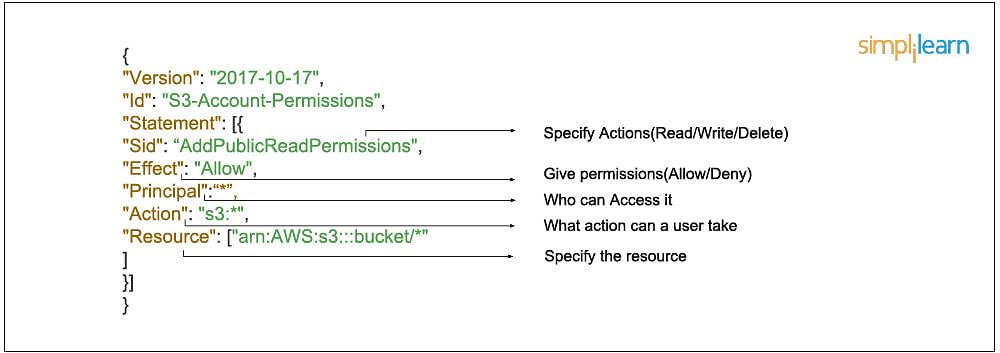
4] Policies : A policy is an entity that, when attached to an identity or resource, defines their permissions. An IAM policy is an JSON object which defines a sets of permissions and controls access to AWS resources. Policies are stored in AWS as JSON documents. Permissions specify who has access to which resources and what actions they can perform. For example, we can create a policy could allow an IAM user to access one of the buckets in Amazon S3 and not other buckets. So basically we have a set of permission policies which we can attach to users, groups or roles giving them permissisons associated with that policy.
- Who can access it
- What actions that user can take
- Which AWS resources that user can access
- When they can be accessed
In JSON format that would look like this :
There are two types of policies in AWS, which are as followed :
- AWS Managed - These are policies already created by AWS that we can use. Eg - Ec2FullAcess, S3ReadOnlyAccess etc. You cannot change the permissions defined in AWS managed policies.
- Customer Managed - These are custom policies that we can create to define our own set of permissions. AWS managed policies usually provide broad administrative or read-only permissions. For greatest security, grant least privilege, which is granting only the permissions required to perform specific job tasks.
Features of IAM
To review, here are some of the main features of IAM :
- Shared access to the AWS account. The main feature of IAM is that it allows you to create separate usernames and passwords for individual users or resources and delegate access.
- Granular permissions. Restrictions can be applied to requests. For example, you can allow the user to download information, but deny the user the ability to update information through the policies.
- Multifactor authentication (MFA). IAM supports MFA, in which users provide their username and password plus a one-time password from their phone—a randomly generated number used as an additional authentication factor.
- Identity Federation. If the user is already authenticated, such as through a Facebook or Google account, IAM can be made to trust that authentication method and then allow access based on it. This can also be used to allow users to maintain just one password for both on-premises and cloud environment work.
- Free to use. There is no additional charge for IAM security. There is no additional charge for creating additional users, groups or policies.
- PCI DSS compliance. The Payment Card Industry Data Security Standard is an information security standard for organizations that handle branded credit cards from the major card schemes. IAM complies with this standard.
- Password policy. The IAM password policy allows you to reset a password or rotate passwords remotely. You can also set rules, such as how a user should pick a password or how many attempts a user may make to provide a password before being denied access.
---------------------------------------------------------------------------------------------------------------
AWS RDS (Relational Database Service)
The Amazon Relational Database Service (RDS AWS) is a web service that makes it easier to set up, operate, and scale a relational database in the cloud. It provides cost-efficient, re-sizable capacity in an industry-standard relational database and manages common database administration tasks.
RDS is not a database, it’s a service that manages relational databases like MYSQL,PostgreSQL,Oracle etc
Some components of AWS RDS are the following :
- DB Instances
- Regions and Availability Zones
- Security Groups
- DB Parameter Groups
- DB Option Groups
1] DB Instances
- They are the building blocks of RDS. It is an isolated database environment in the cloud, which can contain multiple user-created databases, and can be accessed using the same tools and applications that one uses with a stand-alone database instance.
- A DB Instance can be created using the AWS Management Console , the Amazon RDS API, or the AWS Command line Interface .
- The computation and memory capacity of a DB Instance depends on the DB Instance class. For each DB Instance you can select from 5GB to 6TB of associated storage capacity.
- The DB Instances are of the following types:
- Standard Instances (m4,m3)
- Memory Optimised (r3)
- Micro Instances (t2)
2] Regions and Availability Zones
- The AWS resources are housed in highly available data centers, which are located in different areas of the world. This “area” is called a region.
- Each region has multiple Availability Zones (AZ), they are distinct locations which are engineered to be isolated from the failure of other AZs.
- You can deploy your DB Instance in multiple AZ, this ensures a failover i.e. in case one AZ goes down, there is a second to switch over to. The failover instance is called a standby, and the original instance is called the primary instance.
3] Security Groups
- A security group controls the access to a DB Instance. It does so by specifying a range of IP addresses or the EC2 instances that you want to give access.
- Amazon RDS uses 3 types of Security Groups :
- VPC Security Group
- It controls the DB Instance that is inside a VPC.
- EC2 Security Group
- It controls access to an EC2 Instance and can be used with a DB Instance.
- DB Security Group
- It controls the DB Instance that is not in a VPC.
4] DB Parameter groups
- It contains the engine configuration values that can be applied to one or more DB Instances of the same instance type.
- If you don’t apply a DB Parameter group to your instance, you are assigned a default Parameter group which has the default values.
5] DB Option groups
- Some DB engines offer tools that simplify managing your databases.
- RDS makes these tools available with the use of Option groups.
RDS AWS Advantages
Let’s talk about some interesting advantages that you get when you are using RDS AWS,
- So usually when you talk about database services, the CPU, memory, storage, IOs is bundled together, i.e. you cannot control them individually, but with AWS RDS, each of these parameters can be tweaked individually.
- Like we discussed earlier, it manages your servers, updates them to the latest software configuration, takes backup, everything automatically.
- The backups can be taken in two ways
- The automated backups where in you set a time for your backup to be done.
- DB Snapshots, where in you manually take a backup of your DB, you can take snapshots as frequently as you want.
- It automatically creates a secondary instance for a failover, therefore provides high availability.
- RDS AWS supports read replicas i.e. snapshots are created from a source DB and all the read traffic to the source database is distributed among the read replicas, this reduces the overall overhead on the source DB.
- RDS AWS can be integrated with IAM, for giving customized access to your users who will be working on that database.
- When an update is available for your DB you get a notification in your RDS Console you can take one of the following actions
- Defer the maintenance items.
- Apply maintenance items immediately.
- Schedule a time for those maintenance items.
- Once maintenance starts, your instance has to be taken offline for updating it, if your instance is running in Multi-AZ, in that case the standby instance is updated first, it is then promoted to be a primary instance, and the primary instance is then taken offline for updating, this way your application does not experience a downtime.
- If you want to scale your DB instance, the changes that make to your DB instance also happen during the maintenance window, you can also apply them immediately, but then your application will experience a downtime if its in a Single-AZ.
NOTE : AWS also provides a NO-SQL Database called DynamoDB , it is a fully managed proprietary NoSQL database service that supports key–value and document data structures
---------------------------------------------------------------------------------------------------------------
(Read BigData blog before reading this)
AWS REDSHIFT
Amazon Redshift is a fully-managed petabyte-scale cloud based data warehouse product designed for large scale data set storage and analysis.
Redshift’s column-oriented database is designed to connect to SQL-based clients and business intelligence tools, making data available to users in real time. Based on PostgreSQL 8, Redshift delivers fast performance and efficient querying that help teams make sound business analyses and decisions.
What is a Redshift Cluster?
Each Amazon Redshift data warehouse contains a collection of computing resources (nodes) organized in a cluster. Each Redshift cluster runs its own Redshift engine and contains at least one database.
Is Amazon Redshift a Relational Database?
Amazon Redshift is a relational database management system (RDBMS), so it is compatible with other RDBMS applications. Although it provides the same functionality as a typical RDBMS, including online transaction processing (OLTP) functions such as inserting and deleting data, Amazon Redshift is optimized for high-performance analysis and reporting of very large datasets. Amazon Redshift is based on PostgreSQL with few important differences.
Redshift is Amazon’s analytics database, and is designed to crunch large amounts of data as a data warehouse. Those interested in Redshift should know that it consists of clusters of databases with dense storage nodes, and allows you to even run traditional relational databases in the cloud.
Is Redshift fully managed?
Redshift is a fully managed cloud data warehouse. It has the capacity to scale to petabytes, but lets you start with just a few gigabytes of data. Leveraging Redshift, you can use your data to acquire new business insights.
Key Differentiators of RedShift :
- A key differentiator for Redshift is that with its Spectrum feature, organizations can directly connect with data stores in the AWS S3 cloud data storage service, reducing the time and cost it takes to get started.
- One of the benefits highlighted by users is Redshift’s performance, which benefits from AWS infrastructure and large parallel processing data warehouse architecture for distributing queries and data analysis.
- For data that is outside of S3 or an existing data lake, Redshift can integrate with AWS Glue, which is an extract, transform, load (ETL) tool to get data into the data warehouse.
- Data warehouse storage and operations are secured with AWS network isolation policies and tools, including virtual private cloud (VPC).
RedShift easily Integrates with following services :
- Amazon CloudWatch
- Amazon RDS for PostgreSQL
- Amazon Aurora PostgreSQL
- Amazon S3
- Amazon DynamoDB
- Amazon EMR
Redshift Spectrum is a feature within AWS Redshift that lets a data analyst conduct fast, complex analysis on objects stored on the AWS cloud. With Redshift Spectrum, an analyst can perform SQL queries on data stored in Amazon S3 buckets.
NOTE : The Redshift is just like a regular RDBMS but is distributed with cluster of nodes. We can run SQL queries over it and even connect to it using sql clients like workbench. The only confusing task is uploading datasets to the Redshift cluster.
---------------------------------------------------------------------------------------------------------------
(Pre-requisites to understand AWS SageMaker)
A typical workflow for a machine learning project goes through 3 main stages : Build,Train,Deploy.

The biggest abstraction rendered in this process is in the dimension of ‘scale’. As the scale of ‘data’, ‘training iterations’ and ‘inference’ post deployment increases, this entire workflow gets overly complex and eventually evolves into 3 independent workflows.
Consider a fairly complex ML problem we would deal in an enterprise. Say, you have a very large dataset with millions of records (~10GB — 1TB) to process and would need at least a few hundred iterations (say, for a deep neural network) and around 100,000 API calls per minute once the service is deployed. Then, the vanilla PoCs we developed during experimentation is no longer a comparison for the use-case. Each group (Build, Train, Deploy) would need a different kind of compute infrastructure, a different approach to execute the problem and a distinct set of disciplines to accomplish. Fig 2 (below), helps in understanding how each of these groups within the workflow, fork out as an independent branch with diverse requirements of skills and infrastructure to execute. Build phase requires a combination of Data Engineering and Data Analytics. Train phase requires Machine Learning skills and finally, Deploy phase requires primarily Software Engineering skills and a bit of ML skills. Each of these phases would need a person with a completely different skillset.

To solve this problem, most organizations hire multiple individuals with their respective skills in a project to fulfill the demands in each phase.
The major problem in this equation lies in the transition from BUILD to TRAIN and then to DEPLOY. Data scientists are not software engineers and similarly, software engineers are not data scientists. It is indeed a mammoth task for a data scientist to deploy a machine learning solution (that he researched and prototyped) into a full-scale web service (an API that can be integrated into a software ecosystem).
On the other hand, software engineers are proficient in this task and can easily have this done for a large software system. However, the lack of understanding of machine learning and math skills brings in several impediments for the implementation. Developing a full-scale ML service does require the developer to have a deeper understanding of the process which in most cases is quite overwhelming.
The most effective way to solve large ML problems is by aiding a data scientist with the necessary software skills in neat abstract yet effective way to deliver an ML solution as a highly scalable web-service (API). The software development team can integrate the API into the required software systems and abstract the ML service as just another service wrapped around an API. (Software engineers love APIs). Therefore, we need a platform that can enable a data scientist with the necessary tools to independently execute a machine learning project in a truly end-to-end way.
Thus, we need a platform where the data scientist will be able to leverage his existing skills to engineer and study data, train and tune ML models and finally deploy the model as a web-service by dynamically provisioning the required hardware, orchestrating the entire flow and transition for execution with simple abstraction and provide a robust solution that can scale and meet demands elastically.
The 2 main platforms for End-to-End ML projects :
1] Microsoft Azure ML Studio
2] AWS SageMaker
---------------------------------------------------------------------------------------------------------------
AWS SageMaker
Amazon SageMaker helps data scientists and developers to prepare, build, train, and deploy high-quality machine learning (ML) models quickly by bringing together a broad set of capabilities purpose-built for ML.
It provides Jupyter NoteBooks running R/Python kernels with a compute instance that we can choose as per our data engineering requirements on demand. We can visualize, process, clean and transform the data into our required forms using the traditional methods we use (say Pandas + Matplotlib or R +ggplot2 or other popular combinations).
Post data engineering, we can train the models using a different compute instance based on the model’s compute demand, say memory optimized or GPU enabled. Leverage a smart default high-performance hyperparameter tuning settings for a variety of models. Leverage performance-optimized algorithms from the rich AWS library or bring our own algorithms through industry standard containers.
Also, deploy the trained model as an API, again using a different compute instance appropriate to meet business requirements and scale elastically. And the entire process of provisioning hardware instances, running high capacity data jobs, orchestrating the entire flow with simple commands while abstracting the mammoth complexities and finally enabling serverless elastic deployment works with a few lines of code and yet is cost effective.
NOTE : In AWS Sagemaker you can build-train-deploy models using 2 things : 1] Notebook Instance 2] Sagemaker Studio
Sagemaker Notebooks are Jupyter Notebooks running on Aws Ec2 Instances whereas Sagemaker Studio is a web-based, integrated development environment (IDE) for machine learning that lets you build, train, debug, deploy, and monitor your machine learning models.
(Diff b/w Sagemaker Notebooks & Sagemaker Studio - here)
NOTE : The Sagemaker Studio also comes with a feature called "Autopilot" which bascially automates the entire ML pipeline.It just takes the data and autoamtically does data processing,trains multiple models and gives us the model with best predictions. (Click here)
Implementing a Regression model and Uploading different version of trained models in AWS S3 using AWS Sagemaker Notebook Instance - (private git repo)
---------------------------------------------------------------------------------------------------------------
Useful : 1] Click
AWS EMR (Amazon Elastic MapReduce)
Amazon EMR is a managed cluster platform that simplifies running big data frameworks, such as Apache Hadoop and Apache Spark, on AWS to process and analyze vast amounts of data. Using these frameworks and related open-source projects, you can process data for analytics purposes and business intelligence workloads.
Amazon EMR also lets you transform and move large amounts of data into and out of other AWS data stores and databases, such as Amazon S3 and Amazon DynamoDB.
---------------------------------------------------------------------------------------------------------------


Comments
Post a Comment