WSL2 Notes
The Windows Subsystem for Linux, or WSL, is an optional feature of Windows 10 that allows Linux programs to run natively on Windows. WSL was designed by Microsoft in partnership with Canonical, the creators of Ubuntu. Together, they created a kernel compatibility layer based on Ubuntu. This compatibility layer allows Linux programs to run in a Windows 10 version of the Bash shell.
Not all Linux programs can be used in WSL. Some low-level system tools, for example, require an actual Linux kernel to run correctly. Also, WSL is not intended to run GUI applications. Although it's possible to install the X11 window system under WSL, graphical programs are not guaranteed to work correctly, if at all.
However, WSL comes with the software package tools apt and dpkg, which provides access to a thousands of command-line Linux applications. They can operate side-by-side with traditional Windows applications, with native access to the Windows filesystem. In essence, WSL makes Linux tools a part of Windows.
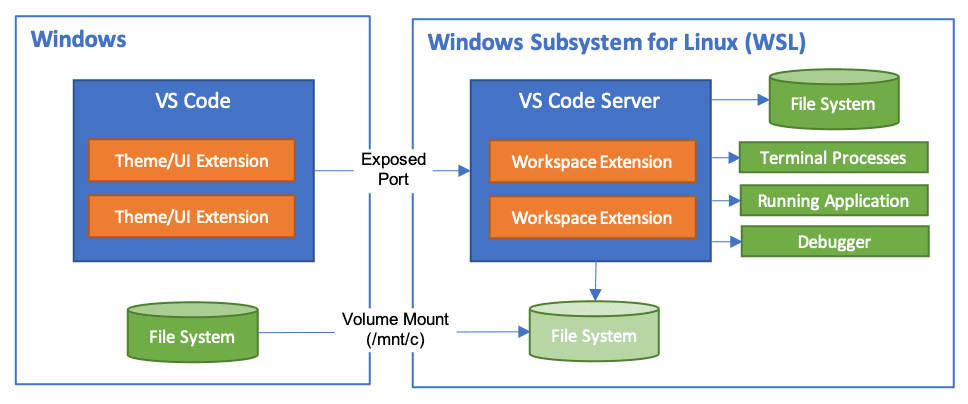
WSL 2 is a major upgrade over the original version of WSL Microsoft introduced in 2017. More than a mere version bump, WSL 2 is faster, more versatile, and uses a real Linux kernel. WSL 2 runs a very lightweight Hyper-V VM (the same type we use for Hyper-V isolated containers) with a full Linux kernel so there is no syscall translation occurring. These VMs use virtually allocated memory, start up in under a second and stop even faster.
NOTE : This video explains all about how to install wsl2 on windows 10 and also access each other's file systems.
NOTE : Some basic WSL commands to know in order to interact with WSL on windows - click here.
NOTE : You can access the windows C-drive from inside WSL at the path "/mnt/c" from the root directory.
NOTE : You can access the linux file system in windows by searching for path "\\wsl$" on the file explorer. It'll only work when you are loggedIn to WSL.
---------------------------------------------------------------------------------------------------------------


Comments
Post a Comment