WebRTC Notes
Useful : 1] Click 2] Click 3] Click 4] Click
Peer-to-Peer Network
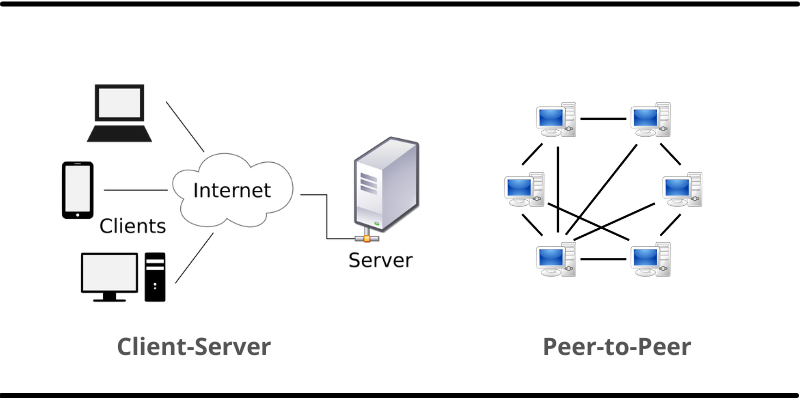
A peer-to-peer (P2P) network is created when two or more PCs are connected and share resources without going through a separate server computer. In a peer-to-peer network, computers on the network are equal, with each workstation providing access to resources and data. This is a simple type of network where computers are able to communicate with one another and share what is on or attached to their computer with other users.
WebRTC (Web Real-Time Communication)
Web Real-Time Communication (WebRTC) is a collection of standards, protocols, and JavaScript APIs, the combination of which enables peer-to-peer audio, video, and data sharing between browsers (peers).
WebRTC is an open-source project aimed at creating a simple, standardized way of providing real-time communications (RTC) over the web. Shortly after Google Chrome was released, its team noticed that the Web’s infrastructure fell short when it came to real-time communications. There was no default implementation in any browser, let alone a standard across all browsers, to allow direct data transfers between people. Google set out to define the necessary specifications for smooth data transfer on a common platform, eliminating the need for third-party apps or plug-ins. Within a few years, Mozilla, Microsoft, Opera, and Apple all joined the project.
WebRTC (Web Real-Time Communication) is a technology that enables Web applications and sites to capture and optionally stream audio and/or video media, as well as to exchange arbitrary data between browsers without requiring an intermediary. WebRTC consists of several interrelated APIs and protocols which work together to achieve this.
Traditional web architecture is based on the client-server paradigm, where a client sends an HTTP request to a server and gets a response containing the information requested. In contrast, WebRTC allows the exchange of data among 'N' peers. In this exchange peers talk to each other without a server in the middle like Websockets. WebRTC comes built-in with most browsers, so you don’t need a third-party software or plug-in to use it, and you can access it in your browser through the WebRTC API.

WebRTC uses the UDP protocol, and therefore it's often not a replacement for websockets since TCP is more relaible. Even though the WebRTC facilitates P2P connection and streaming of data, we still need an intermediary server, which can help us exchange connection data like SDP. This intermediary server is often called as "signaling server". WebRTC knows how to talk directly to another peer without a signaling server, but it doesn't know how to discover another peer, that's why we need to share that connection information through an intermediary server.
NOTE : In WebRTC there is no standard way to perform signaling, so we can use any service we want like websockets, firebase, agora, twilio etc for passing data around.
---------------------------------------------------------------------------------------------------------------
(Useful: 1] Click )
WebRTC Flow
When using WebRTC, every client browser holds 2 important values - "LocalSDP" and "RemoteSDP". The LocalSDP is the client's contact information, whereas the RemoteSDP is another peer's contact information we may use to connect him. The main goal of the signaling process in WebRTC is to exchange these SDP's.
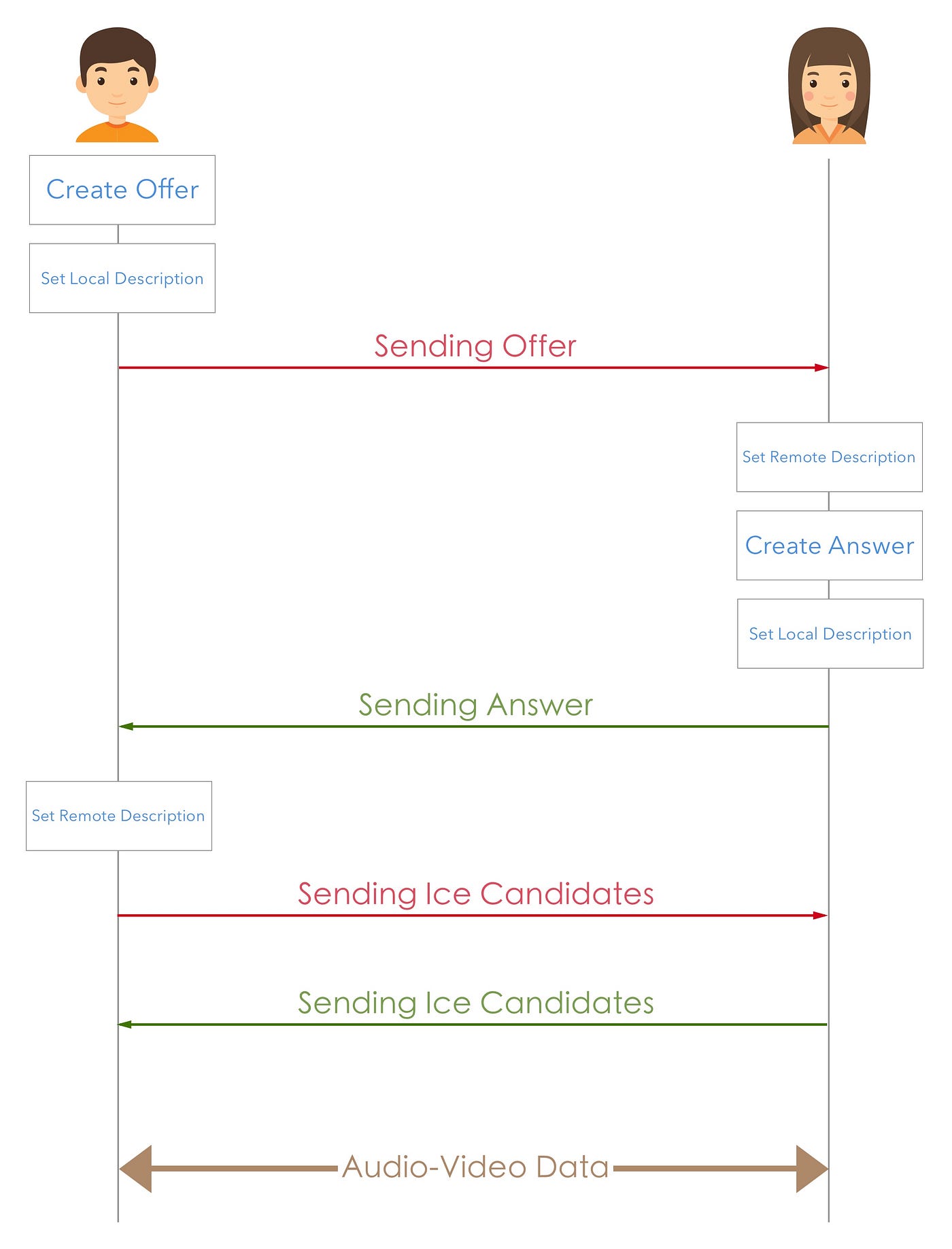
Before we can start exchanging data with a peer, we need to make an offer to a peer and retrieve it's answer back. The offer we send contain our LocalSDP (which becomes the other peer's RemoteSDP) the other peer takes this offer and creates the answer (which becomes our RemoteSDP). This whole exchange of SDP's go through the signaling server, and P2P connection begins when Local/Remote SDP's are set on both the peers. WebRTC takes care of data transfer after that.
NOTE: The WebRTC API provides easy Javascript functions to create offer or answer, the hard part is to perform signaling i.e the exchange of SDP's.
---------------------------------------------------------------------------------------------------------------
SDP (Session Description Protocol)
The Session Description Protocol is a format for describing communication sessions for the purposes of announcement and invitation. An SDP object is an object containing information about the session connection such as codec, address, media type, audio, video and so on.
The purpose of SDP is to convey information about media streams in multimedia sessions to help participants join or gather info of a particular session. SDP is a short structured textual description. It conveys the name and purpose of the session, the media, protocols, codec formats, timing and transport information. A tentative participant checks these information and decides whether to join a session and how and when to join a session if it decides to do so.
In WebRTC, the caller who wants to make an offer to another peer must create an SDP object and send it to the peer. This SDP will contain all the required information about the caller and how to connect to him.
STUN Server (Useful: 1] Click 2] Click)
In order for setup a peer-to-peer connection between two different clients, they must know each others public IP addresses as a way to reach other on internet. But most devices today sit behind things like Firewalls, NATs, Wifi etc which make it hard to get the user's public IP address, that's where we use the STUN servers.
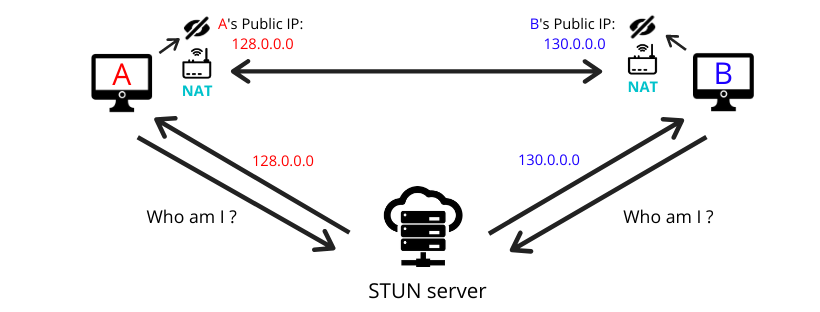
A STUN server is a server that runs on the public network and effectively answers the question “what is my IP address?”, it replies to incoming requests the public IP address the request was sent to him from. This way each client is aware of their public IP address and can add then into their SDP objects before sending to peer. Setting up a STUN server is easy and there's alot of free STUN servers available online but they unreliable, so in production you must always use your own STUN servers.
NOTE : When using WebRTC you only need to specify the addresses of your STUN servers, the rest of the part like sending requests and stuff will be handled by WebRTC internally.
TURN Server (Useful: 1] Click)
Sometimes when using STUN servers we may still not be able to get the required public IP address, or the peer-to-peer connection may not be possible if the peer is sitting behind a firewall which does'nt allow such direct traffic to take place. In such cases, we route the data through an intermediary public server called TURN.
The TURN server is a relay which allows both the peers to pass data through it. When using this relay, the connection is not peer-to-peer anymore since the TURN server acts as an intermediary server, but it's better than no connection.

A STUN server is used to get an external network address, and TURN server is used to relay traffic if a direct (peer-to-peer) connection fails. A TURN server has a public address, so both peers can interact with TURN server even behind firewalls. So when no direct peer-to-peer connection available, TURN server transmits audio/video streams of both peers just like a common media server.

NOTE : As TURN server transmits the media streams between peers it consumes a lot of traffic and requires a lot of power, hence we must always setup our own TURN servers or use a commercial one. Most of the times a STUN server are also equipped with TURN server functionalities.
ICE Candidates (Useful: 1] Click)
Interactive Connectivity Establishment (ICE) is a protocol used in computer networking to find ways / paths for two computers to talk to each other as directly as possible in peer-to-peer networking. It's a way of collecting information that describes the optimal path of connection between peers, and this information is put in an object called ICE candidate.
ICE candidates are objects consisting of the local-IP address, security & routing protocols like reflexive addresses (STUN) and relayed addresses (TURN), supported formats, etc... and all ICE candidates/collected information are sent to the peer via SDP during the signaling process.
In a nutshell, an ICE candidate is basically an address that describes an path for connecting with the respective client. In WebRTC, these candidates include local IP addresses (sometimes both peers may be on the same network) and the Public IP addresses obtained through STUN or TURN servers.
Once the WebRTC Client has all the collected ICE addresses of itself and its peer, it starts initiating connectivity checks. These checks essentially try sending media over the various addresses until success. The downside of using ICE is the time it takes, which can be 10s of seconds. To run faster, a new mechanism was added in WebRTC called "Trickle ICE".
The main bottleneck in ICE is the time it takes to start initiating connectivity checks ,it requires collecting all ICE candidates in advance, which in turn means interacting with external servers (STUN and TURN servers). This takes several round trips. When using "Trickle ICE" the WebRTC framework does'nt wait to gather all ICE candidates before sending the SDP, rather it sends the SDP as soon as it gets the first candidates and later trickles or resends the remaining candidates to the peer.
---------------------------------------------------------------------------------------------------------------
WebRTC API
Th main idea of WebRTC is to automate most of the tasks needed for a peer-to-peer connection and provide an easy API for web developers. WebRTC API has 3 main components that each serve their own purpose, these are as followed :
MediaStream : It is used to aquire audio/video streams from the device.
RTCPeerConnection : It enables transfer of video/audio streams between peers.
RTCDataChannel : It enables transfer of arbitrary data (not video/audio) between peers.
MediaStream API
The MediaStream API was designed to easy access the media streams from local cameras and microphones. The getUserMedia() method is the primary way to access local input devices. Each MediaStream object includes several MediaStreamTrack objects. They represent video and audio from different input devices. Each MediaStreamTrack object may include several channels (like right and left audio channels). These are smallest parts defined by MediaStream API.

There are two ways to output MediaStream objects. First, we can render output into a video or audio element. Secondly, we can send output to the RTCPeerConnection object, which then send it to a remote peer as need in webrtc.
NOTE : The getUserMedia() method only works in a secure context. A secure context is, in short, a page loaded using HTTPS or the file:/// URL scheme, or a page loaded from localhost. In insecure contexts like HTTP it'll be undefined.
Example] In the below example we display the user's webcam stream on screen.
RTCPeerConnection API
RTCPeerConnection does a lot, It takes care of codecs, bandwidth adjustments, actual media transfer, and SDP negotiation, as well as issues like packet loss. You don't need an intermediary server to create a direct connection with your peers. A video or audio feed is created by plugging the output from the media stream API into RTCPeerConnection.
The RTCPeerConnection interface represents a WebRTC connection between the local computer and a remote peer. It provides methods to connect to a remote peer, maintain and monitor the connection, and close the connection once it's no longer needed.
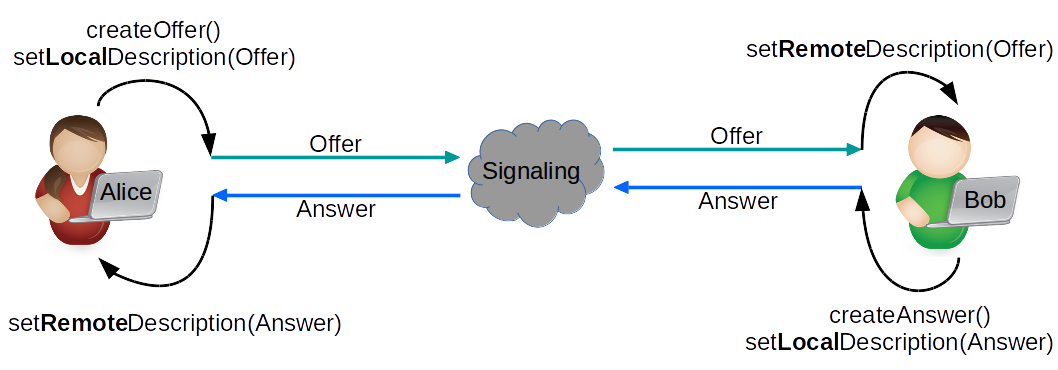
Below is the flow of how WebRTC methods are invoked in a P2P connection :

RTCDataChannel API
Sometimes you may want to share arbitrary data which is not audio or visual in a peer-to-peer way. This can be done using the RTCDataChannel API of WebRTC. With this we can share any type of data from raw bytes to JSON objects etc. Its UDP-based streams provide reliable delivery of data without the latency and bottlenecks associated with TCP connections. This is often used in video games where you may need to share the position of one player among many other in realtime manner.


Comments
Post a Comment