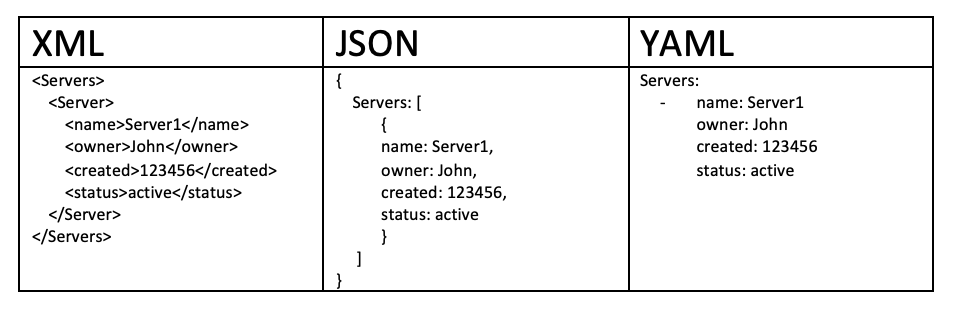
YAML is a data serialization language just like XML or JSON. Back when it came out in 2001, YAML stood for “Yet Another Markup Language.” The acronym was later changed to “YAML Ain’t Markup Language” to emphasize that the language is intended for data and not documents. It is not a programming language in the true sense of the word.
YAML files store information, so they do not include actions and decisions. Unlike XML or JSON, YAML presents data in a way that makes it easy for a human to read. The simple syntax does not impact the language’s capabilities. Any data or structure added to an XML or JSON file can also be stored in YAML.
Altough all these formats can be used to create a data representation of the same data, these are often used for different tasks. JSON is most commonly used for data exchange between API services, whereas XML and YAML are used to build configuration files. YAML is a data-representation format. There are no executable commands, which makes the language highly secure when exchanging files with third parties.---------------------------------------------------------------------------------------------------------------
YAML Syntax
Just like JSON, in YAML everything is based on "key:value" pair. You define keys and their respective values. The YAML files have an extension ".yml" or ".yaml".
Below are some rules that must be followed when writing data into YAML files :
- YAML is case-sensitive.
- There must always be a space between colon and key value.
- YAML does'nt use braces, but needs indentation for structure like python.
- The amount of spaces does'nt matter, just be consistent throughout file.
- YAML doesn't support multiline comments, we have to use the # sign
# main.yaml
Student: Deepesh Mhatre
Address: "Mumbai, India"
Info:
Field: 'Computer Science'
roll: 20205533
isMarried: False
Height: 5.8
#---------------------------------------------
# main.json
{
"Student": "Deepesh Mhatre",
"Address": "Mumbai, India",
"Info": {
"Field": "Computer Science",
"roll": 20205533,
"isMarried": false,
"Height": 5.8
}
}
---------------------------------------------------------------------------------------------------------------
YAML Data Types
The YAML supports 3 main types of data types, which are as followed :
Scalar Data Types
In YAML, scalar means a simple value for a key. The value of the scalar can be integer, float, Boolean, and string.
1] Integer - We can easily define different types of numeric types like Integer, float, octal or hex values. Hex value is indicated by 0x, and octal value is indicated by leading zero.
# main.yaml
IntegerVal: 101
FloatVal: 101.555
OctalVal: 012345
HexaVal: 0x12d4
ExpoVal: 12.3015e+05
#----------------------------------
# main.json
{
"IntegerVal": 101,
"FloatVal": 101.555,
"OctalVal": 5349,
"HexaVal": 4820,
"ExpoVal": 1230150
}
2] String - We can define a string in YAML with or without the quotes.
# main.yaml
name1: "Depesh Mhatre"
name2: 'Deepesh Mhatre'
name3: Deepesh Mhatre
somevalue1: "Hi I am Deepesh \n"
somevalue2: Hi I am Deepesh \n
#----------------------------------
# main.json
{
"name1": "Depesh Mhatre",
"name2": "Deepesh Mhatre",
"name3": "Deepesh Mhatre",
"somevalue1": "Hi I am Deepesh \n",
"somevalue2": "Hi I am Deepesh \\n"
}
If we want to create multiline string and preserve all the indentation and spaces inside the string we can do so by adding a "|" at the start of key value.
# main.yaml
name: "Deepesh Mhatre"
bio: |
Hey I am Deepesh,
I live in Mumbai India.
This is a multiline string.
#----------------------------------
# main.json
{
"name": "Deepesh Mhatre",
"bio": "Hey I am Deepesh, \nI live in Mumbai India. \nThis is a multiline string.\n"
}
But if you want to write a single string in multiple lines, and not preserve the spaces and identation, use the ">" at the start of the key-value.
# main.yaml
name: "Deepesh Mhatre"
bio1: >
Hey I am Deepesh,
I live in Mumbai India.
This is a multiline string.
bio2: Hey I am Deepesh, I live in Mumbai India.
#----------------------------------
# main.json
{
"name": "Deepesh Mhatre",
"bio1": "Hey I am Deepesh, I live in Mumbai India. This is a multiline string.\n",
"bio2": "Hey I am Deepesh, I live in Mumbai India."
}
3] Boolean - We can easily define boolean values as shown below.
# main.yaml
value1: True
value2: False
value3: FALSE
value4: TRUE
#----------------------------------
# main.json
{
"value1": true,
"value2": false,
"value3": false,
"value4": true
}
List Data Type
In YAML we can define a list value using the traditional [ ] notation. We can also use the YAML specific notation by adding "-" in front of an object, doing so will mark that object as part of a list.
# main.yaml
name: "Deepesh Mhatre"
physics_marks: [1,2,3,4,5,6]
maths_marks: ['one','two','three','four']
#----------------------------------
# main.json
{
"name": "Deepesh Mhatre",
"physics_marks": [1,2,3,4,5,6],
"maths_marks": ["one","two","three","four"]
}
# main.yaml
name: "Deepesh Mhatre"
physics_marks:
- 1
- 2
- 3
- 4
maths_marks:
- one
- two
- three
- four
#----------------------------------
# main.json
{
"name": "Deepesh Mhatre",
"physics_marks": [1,2,3,4],
"maths_marks": ["one","two","three","four"]
}
Dictionary Data Type
If we want to write a complex YAML file which holds the complex data structure, we will use dictionaries. It is a collection of key: value pairs and each of the key: value pairs can be nested with other options. It is basically a list of objects.
# main.yaml
Name: "Deepesh Mhatre"
School: "St. Xaviers English High School"
Interests:
CS: ['AI','ML','DL']
Sports: Only Karate & Kudo
Highest_Score: 122
Info:
- street: "Ghodbunder road"
- pincode: 400615
- country: "India"
#----------------------------------
# main.json
{
"Name": "Deepesh Mhatre",
"School": "St. Xaviers English High School",
"Interests": {
"CS": ['AI','ML','DL'],
"Sports": "Only Karate & Kudo",
"Highest_Score": 122
},
"Info": [ {"street": "Ghodbunder road"}, {"pincode": 400615},
{"country": "India"}]
}
This format as shown above, of creating a block in yaml with different options is also known as "Block Style". It let's us add an object as value to a specific key
One thing that most people might not know is that YAML is a superset of JSON. This means that any JSON is a valid YAML file! YAML just extends the JSON syntax to provide more features (like comments etc) and alternatives to represent the same data structures. This is also called "Flow Style", since we simply write the entire data in this JSON format rather than creating new indentated lines.
# main.yaml
Name: "Deepesh Mhatre"
School: "St. Xaviers English High School"
Interests:
CS: ['AI','ML','DL']
Sports: Only Karate & Kudo
Highest_Score: 122
Info: {
"street":"Ghodbunder road",
"pincode": 400615,
"country": "India"
}
#----------------------------------
# main.json
{
"Name": "Deepesh Mhatre",
"School": "St. Xaviers English High School",
"Interests": {
"CS": [
"AI",
"ML",
"DL"
],
"Sports": "Only Karate & Kudo",
"Highest_Score": 122
},
"Info": {
"street": "Ghodbunder road",
"pincode": 400615,
"country": "India"
}
}
Timestamp Data Type
In YAML we can also store timestamp values in different formats, below is an example.
# main.yaml
canonical: 2001-12-15T02:59:43.1Z
valid iso8601: 2001-12-14t21:59:43.10-05:00
space separated: 2001-12-14 21:59:43.10 -5
no time zone (Z): 2001-12-15 2:59:43.10
date (00:00:00Z): 2002-12-14
#----------------------------------
# main.json
{
"canonical": "2001-12-15T02:59:43.100Z",
"valid iso8601": "2001-12-15T02:59:43.100Z",
"space separated": "2001-12-15T02:59:43.100Z",
"no time zone (Z)": "2001-12-15T02:59:43.100Z",
"date (00:00:00Z)": "2002-12-14T00:00:00.000Z"
}
---------------------------------------------------------------------------------------------------------------
Specifying Data Types
Even though YAML finds the data types on its own, we can optionally also explicitly specify the data types of our variables inside the YAML file.
# main.yaml
Name: !!str "Deepesh Mhatre"
Marks: !!int 1223
isMarried: !!bool FALSE
Height: !!float 5.88
Date: !!timestamp 2022-10-25
#----------------------------------
# main.json
{
"Name": "Deepesh Mhatre",
"Marks": 1223,
"isMarried": false,
"Height": 5.88,
"Date": "2022-10-25T00:00:00.000Z"
}
---------------------------------------------------------------------------------------------------------------
Anchors & Aliases
Sometimes you may want to reuse some variables inside the YAML file, we can do so by using Anchors. You can place Anchors (&) on an entity to mark a multi-line section. You can then use an Alias (*) call that anchor later in the document to reference that section. Anchors and Aliases are very helpful for larger projects as they cut visual clutter caused by extra lines.
The Alias essentially acts as a "see above’’ command, which makes the program pause standard traversal, return to the anchor point, then resume standard traversal after the Anchored portion is finished.
# main.yaml
Name1: "Deepesh Mhatre"
PRN1: 2020427777
Address1: &addr
street: 315, Waghbil Gaon
city: Thane west, Mumbai
state: Maharashtra
country: India
Name2: Rohan Singh
PRN2: 20203455667
Address2: *addr
Name3: Kiran Gode
PRN3: 20203455667
Address3: *addr
#------------------------------------------------
# main.json
{
"Name1": "Deepesh Mhatre",
"PRN1": 2020427777,
"Address1": {
"street": "315, Waghbil Gaon",
"city": "Thane west, Mumbai",
"state": "Maharashtra",
"country": "India"
},
"Name2": "Rohan Singh",
"PRN2": 20203455667,
"Address2": {
"street": "315, Waghbil Gaon",
"city": "Thane west, Mumbai",
"state": "Maharashtra",
"country": "India"
},
"Name3": "Kiran Gode",
"PRN3": 20203455667,
"Address3": {
"street": "315, Waghbil Gaon",
"city": "Thane west, Mumbai",
"state": "Maharashtra",
"country": "India"
}
}
We can also override the Anchor values when called by entering "<<:" before the Alias. Below this, you can write any desired changes. Mappings are overridden if the new mapping has the same name or is added afterward if different.
# main.yaml
Name1: "Deepesh Mhatre"
PRN1: 2020427777
Address1: &addr
street: 315, Waghbil Gaon
city: Thane west, Mumbai
state: Maharashtra
country: India
Name2: Rohan Singh
PRN2: 20203455667
Address2:
<<: *addr
city: Bangalore
country: Africa
#----------------------------------
# main.json
{
"Name1": "Deepesh Mhatre",
"PRN1": 2020427777,
"Address1": {
"street": "315, Waghbil Gaon",
"city": "Thane west, Mumbai",
"state": "Maharashtra",
"country": "India"
},
"Name2": "Rohan Singh",
"PRN2": 20203455667,
"Address2": {
"street": "315, Waghbil Gaon",
"city": "Bangalore",
"state": "Maharashtra",
"country": "Africa"
}
}
---------------------------------------------------------------------------------------------------------------


Comments
Post a Comment