Web Vitals for Performance - (LCP, FID, CLS, SI, TTI)
Web Vitals are a set of metrics that measure the user experience of a website. They were developed by Google and are intended to help website owners and developers improve the performance and user experience of their sites.

Some important Web Vitals to know about are mentioned below :
- Largest Contentful Paint (LCP): measures loading performance
- First Input Delay (FID): measures interactivity
- Cumulative Layout Shift (CLS): measures visual stability
- Time to Interactive (TTI) : measures how long it takes for a page to become interactive
NOTE : These metrics are considered to be important indicators of the overall user experience and are used by Google to help rank websites in search results.
Developers can use web vitals to measure and track the performance of their website and identify areas for improvement. Here are a few ways developers can use web vitals:
- Measure performance : Developers can use tools such as Google's Web Vitals extension for Chrome or the Lighthouse audit tool to measure the performance of their website and track the values of key web vitals metrics, such as LCP, FID, CLS, SI and TTI.
- Identify issues : By measuring the performance of their website, developers can identify issues that are affecting the user experience, such as slow loading times or layout shifts.
- Make improvements : Once issues have been identified, developers can make improvements to the website to improve performance and the user experience. For example, they can optimize images, reduce the number of requests, or use code-splitting to reduce the size of the JavaScript bundles.
- Monitor performance over time : Developers can use monitoring tools such as Google Analytics to track the performance of their website over time and see the impact of any improvements they have made.
- Optimize for SEO : Developers can use web vitals to optimize the website for SEO. By providing a better user experience, search engines like Google will reward the website with higher visibility and ranking in search results.
Largest Contentful Paint (LCP)
The Largest Contentful Element (LCE) is the largest element (based on the width and height) that is visible to the user and is within the viewport.This can be an image, a block of text, a video, or any other type of content that is visible to the user. It's important to note that the LCE is not determined by the total size of an element (in bytes or other units) but by the element's dimensions on the viewport.
The Largest Contentful Paint (LCP) metric measures the time it takes for the largest element in the viewport to be fully rendered on the screen. A good value for Largest Contentful Paint (LCP) should be less than 2.5 seconds.

In a nutshell, LCP assumes that the largest object visible in the viewport is the one you consider to be your primary content. The new LCP metric can help you determine how long it takes for your most important content to appear on your users screen. However, this only gives you vital information if Google’s assumption is correct and your main content covers the largest part above the fold. You should therefore analyze your site carefully instead of blindly following that metric.
NOTE : LCE is only calculated for the elements that are in the viewport and not for the elements that are below the fold (not visible without scrolling). This means that if an element is not visible to the user because it is below the fold, it will not be considered as the LCE, even if it is the largest element on the page.
Some ways that developers can improve the LCP metric :
- Optimize images : Optimize images by reducing their file size and compressing them. This will help to reduce the time it takes for them to load.
- Minimize requests : Minimize the number of requests made by the page by combining files, using data URIs, and using browser caching.
- Minimize JavaScript : Minimize the size of the JavaScript bundles and only load the scripts that are needed for the current page.
- Use CDN : Use a CDN to distribute resources across multiple servers and reduce the load on a single server.
- Server-side rendering : Optimize the server-side rendering to send the minimal content to the browser and that way
---------------------------------------------------------------------------------------------------------------
First Input Delay (FID)
First Input Delay (FID) is metric that measures the time from when a user first interacts with a page (i.e. clicks a button, taps a link, etc.) to the time when the browser is able to respond to that interaction.
A first interaction on a web page is defined as the first time a user interacts with the page after it has loaded. This can include a variety of user actions such as clicking a button, tapping a link, filling out a form, or scrolling. The first interaction typically happens after the page has finished loading, but it can also happen before the page has fully loaded if the user interacts with the page before it is fully loaded.
For example, if a user clicks a button or taps a link before the page has finished loading, the First Input Delay (FID) will be measured from the time of that user interaction, not from the time the page finished loading.
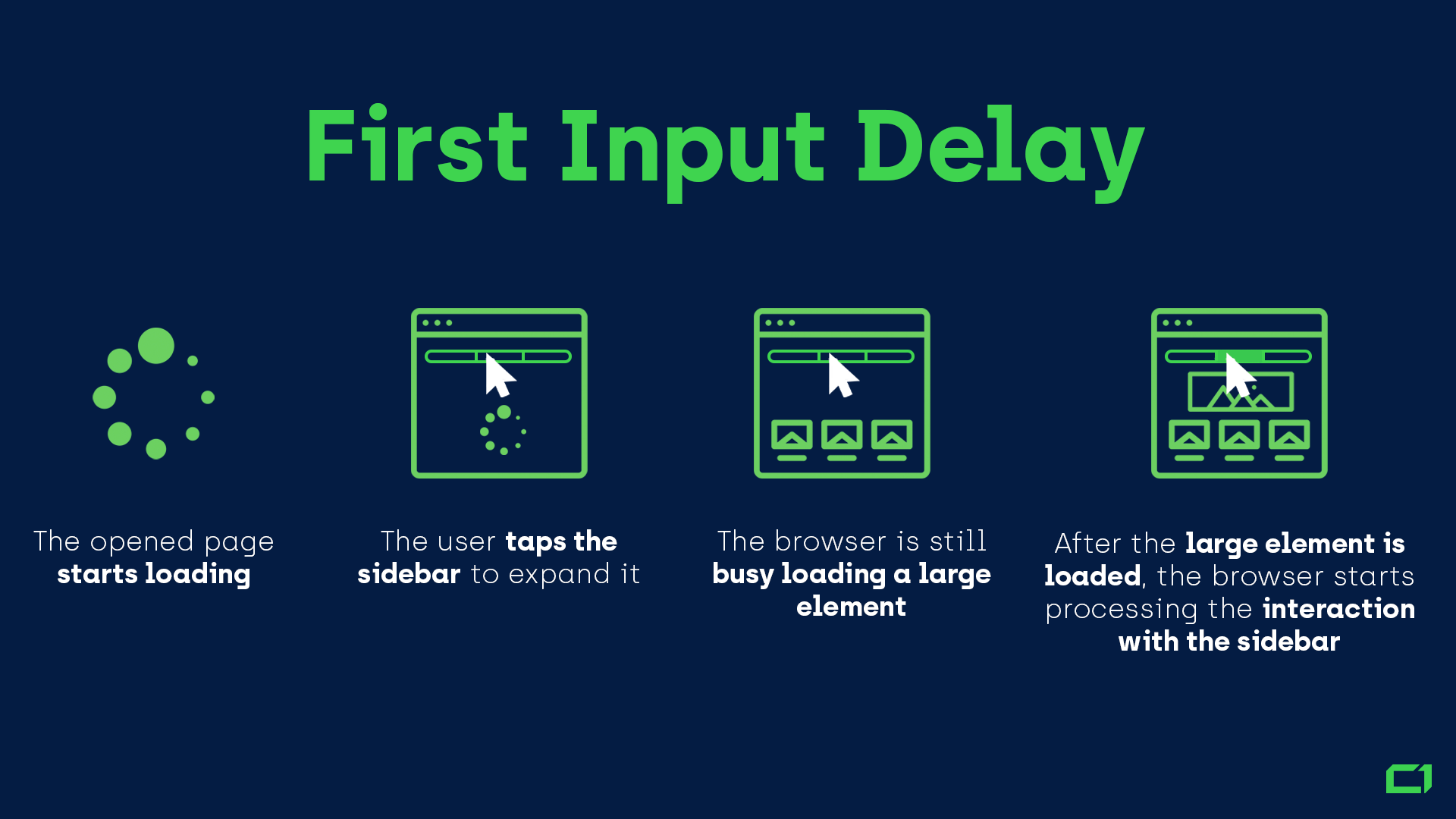
The Load speed of a website does'nt affect the FID metric. A website can have a fast page load speed, but still have a high FID if the browser is blocked by long tasks, such as JavaScript execution or layout recalculations, and is unable to respond to user input in a timely manner.
The First Input Delay (FID) metric aims to measure how soon a page becomes interactive after it starts loading. A good FID value should be less than 100 milliseconds.
Some ways developers can improve First Input Delay (FID) on a website:
- Minimize JavaScript execution on the main thread : Long-running JavaScript tasks can block the main thread and prevent the browser from responding to user input. Minimizing the amount of JavaScript that runs on the main thread can help reduce FID.
- Break up long-running JavaScript tasks : If you can't minimize JavaScript execution on the main thread, try breaking up long-running tasks into smaller chunks. This can help reduce the amount of time the main thread is blocked.
- Use web workers: Web workers allow you to offload tasks to background threads, which can help reduce the amount of time the main thread is blocked.
- Optimize images: Large images can take a long time to load, which can increase FID. Try optimizing images by compressing them and using next-gen image formats like WebP.
- Minimize third-party scripts: Third-party scripts can add significant delay to FID, try to minimize their usage or consider loading them asynchronously
- Avoid blocking the main thread with styles: Be mindful of how you're applying styles to elements on the page, as this can cause layout recalculations that block the main thread.
---------------------------------------------------------------------------------------------------------------
Time To Interactive (TTI)
Time to Interactive (TTI) measures the amount of time it takes for a web page to become fully interactive after it starts loading. When a web page is loading, the main thread can become busy with various tasks such as parsing HTML, loading CSS and JavaScript, constructing DOM and executing scripts.
While the main thread is busy, the page is not fully interactive, the user cannot interact with it and the user experience is poor. So basically TTI measure the time it takes for the main thread to become free after page starts loading.

A good Time to Interactive (TTI) value is one that is as low as possible while still providing an acceptable user experience. Google recommends that TTI should be less than 3 seconds, this means that the web page should be fully interactive within 3 seconds of starting to load.
NOTE : The First Input Delay (FID) can be calculated even before TTI because some elements on page may become interactive even before entire page's loaded, but TTI can only be calculated after the main thread becomes free and entire page is loaded.
---------------------------------------------------------------------------------------------------------------
Cumulative Layout Shift (CLS)
Cumulative Layout Shift (CLS) is a web performance metric that measures the visual stability of a web page. It calculates the sum of all individual layout shift scores for every unexpected layout shift that occurs during the entire lifetime of the page.A layout shift is an unexpected change in the position of visible elements on a web page.
These shifts can happen when elements are dynamically added, removed, or resized, and can cause a disorienting experience for users. In CLS we give a score to each shift that occurs and then sum them all to get the final CLS score. A high CLS score indicates that a web page has many unexpected layout shifts, which can be frustrating for users. The goal is to keep the CLS score as low as possible, ideally under 0.1.

Delayed content is a major reason for unexpected layout shifts on a web page. When elements like images, ads, or other media are loaded asynchronously, they can take longer to load than other elements on the page. If these elements are not handled properly, they can cause layout shifts when they are added to the page.
For example, if an image is loaded after the initial page load and is not properly sized, it can cause the layout of surrounding elements to shift when it is finally rendered. Similarly, if an ad is loaded and takes up more space than was initially reserved for it, it can cause the layout of the surrounding elements to shift.
Some ways developers can reduce Cumulative Layout Shift (CLS) on web page:
- Reserve space for elements that will be loaded asynchronously : By reserving the appropriate space for elements that will be loaded asynchronously, you can prevent layout shifts from occurring when they are finally rendered.
- Use
widthandheightattributes: Specifying the width and height of images and other elements can help prevent layout shifts that can occur when they are loaded.
- Use font-display strategies: By using font-display strategies, you can prevent layout shifts that can occur when web fonts are loaded.
- Avoid inserting new elements in the middle of the layout: instead add elements to the end of the layout, this will prevent the layout from shifting around.
- Use Intersection Observer API: using this API developers can detect when an element is about to be rendered and take actions to prevent layout shift
- Use animations and transitions: Instead of layout shift, use animations and transitions, which will give users a better experience.
The browser calculates the Cumulative Layout Shift (CLS) score by measuring the change in position of visible elements on a web page. The calculation is based on the distance between the element's start position and its final position, multiplied by the area of the element. When an element is added, removed, or resized, it can cause other elements on the page to shift around.
The browser will track all layout shifts that occur on the page and calculate a score for each shift. The scores for all the shifts are then summed to get the final CLS score for the page. The browser will track layout shifts throughout the lifetime of the page, until the user closes the browser tab.
NOTE : Cumulative Layout Shift (CLS) is calculated throughout the entire lifetime of the web page, from the moment it starts loading until the user closes the browser tab. It's a cumulative metric, meaning that it takes into account all of the layout shifts that occur on the page, whether they happen during the initial load, during user interaction, or even after the page has fully loaded.
NOTE : The Lighthouse tool in Chrome DevTools is a testing tool that simulates the user's view of the page during the initial load, so it doesn't take into account the changes that may happen after the user has interacted with the page.
---------------------------------------------------------------------------------------------------------------


Comments
Post a Comment