MySQL SQL Notes - Part 4 (Window Functions, Partitioning, Optimization)
Partitioning
Partitioning in SQL refers to the process of dividing a dataset into smaller, more manageable subsets based on specified criteria. There are different types of partitioning techniques, such as Table partitioning and Window partitioning (not supported in MySQL), each serving distinct purposes.
Table partitioning involves dividing a large table into smaller partitions or segments based on specific criteria, such as ranges of values in a column (e.g., date ranges, numeric ranges), list of discrete values or a hash function applied to columns.

Partitioning can enhance query performance by allowing the database system to perform operations, such as scans and joins, on smaller partitions rather than the entire table.
MySQL supports several partitioning types, each suited for different data organization and access patterns :
- Range Partitioning: Divides data into partitions based on a specified range of column values. Useful for time-series data or numeric data where data can be logically grouped into ranges. For example, partitioning a sales table by date ranges.
- List Partitioning: Divides data into partitions based on a list of discrete values specified in a column. Suitable for partitioning data into distinct groups or categories. For example, partitioning a customer table by country.
- Hash Partitioning: Distributes data into partitions based on a hash function applied to one or more columns, aiming for a uniform distribution of data across partitions.
- Key Partitioning: Similar to hash partitioning but uses a user-defined expression or function to determine partitioning keys.
- Linear Hash Partitioning: A variant of hash partitioning that provides better performance for large partitioned tables.
- Subpartitioning: Divides each partition into subpartitions using the same or different partitioning criteria, offering finer granularity and flexibility.
NOTE : Partitioning a table is typically done before inserting data or during table creation, where you define the partitioning scheme, including the key and criteria (e.g., range values, list values, hash functions). Once partitioned, you can insert data, and the system places it in the correct partitions automatically based on the defined scheme.
If you already have data in a table and you want to partition it, you'll need to perform a process called "partitioning an existing table" This process involves creating a new partitioned table with the desired partitioning scheme and then moving the existing data into the new partitioned table.
In orde to perform partitioning while table creation we use the PARTITION BY command along with one of the following partition strategies :
- Range Partition :
PARTITION partition_name VALUES LESS THAN (value) - List Partition :
PARTITION partition_name VALUES IN (value_list) - Hash Partition :
PARTITION BY HASH (...) PARTITIONS num_partitions - Key Partition :
PARTITION BY KEY (...) PARTITIONS num_partitions
NOTE : When partitioning a table always provide a default partition too so that data that falls outside the partitioning key values then it goes into default partition. If you don't do this then data falling outside the range of partitions is skipped or an error is thrown while insertion/updation.
NOTE : Ensure that the data type of the partitioning key column is compatible with the chosen partitioning strategy and the data it represents. Eg - Don't use range partitioning with a categorical (string) column.
Partition Key
A partition key, also known as a "Partitioning Key", is a column or set of columns used to divide a table into separate logical or physical partitions. When you insert data into a partitioned table in MySQL, the database system automatically routes/inserts the data into the appropriate partitions based on the partitioning key and the defined partition ranges or values.
Include the partitioning key column in WHERE clauses whenever possible. This allows MySQL to perform partition pruning, which reduces the number of partitions scanned during query execution.
In a query, when you include the partitioning key column in the WHERE clause, MySQL can analyze WHERE conditions against the partitioning key to determine which partitions may contain relevant data and only scan those partitions.
Range Partitioning
Range partitioning is a feature that enables you to split a table into multiple partitions based on specified ranges of values in a column. Each partition holds data that fits within a particular range.

For range partitioning to be implemented, you must have at least one column that can be utilized to segment the data into these ranges. This column often corresponds to date ranges, numeric quantities, or other criteria suitable for partitioning purposes.
Always define a default partition to capture data that falls outside the specified range boundaries. This ensures that all data is accounted for and prevents errors or unexpected data handling. In MySQL, you can use the PARTITION BY RANGE ... PARTITION syntax along with the VALUES LESS THAN MAXVALUE clause to do this.
Ensure that the ranges defined for each partition result in balanced data distribution across partitions. Imbalanced partitions can lead to performance issues, such as uneven query execution times.
List Partitioning
List partitioning enables you to split a table into multiple partitions, but instead of defining partitions based on ranges of values, you specify a list of discrete values for each partition. Each partition contains data that matches one of the specified values in the partitioning column.
List partitioning is useful when you want to partition your data based on specific, discrete categories or values rather than continuous ranges.
NOTE : The DEFAULT keyword is used in the default partition to capture any other product types not explicitly listed.
Partitioning Best Practices
- Choose the Correct Partition Key: Select a partition key that aligns with your data distribution and query patterns. Common choices include time-based or range-based values.
- Monitor Query Performance: Continuously monitor query performance after partitioning. Use tools like EXPLAIN to assess query execution plans.
- Watch for Bloat: Over time, partitions can accumulate large amounts of data, leading to slow queries.
- Include a Default Partition: Always include a default partition to capture data that doesn't match any of the specified partition values. This prevents errors and ensures all data is accounted for.
- Consider Data Distribution: Analyze your data distribution to ensure even distribution across partitions. Uneven data distribution can lead to performance issues.
- Plan for Maintenance Operations: Consider the impact of partitioning on maintenance operations such as backup, restore, and data loading. Plan strategies to handle these operations efficiently.
---------------------------------------------------------------------------------------------------------------
Window Functions
Window functions in SQL allow you to perform calculations or aggregations over a specific set of rows called a "window" within a query result. These functions operate on a group of rows related to the current row based on a defined window frame, partition, and ordering criteria. They are distinct from 'Group By' because they do not collapse multiple rows into a single result but rather calculate values for each row based on its window.
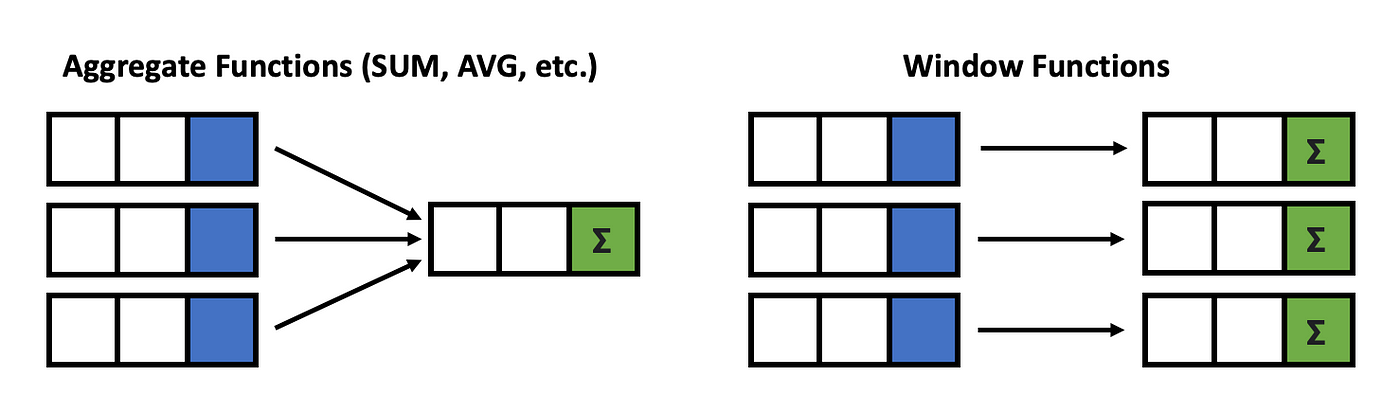
SUM(), AVG(), COUNT()) for each group and reduces the number of rows in the result set to the number of distinct groups. A window function query would return all rows from original result set with additional column(s) containing the calculated values based on the window function and windowing conditions.The key difference between Window Functions and GROUP By is the window function result contains the original row detail in the final result. Window functions calculate values based on a specific window or partition of rows related to the current row and assign the calculated value of the function to each row in the result set, typically adding additional columns.

Use GROUP BY to collapse rows and obtain summary values like totals or averages for each group, ideal for generating summary reports. In contrast, utilize window functions for calculating function values within partitions of rows, comparing values between rows, or maintaining the original result set structure alongside other column values.
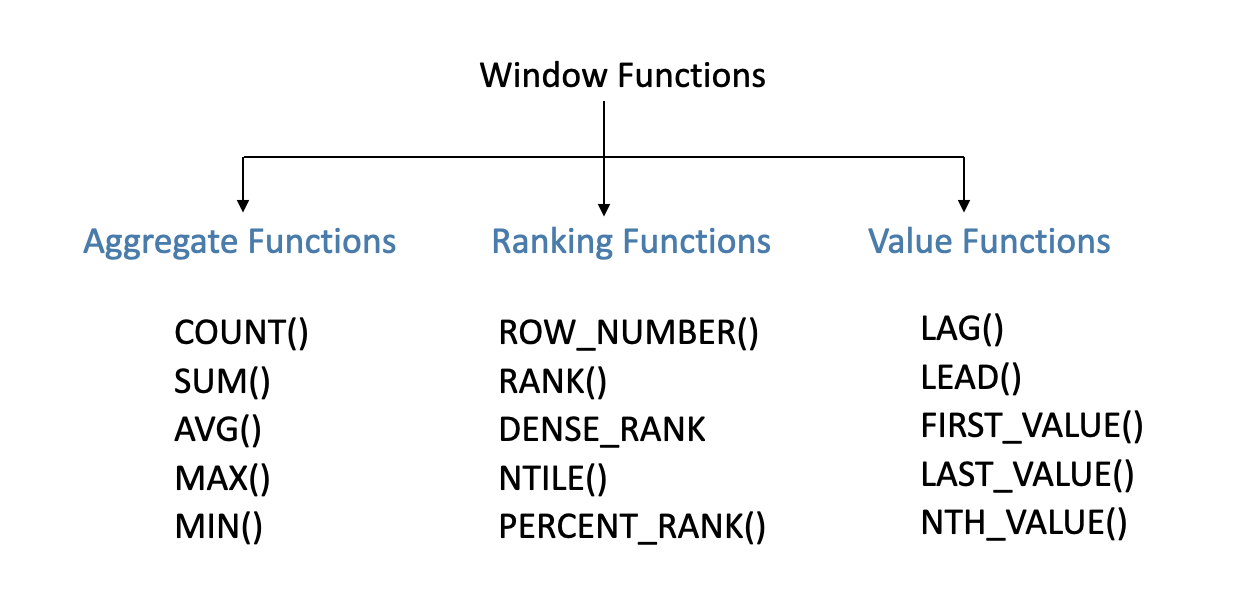
SQL supports various types of window functions, each serving different analytical purposes as following :
- Aggregate Functions: Functions like
SUM,AVG,MIN,MAX,COUNT, etc., calculate aggregate values over the window frame.
- Ranking Functions: Functions like
ROW_NUMBER,RANK,DENSE_RANK,NTILE, etc., assign rankings or row numbers within each partition based on specified criteria.
- Analytic Functions: Functions like
LEAD,LAG,FIRST_VALUE,LAST_VALUE, etc., access data from other rows within the window frame for advanced analysis.
OVER(), which define the window or partition of rows over which the function operates. The OVER() clause specifies the window's boundaries and can include PARTITION BY, ORDER BY, and ROWS/RANGE clauses to control the window's scope and ordering.
OVER() clause immediately after the window function. Within the OVER() clause, you can include :- PARTITION BY: Optional. Divides the result set into partitions or groups based on specified columns. The window function operates independently within each partition.
- ORDER BY: Optional. Specifies the order of rows within each partition. It determines the logical order in which the window function processes the rows.
- ROWS/RANGE BETWEEN: Optional. Specifies the window frame or range of rows over which the function operates. It determines which rows are included in the window's calculations.
OVER() clause in a window function, it essentially creates a window that includes all rows from the result set. This means that the window function will operate on the entire result set without partitioning or specifying any particular ordering. The behavior is similar to applying an aggregate function without grouping in a regular query.PARTITION BY or ORDER BY inside the OVER() clause means that the window function operates on all rows without partitioning or specific ordering.Rank Functions with Window Functions
Rank functions are a category of window functions in SQL that assign a rank or position to each row within a partition of a result set. These functions are commonly used for tasks such as ranking items based on specific criteria, identifying top performers, or filtering data based on rank thresholds.
Some commonly used Rank functions in MySQL are as followed below :
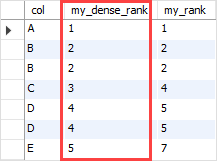
- ROW_NUMBER() : Assigns a unique sequential number to each row in the result set, starting from 1. If two rows have the same value for the ordering criteria, they will receive different row numbers. Example: If you rank students based on their exam scores, each student will have a unique row number even if they have the same score.
- RANK() : Assigns a rank to each row based on the specified ordering criteria. If two rows have the same value for the ordering criteria, they will receive the same rank, and the next rank is skipped. Example: If you rank salespersons based on their sales amounts, those with the same sales amount will have the same rank, and the next rank will be skipped.
- DENSE_RANK() : Assigns a rank to each row based on the specified ordering criteria. If two rows have the same value for the ordering criteria, they will receive the same rank, and the next rank is not skipped (i.e., ranks are dense). Example: If you rank students based on their exam scores, those with the same score will have the same rank, and the next rank will be consecutive without skipping.
Analytical Functions with Window Functions
Analytical functions in SQL are used to perform calculations and retrieve values from rows related to the current row within a window or partition of data. It allow us to access data from rows that are offset from the current row within the window.
These functions are helpful when we need to compare the current row to a preceding or successive row. Examples include comparing today’s stock data to last week’s stock data (LAG), or comparing salaries to the lowest salary (FIRST_VALUE with ORDER BY).
1] LEAD() : This function retrieves the value from a subsequent/next row within the window partition relative to current row. The LEAD() takes the following arguments when used in SQL :
column_name: The column whose value you want to retrieve from the subsequent row.
offset: The number of rows ahead to look (default is 1 if not specified).
default_value: Optional. The value to return if there is no subsequent row (default is NULL if not specified).
PARTITION BY: Optional. Specifies the columns to partition the data into groups.
ORDER BY: Specifies the order of rows within each partition.
NOTE : It is typically used in scenarios where you need to compare values or calculate differences between the current row and the next row.

2] LAG(): This function retrieves the value from a previous row within the window partition relative to the current row. The LAG() function takes the following arguments when used in SQL :
- column_name: The column whose value you want to retrieve from the previous row.
- offset: The number of rows behind to look (default is 1 if not specified).
- default_value: Optional. The value to return if there is no previous row (default is NULL if not specified).
- PARTITION BY: Optional. Specifies the columns to partition the data into groups.
- ORDER BY: Specifies the order of rows within each partition.
The LAG() function is particularly useful for accessing values from previous rows within a window partition. It allows you to compare values or calculate differences between the current row and the preceding row, providing insights into trends, changes, or patterns in data sets.
NOTE : The ORDER BY clause determines the sequence in which rows are processed, which is crucial for calculating the lead or lag values accurately.
3] FIRST_VALUE() & LAST_VALUE() :
The FIRST_VALUE function in SQL is a window function that allows you to retrieve the first value of a specified expression within a window frame.
The LAST_VALUE function, on the other hand, retrieves the last value of a specified expression within a window frame. This function is useful when you need to access the final value within a partition or an ordered set of rows.

- When you do not use
PARTITION BY, the entire result set is considered as a single partition. - For
FIRST_VALUE& LAST_VALUE it retrieves the first/last value of the specified expression across the entire result set.
- When you use
PARTITION BY, the result set is divided into partitions based on the specified column(s). - For
FIRST_VALUE& LAST_VALUE it calculates the first/last value of the specified expression within each partition separately.
---------------------------------------------------------------------------------------
NOTE : The ORDER BY clause is used to determines the order in which rows are considered when calculating the first and last values. If you use the PARTITION BY clause, remember that it divides the rows into separate partitions, and the first and last values are calculated within each partition.
---------------------------------------------------------------------------------------------------------------
SQL Optimization
The primary objective of query optimization is to reduce the search space or the amount of data processing required to produce the desired output. This involves various strategies such as using indexes effectively, optimizing joins, limiting result sets, choosing appropriate data types, and avoiding inefficient operations like unnecessary subqueries or functions in WHERE clauses.
By reducing the search space or the amount of data processed, query optimization can significantly improve the speed and efficiency of SQL queries, leading to faster response times and better overall performance of database systems.
Order of Execution
The SQL order of execution defines the order in which the clauses of a query are evaluated.The order of Execution in SQL is similar to the mathematical operation BODMAS. The order of execution in SQL follows these main steps :
- FROM and JOINs: Specify the data source and perform any necessary joins to combine data from multiple tables.
- WHERE: Apply filters to select specific rows based on conditions.
- GROUP BY: Group rows with common attributes together.
- HAVING: Filter grouped rows based on conditions.
- SELECT: Specify columns to include in the result set and perform calculations or transformations.
- DISTINCT: Remove duplicate rows from the result set if specified.
- ORDER BY: Sort the result set based on specified columns and sorting order.
- LIMIT/OFFSET (Optional): Restrict the number of rows returned or skip a certain number of rows.
- UNION, INTERSECT, EXCEPT (Optional): Merge or compare multiple result sets if applicable.

NOTE : Apply selective filtering conditions early in the query using the WHERE clause. This reduces the amount of data processed in subsequent steps, leading to faster query execution.
Avoid SELECT *
Using SELECT * should be avoided in SQL queries due to its performance impact, network overhead, potential query optimization issues, code maintainability concerns, impact of schema changes, and data security considerations. Explicitly listing the required columns in the SELECT statement is a best practice that leads to more efficient and manageable SQL code.
- Performance Impact: Using
SELECT *retrieves all columns, potentially including large data types, leading to increased I/O operations, slower query execution, and higher resource consumption.
- Network Overhead: Transmitting unnecessary data can cause network congestion and slow down data retrieval, especially in distributed systems or slower network connections.
- Query Optimization:
SELECT *limits the optimizer's ability to generate efficient execution plans, leading to suboptimal performance. Explicitly specifying columns helps optimize query execution.
- Code Maintenance:
SELECT *makes code harder to maintain and understand, particularly in larger queries or team environments. Explicitly listing columns improves readability and reduces ambiguity.
- Impact of Schema Changes:
SELECT *can cause issues when table schemas change. Specifying columns ensures query resilience and prevents errors.
- Data Security: Selecting all columns may expose sensitive data. Specifying columns helps enforce data security policies effectively.
Avoid Subqueries
Subqueries are executed repeatedly for each row in the outer query, which can lead to increased processing time and resource usage. This is especially problematic when dealing with large datasets or complex subqueries.
Subqueries can be suitable only for smaller tables or situations where the number of rows being processed is limited. However, when dealing with larger tables or scenarios where the subquery needs to be executed repeatedly for each row fetched in the outer query, subqueries can become less optimal in terms of performance and resource usage.

NOTE : One way to optimize subqueries is by using a WHERE condition in the outer query to reduce the number of rows for which the subquery needs to be executed.
Alternatives to Subqueries :
- JOINs: JOIN operations are executed faster than subqueries, especially when dealing with large datasets. Databases can optimize JOINs using indexes and efficient algorithms.
- CTEs : CTEs are executed only once at the beginning of the query execution, and the result set is stored in memory or temporary storage. This means that the calculations or filtering performed by the CTE are done just once, regardless of the number of times the CTE is referenced in the main query.
- Window Functions: Window functions can perform complex calculations efficiently without the need for subqueries, especially when dealing with analytical tasks like running totals, rankings, and moving averages.
Use EXPLAIN
Using the EXPLAIN command in SQL is an essential tool for query optimization. It helps you understand how the database engine processes a query, including the query plan, indexes used, join types, and estimated costs.
To optimize a query using EXPLAIN, follow these steps :
- Check if indexes are being utilized efficiently. Look for index scans or index-only scans, as they can significantly improve query performance.
- Evaluate the join types and order. Ensure that the most selective conditions are applied early in the query to reduce the number of rows processed.
- Look for costly operations such as sequential scans or nested loop joins. Consider rewriting the query or adding appropriate indexes to optimize these operations.
- Pay attention to any warnings or notes provided in the
EXPLAINoutput, as they may highlight potential issues or optimizations.
SHOW PROCESSLIST
In MySQL, the SHOW PROCESSLIST command displays each active connection to the MySQL server along with its status. The output includes columns such as Id, User, Host, DB, Command, Time, State, and Info. Among these, the columns relevant to the connection status are :
- Id: The unique identifier for each connection.
- User: The username associated with the connection.
- Host: The host from which the connection originates.
- DB: The database that the connection is currently using.
- Command: The type of command or operation being executed by the connection (e.g., Query, Sleep, Connect).
- Time: The time in seconds that the connection has been active.
- State: The current state or status of the connection (e.g., executing a query, sleeping, connecting, etc.)
By examining the State column in the SHOW PROCESSLIST output, you can determine the status of each connection, whether it's actively executing a query, waiting for a command, or performing other tasks. Here's a brief explanation of the common values for the state column in MySQL :
- Sleep : The connection is idle and waiting for new commands. This state is typical for connections that are not actively executing queries.
- Query : The connection is actively executing a query or command. This state indicates that the connection is processing SQL statements.
- Locked : The connection is waiting for a lock, such as a table lock or row lock. This state occurs when a query is waiting for access to a resource that is currently locked by another process.
- Waiting for tables : The connection is waiting for table metadata lock. This state occurs when a query is waiting for access to table metadata (e.g., during ALTER TABLE operations).
- Creating table : The connection is in the process of creating a new table. This state occurs when a DDL (Data Definition Language) statement like CREATE TABLE is being executed.
- Sorting result : The connection is sorting query results. This state occurs when the ORDER BY clause or GROUP BY clause is used in a query.
- Sending data : The connection is sending data to the client. This state occurs during the transmission of query results to the client.
Use SHOW PROCESSLIST to monitor the current activity on the MySQL server, such as which queries are being executed, how long they have been running, and the status of each connection.
It can help identify blocking queries that are causing delays or contention. By checking the state of each connection, you can identify connections waiting for locks (Locked state) or waiting for table metadata (Waiting for tables state), which can indicate potential blocking issues.
---------------------------------------------------------------------------------------------------------------


Comments
Post a Comment