MongoDB Notes - part 2 (Aggregation, Indexing, Transactions)
MongoDB Aggregation
Aggregation is a way of processing a large number of documents in a collection by means of passing them through different stages. The term "aggregate pipeline" in MongoDB refers to a sequence of data processing stages applied to a collection of documents.
Each stage in the pipeline represents a specific operation or transformation performed on the documents, and the output of one stage serves as the input for the next stage.

Stages can perform operations on data such as the following :
- filtering: This resembles queries, where the list of documents is narrowed down through a set of criteria
- sorting: You can reorder documents based on a chosen field
- transforming: The ability to change the structure of documents means you can remove or rename certain fields, or perhaps rename or group fields within an embedded document for legibility
- grouping: You can also process multiple documents together to form a summarized result
It's often used to calculate aggregate values for groups of documents, similar to SQL's GROUP BY clause with functions like COUNT, SUM, and AVG. However, MongoDB Aggregation can do more than that—it can also perform joins, reshape documents, create new collections, and more.
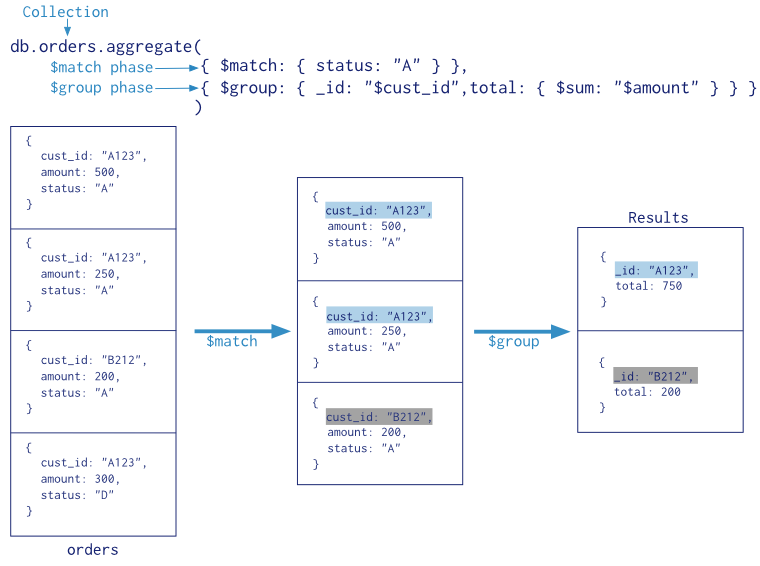
MongoDB's aggregation pipeline provides a wide range of operators to manipulate and process data during each stage. Here are some commonly used operators :
- $match: Filters documents based on specified criteria, similar to the WHERE clause in SQL.
- $group: Groups documents together based on a specified key and performs aggregate functions like sum, average, etc., within each group.
- $project: Reshapes documents, including adding new fields, removing existing ones, or including/excluding fields.
- $sort: Orders the documents based on a specified key.
- $limit: Limits the number of documents passed to the next stage.
- $lookup: Performs a left outer join with another collection to combine data from multiple collections.
- $unwind: Deconstructs an array field from the input documents and outputs one document for each element.
NOTE : Pipeline stages have a limit of 100 megabytes of RAM. If a stage exceeds this limit, MongoDB will produce an error. To allow for the handling of large datasets, use the option to enable aggregation pipeline stages to write data to temporary files.
$match
The $match stage in MongoDB aggregation is used to filter documents based on specified criteria. It's analogous to the find() method in MongoDB queries but operates within the aggregation pipeline. The $match stage passes only the documents that match the specified conditions to the next stage of the pipeline.
The syntax for the $match stage in MongoDB's aggregation pipeline is similar to the syntax used in the find() method for queries.
$project
The $project stage in MongoDB's aggregation pipeline is used to reshape documents by including or excluding fields, adding new fields, or computing expressions. Some of the things we can do using this operator is as followed :
- Include/Exclude Fields: We can explicitly specify which fields to include or exclude from the output document.
- Rename Fields: We can rename fields using the
$projectoperator.
- Computed Fields: We can create new fields in the output document based on existing fields or using expressions.
NOTE : When specifying fields within the $project stage, you can use either 0 or 1 to control inclusion or exclusion.
$limit & $sort
In MongoDB aggregation pipeline, you can use the $limit and $sort stages to control the number of documents returned and to sort the documents respectively.
$limit: Limits the number of documents passed to the next stage in the pipeline. It takes an integer value specifying the maximum number of documents to return.
$sort: Sorts the documents based on the specified fields. It takes an object where keys represent the fields to sort by and values represent the sort order (
1for ascending order,-1for descending order).
$group
The $group stage in MongoDB aggregation pipeline is used to group documents by specified fields and perform aggregation operations on them. It allows you to calculate aggregated values based on the grouped data.
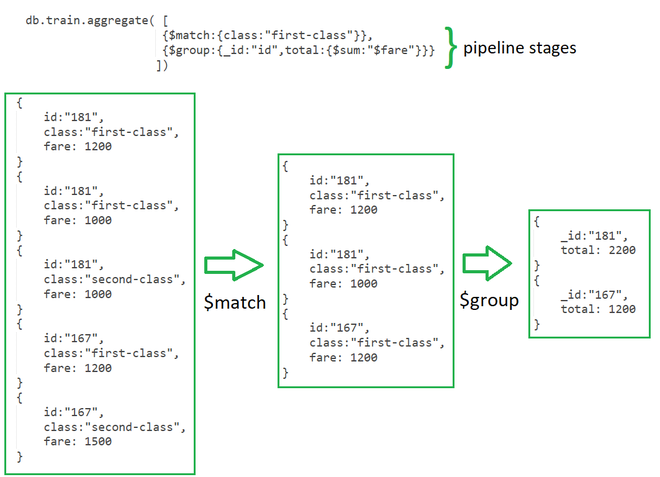
The $group stage in the MongoDB aggregation pipeline divides documents into groups based on certain criteria (specified by the _id field) and then performs aggregation operations (like sum, average, count, etc.) on each group of documents.
The following fields are explained below :
_id: This is a required field that specifies the grouping criteria. Documents with the same value for the_idexpression are grouped together. It could be :
- A field name: Group documents by the value of that field.
- An expression: Evaluate an expression to group documents.
null: Group all documents together.
new_field1,new_field2, ...: These are optional and represent new fields that you want to add to each grouped result.
<accumulator1>,<accumulator2>, ...: These are aggregation functions like$sum,$avg,$min,$max, or$addToSet, among others. They define the aggregation operation to perform on the grouped data.
<expression1>,<expression2>, ...: These are expressions that specify the field or value over which the aggregation function is applied.
NOTE : When you pass null to the _id field in the $group stage, MongoDB will group all documents together into a single group.
$lookup
The $lookup stage in MongoDB aggregation pipeline is used to perform a left outer join between documents from the current collection and documents from another collection. It allows you to bring documents from another collection into the output documents of the current aggregation operation.
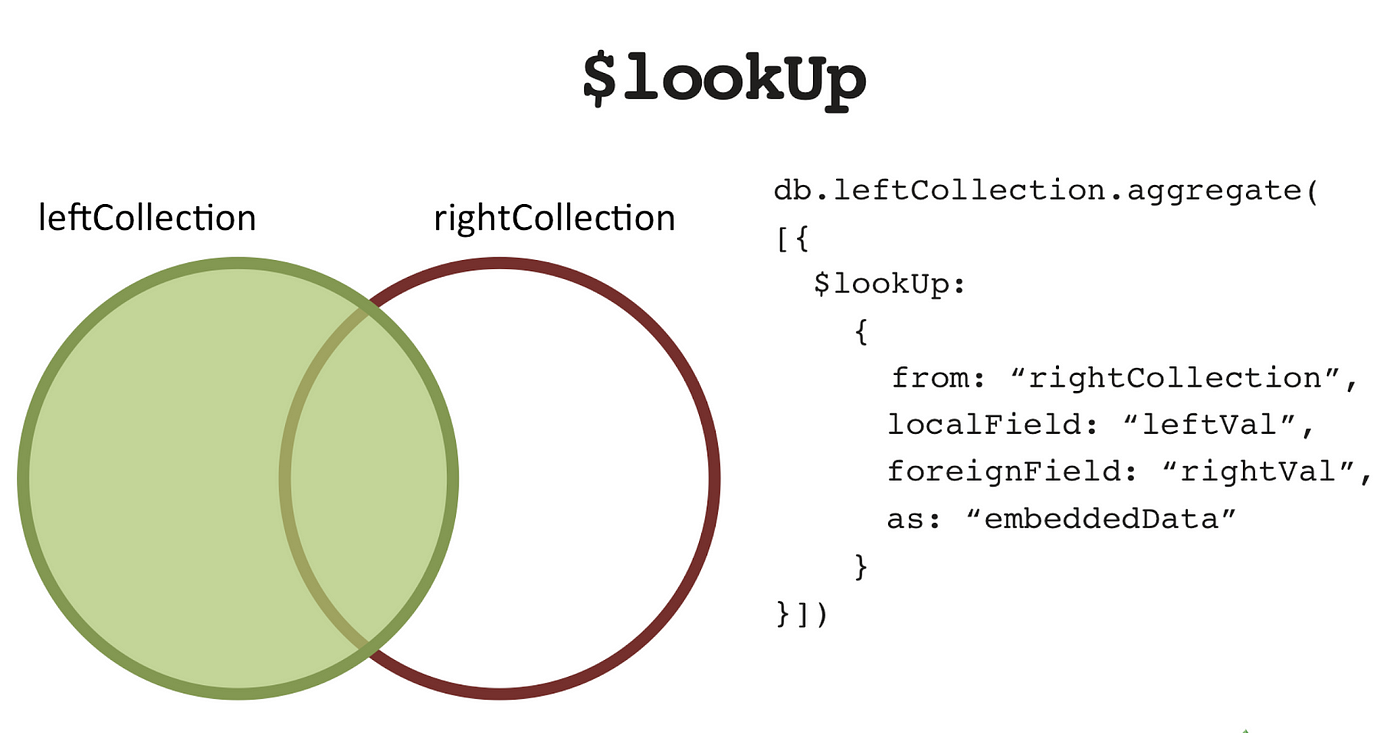
When you use $lookup in an aggregation pipeline, MongoDB matches documents from the current collection with documents from another collection based on specified criteria (localField and foreignField). It then adds the matched documents to the output documents as sub-array.
Below we explain each parameter required to join collections :
from: This specifies the name of the collection in the same database to perform the join with. It's the collection you want to query for matching documents.
localField: This specifies the field from the input documents (current collection or previous stages in the pipeline) to match against documents from the "from" collection. It's the field you want to use for matching.
foreignField: This specifies the field from the documents in the "from" collection to match against thelocalField. It's the field in the "from" collection you want to use for matching.
as: This specifies the name of the array field that will contain the joined documents in the output documents.
NOTE : For efficient lookup operations, it's recommended to have indexes on the fields used for matching (localField and foreignField) to improve performance.
$unwind
The $unwind stage is a powerful tool in MongoDB's aggregation framework used to deconstruct an array field from the input documents. It transforms array elements into separate documents, allowing you to perform operations on individual elements within the array.
Each output document will contain all the fields from the original document, with the array field replaced by a single element from the array. Other fields in the document remain unchanged.
NOTE : If an document contains an array with n elements, $unwind will output n documents for that document.
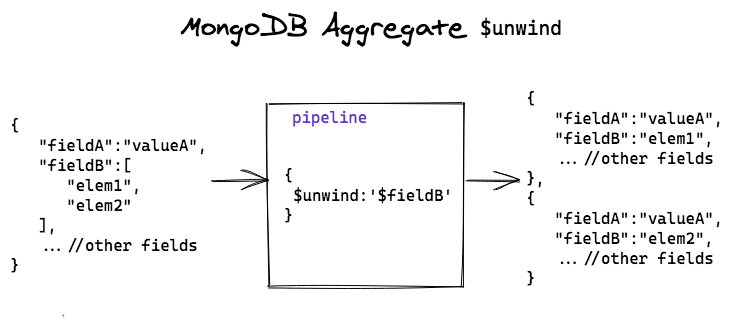
The $unwind stage in MongoDB's aggregation pipeline doesn't change the existing collection. After the aggregation pipeline completes, the original documents remain unchanged in the collection.
After unwinding an array, you can easily match or filter documents based on specific elements within the array. This enables more precise querying and filtering of data. We can easily group and count occurrences of specific elements within the array. This is useful for generating frequency distributions or summarizing data.
Below we explain each parameter required for unwind operation :
path: Specifies the array field to unwind. It's the field you want to deconstruct.
includeArrayIndex: Optional. Allows you to include the index of the array element in the output documents. It's useful for keeping track of the position of elements after the unwind operation.
preserveNullAndEmptyArrays: Optional. If set totrue, preserves documents with empty arrays or documents that lack the specified array field. By default, it removes such documents from the output.
NOTE : The $unwind operates only on array fields. If the specified field is not an array, the operation will produce an error. Unwinding large arrays can consume significant memory, especially if the array contains a large number of elements.
$facet
The $facet stage in MongoDB's aggregation pipeline is a powerful tool that allows you to execute multiple aggregation pipelines within a single stage. It's particularly useful when you need to perform multiple operations on the same set of documents and retrieve the results in a single query.

Instead of running separate aggregation pipelines sequentially, which can be less efficient, $facet allows you to execute multiple pipelines in parallel within a single stage as each sub-pipeline acts on same set of data.
In applications that require reporting or dashboard functionalities, $facet can be used to generate multiple sets of aggregated data that can be visualized or presented to users.
Example] Below we execute multiple aggregate pipelines inside $facet stage.
Errors in one sub-pipeline do not affect the execution of other sub-pipelines. Each sub-pipeline operates independently, providing fault isolation. It also promotes code modularity by allowing you to break down complex aggregation tasks into smaller, manageable units.
---------------------------------------------------------------------------------------------------------------
Indexing
In MongoDB, indexing is a way to optimize the performance of database queries by allowing the database to quickly locate and retrieve specific documents from a collection. Internally, MongoDB uses B-tree or hash table data structures to store index keys. B-tree indexes are most commonly used and are efficient for range queries and sorting.
MongoDB provides several types of indexes to support various query patterns and optimize database performance. Below are different types of indexes :
Single Field Index: Optimizes queries on a single field, enhancing performance for sorting, filtering, and matching operations.
- Compound Index: Enhances query performance by indexing multiple fields together, supporting efficient filtering and sorting on combinations of fields.
- Text Index: Enables full-text search queries on string content with features like language-specific stemming and relevance-based scoring for efficient text search operations.
- Geospatial Index: Optimizes queries involving geographic data, supporting efficient querying based on the proximity of geographic points, lines, or polygons.
_id field is indexed by default with a unique index. This ensures that each document in a collection has a unique _id value and enables efficient retrieval of documents by their _id.Below are several methods used to manage indexes in MongoDB :
createIndex(): This method is used to create indexes on one or more fields within a collection. It allows specifying the fields to index and the type of index to create (e.g., single field, compound, text, geospatial, etc.).
- dropIndex(): Used to drop an existing index from a collection. It allows removing indexes created using the
createIndex()method.
- dropIndexes(): Drops all indexes (except the default
_idindex) from a collection. It's useful for removing all custom indexes and reverting to the default index state.
- listIndexes(): Lists all the indexes in a collection, including both custom indexes and the default
_idindex. It provides information about the fields indexed and the type of index.
Single & Compound Indexes
A single field index is an index that sorts and organizes the data based on a single field inside your documents. Single field indexes are useful to improve the performance of read operations, making it faster to search for documents containing a specific field value.
To create a single field or compound index in MongoDB, we use the db.collection.createIndex() function, specifying the field name and the sorting order (1 for ascending or -1 for descending order).
A compound index is a type of index in MongoDB that allows you to specify multiple fields in a single index, effectively creating an index on the combined values of those fields. When using a compound index, consider the following :
Left Prefixes: A compound index can support queries on any of its “prefixes”, which are subsets of its fields starting from the left. For example, if a collection has a compound index
{ author: 1, title: -1 }, it can support queries on both theauthorfield and the combinedauthorandtitlefields.Sort Order: The sort order of fields in the compound index can affect query performance. In general, choose the sort order based on your application’s query patterns.
Text Indexes
Text indexes in MongoDB are designed to support full-text search queries on string content within documents. They enable efficient search operations for text-based data, such as articles, blog posts, product descriptions, and other textual content.
Regular indexes are optimized for efficient retrieval of documents based on specific field values, supporting operations such as equality, range, and sorting. On the other hand, text indexes tokenize the text content into individual words or tokens and create an index for each token along with its position in the document.
To create a Text Index, use the db.collection.createIndex() method along with the special index type: { fieldName: "text" }. After creating the Text Index, you can perform text searches on your documents using the $text operator in your queries inside db.collection.find().
NOTE : Attempting to use the $text operator on a field that is not text-indexed will result in an error or incorrect behavior because MongoDB won't be able to execute the full-text search efficiently.
---------------------------------------------------------------------------------------------------------------
Transactions in MongoDB
In MongoDB, transactions provide a way to group multiple operations into a single atomic unit of work. This means that either all operations in the transaction are applied, or none of them are, ensuring data consistency and integrity.
MongoDB supports multi-document transactions, which means you can perform operations on multiple documents within a single transaction. These operations can involve multiple collections or databases.
A transaction in MongoDB typically follows a lifecycle, starting with the startTransaction() method, followed by executing operations within the transaction context, and finally committing or aborting the transaction using commitTransaction() or abortTransaction().
Implement proper error handling mechanisms to handle transaction-related errors. If an error occurs within a transaction, consider aborting the transaction to prevent partial changes from being applied to the database.
---------------------------------------------------------------------------------------------------------------


Comments
Post a Comment